Freemium

TextToPDF

Convert text to PDF and extract editable text from PDFs or scans.

3.5 Writing
3.5 Good 3.5

Bottom line: TextToPDF is a capable writing tool, best known for convert pasted text or uploaded TXT files into a formatted PDF.

Free with no account or sign-up required for core conversion tasks Browser-based OCR tools generally lag dedicated OCR software on complex or low-quality scans
Reviewed by Challenging Voice Editorial · Updated Jul 2026 How we rate
PricingFreemium
Free planNo
CompanyTextToPDF
Best forWriting
Visits5
Last reviewedJul 2026
UpdatedJul 2026
Ask AI about TextToPDF ChatGPT Claude Perplexity

Overview

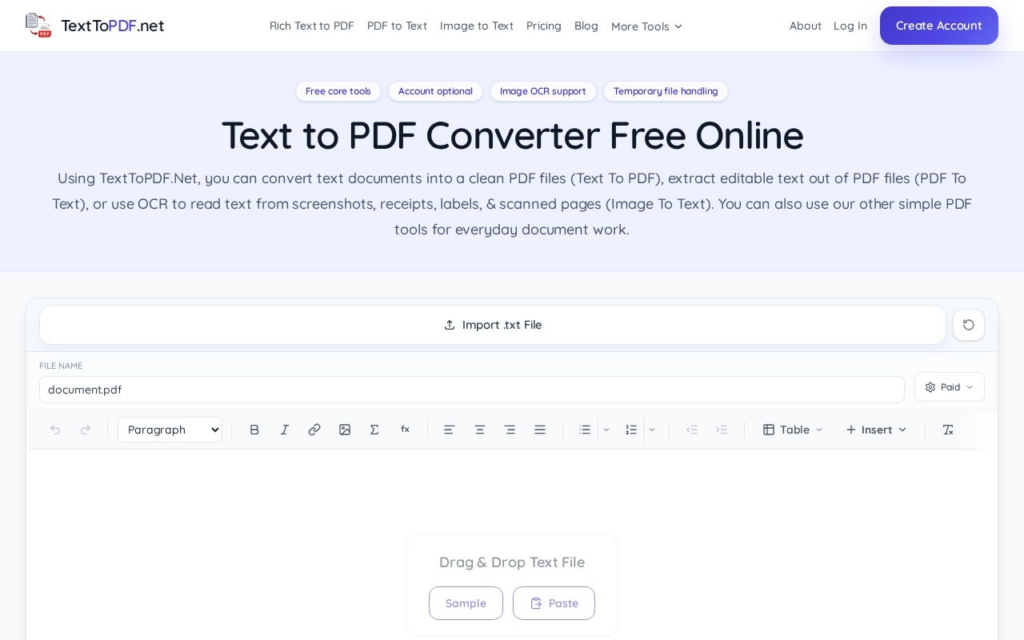
TextToPDF.net is a free browser-based utility for converting text into PDF files and extracting content back out of existing PDFs, including scanned documents. It combines three tasks in one interface: turning pasted text or uploaded TXT files into a formatted PDF, pulling editable text out of digital PDFs, and using OCR to digitize scanned or image-based documents.

A built-in rich text editor handles headings, alignment, and font styling before export, and the site also offers adjacent format converters (Markdown to PDF, CSV to PDF, Web to PDF, and others). No account or sign-up is required, and the site states files are processed through temporary sessions rather than stored.

Key features

  • Convert pasted text or uploaded TXT files into a formatted PDF
  • Extract editable text from existing PDF files
  • OCR support for digitizing scanned or image-based documents
  • Built-in rich text editor for headings, alignment, and font styling before export
  • Additional format converters: Markdown to PDF, CSV to PDF, Web to PDF, Image to PDF

Screenshots & demo

TextToPDF screenshot 1

Pricing

Visit the TextToPDF website for current plans and pricing.

  • Pricing modelFreemium
  • Starting priceCustom
  • Free planNo
Visit TextToPDF

Pricing is provided as a guide. Check the official site for the latest plans.

Pros & cons

Pros

  • Free with no account or sign-up required for core conversion tasks
  • Combines text-to-PDF, PDF text extraction, and OCR in a single tool
  • No-storage, temporary-session processing model for uploaded files
  • Extra format converters cover common adjacent needs (Markdown, CSV, web pages) without leaving the site

Cons

  • Browser-based OCR tools generally lag dedicated OCR software on complex or low-quality scans
  • No desktop or mobile app, browser-only workflow
  • Free, ad-supported utility sites typically lack SLA-backed support for business use
  • No verifiable company/founding information independent of the site itself

How it compares

ToolRatingFreeFromBest known for
TextToPDF (this tool)3.5NoConvert pasted text or uploaded TXT files into a formatted PDF
Texta4.3No$19/moAI-answer visibility monitoring across ChatGPT, Gemini, Claude, and Perplexity
Wordkraft AI4.7Yes$9/moAccess to GPT-4, Claude, Gemini, and other models in one subscription
Bramework4.0Yes$19/moKeyword research built into the writer

Our verdict

3.5 / 5 3.5

TextToPDF is a solid writing tool, best known for convert pasted text or uploaded TXT files into a formatted PDF.

What makes it different: TextToPDF stands out for convert pasted text or uploaded TXT files into a formatted PDF.

How we score it
Overall 3.5
Value for money 4.2
Feature depth 4.9
Popularity 3.7
Best for Writers & bloggersMarketersStudentsContent teams

Frequently asked questions

What is TextToPDF?
TextToPDF is a writing tool listed in the Challenging Voice directory. Convert text to PDF and extract editable text from PDFs or scans.
Is TextToPDF free?
TextToPDF does not offer a free plan.
What are the best TextToPDF alternatives?
Popular alternatives to TextToPDF include GPTZero, Book Witch, and Easy Peasy AI. Browse them all in the Writing category.
Is TextToPDF any good?
TextToPDF scores 3.5 out of 5 based on our editorial review.

Reviews

3.5 No reviews yet

Write a review

Similar tools you might like