Nana Banana AI Image Editor is a browser-based design platform that uses generative AI to modify, expand, and enhance digital photos. It's built for users who need to swap backgrounds or remove objects without the steep learning curve of professional desktop software. The tool focuses on speed and accessibility for marketing and social media workflows.
How Nana Banana Simplifies Graphic Design
Nana Banana AI Image Editor works by integrating diffusion models directly into a standard photo editing interface. When you upload a file, the system doesn't just apply static filters: it analyzes the geometry and lighting of the scene. This allows for generative fill, where you can brush over an area and describe a new object to be placed there.
The platform's background removal is notably different from basic clipping tools. It uses semantic segmentation to understand the difference between a subject's hair and a complex background, reducing the need for manual touch-ups. If you're working on e-commerce product photography, this automation cuts the time spent on preparation by a significant margin.
You'll also find an image expansion feature that generates new pixels around the edges of a frame. This is useful when you have a vertical photo that needs to fit a horizontal banner without losing the core subject. It's a faster alternative to traditional cropping and cloning techniques.
Who Benefits From the Nana Banana Toolset?
The tool suits small business owners and creators who don't have the budget for a dedicated design team. If you're managing a brand's Instagram or building a store on Shopify, the ability to rapidly change seasonal backgrounds or remove photobombers is vital. It bridges the gap between basic mobile apps and a high-end AI Picture Editor used by professionals.
For those who need higher volumes of images or API access for automation, the platform offers Nana Banana Pro. The Pro version typically unlocks faster processing speeds and higher resolution exports that aren't available to free users. This distinction helps separate casual users from those running commercial campaigns.
However, professional retouchers might find the lack of manual layer masks and color grading curves a limitation. Nana Banana is a tool for efficiency and visual consistency rather than fine-grain artistic control. It won't replace a full design suite, but it's an excellent companion for repetitive tasks.
Strategic Editing vs Creative Generation
It's important to distinguish between tools like Nana Banana and pure generators. While platforms in our list of Top Best AI Image Generators in 2026 are great for creating something from nothing, an editor focuses on the "fix" and the "adjustment." You start with a real photograph and use AI to manipulate its reality.
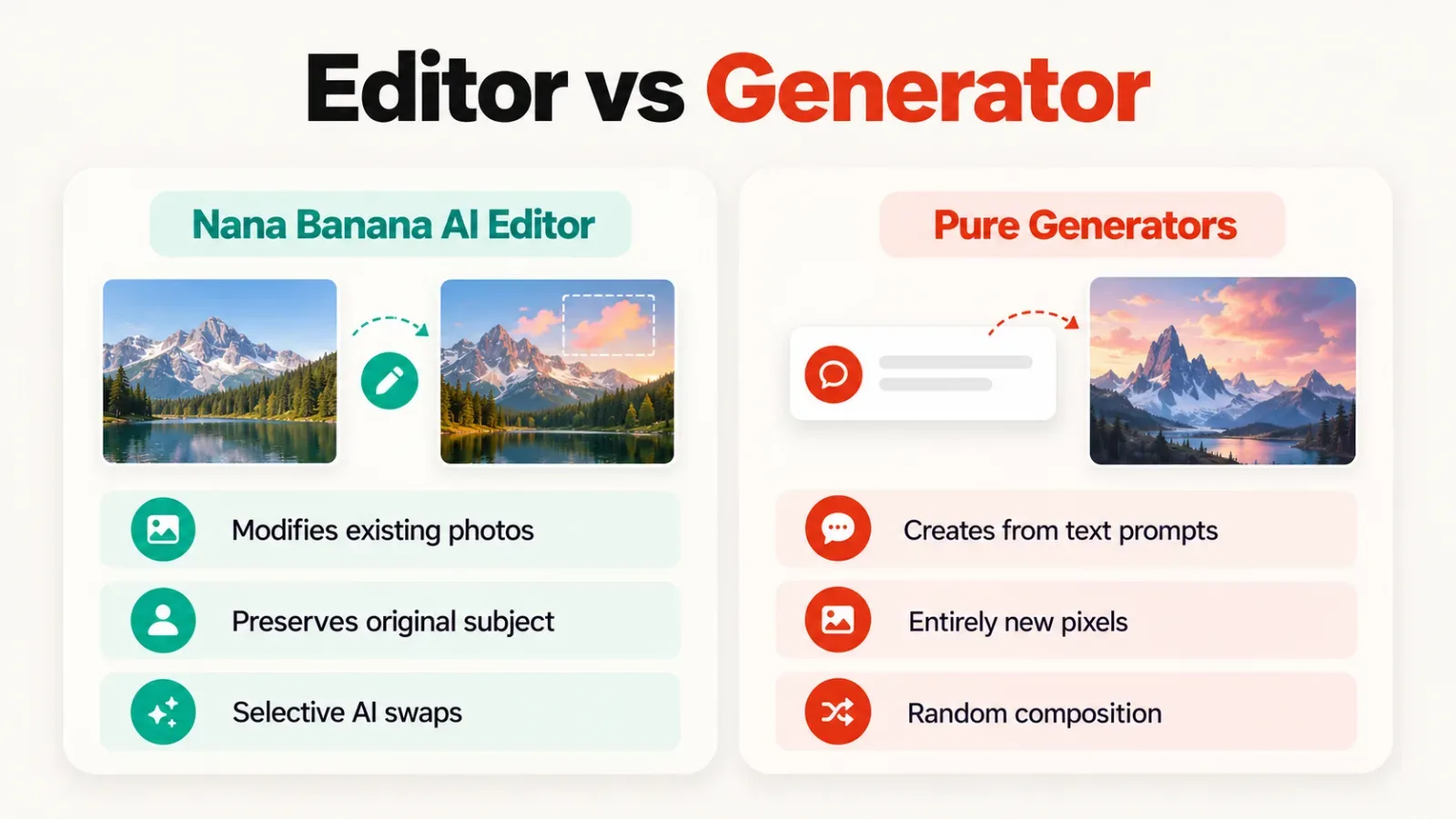
This strategic approach is safer for brands that need to maintain the accuracy of their physical products. You aren't generating a fake item; you're placing your real item in a better setting. There's less risk of "AI hallucinations" when the base of the image is a genuine photo.
If you find that your source photos are low quality, you can use the built-in enhancement tools. These features are comparable to the Best AI Tools for Image Upscaling and Enhancement in 2026, helping to sharpen edges and reduce noise in one click. This makes the editor a versatile hub for most daily digital asset needs.
To see how this compares to other platforms in the same space, explore our directory of the latest AI tools. You can find specialized options for specific tasks, from background cleaning to complete artistic transformations. Selecting the right tool depends on whether you need a quick edit or a total creative overhaul.