
Freemium

AI Picture Editor

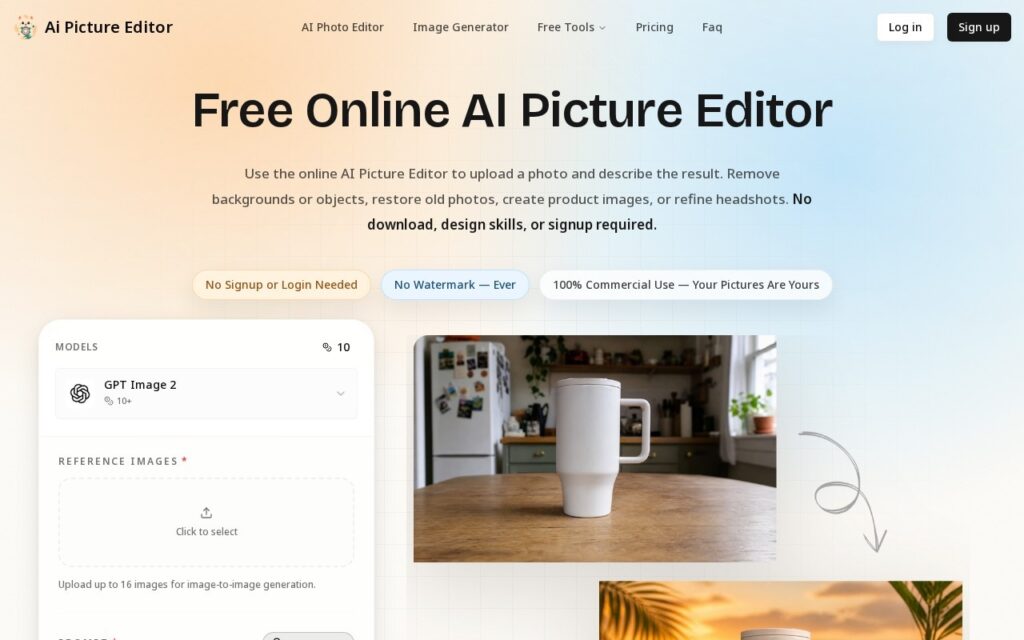
Prompt-based photo editing on GPT Image 2 – remove, replace, restore, retouch – with up to 16 reference images per edit.

3.8 Design
3.8 Good 3.8

Bottom line: AI Picture Editor is a capable design tool, best known for prompt-based background removal, object erasure and restoration. It has a free plan.

Text-prompt editing removes the need for traditional editing software skill Ambiguous prompts can produce unintended results on precise edits
Reviewed by Challenging Voice Editorial · Updated Aug 2026 How we rate
PricingFree
Free planYes
CompanyAI Picture Editor
PlatformsWeb
Best forDesign
Visits4
Last reviewedAug 2026
UpdatedAug 2026
Ask AI about AI Picture Editor ChatGPT Claude Perplexity

Overview

AI Picture Editor performs text-prompt-driven photo editing: background removal and replacement, object erasure, old-photo restoration, portrait retouching and style application, all described in plain language rather than manipulated with traditional editing tools. It runs on GPT Image 2, accepts up to 16 reference images for image-to-image generation, and exports at up to 4K with no watermark.

Prompt-based editing lowers the skill floor for edits that traditionally require real Photoshop competence – object removal and photo restoration in particular are technically demanding manual tasks that a well-phrased text instruction now handles directly. Supporting up to 16 reference images per generation also allows more complex, multi-source edits than a single before/after image pair.

Prompt-based editing can misinterpret ambiguous instructions in ways a manual tool wouldn’t, so results on anything precise (exact object boundaries, specific color matching) are worth checking rather than assumed correct on the first try. Credits convert to a limited number of edits per tier (roughly 120-800 depending on plan), worth modeling against real editing volume.

Key features

  • Prompt-based background removal, object erasure and restoration
  • Powered by GPT Image 2
  • Up to 16 reference images per generation
  • Multiple aspect ratios and resolutions up to 4K
  • Free guest access with limitations

Screenshots & demo

AI Picture Editor screenshot 1

Pricing

AI Picture Editor offers a free plan, with paid upgrades for higher limits and more features.

  • Pricing modelFreemium
  • Starting priceFree
  • Free planYes
Visit AI Picture Editor

Pricing is provided as a guide. Check the official site for the latest plans.

Is AI Picture Editor expensive?

AI Picture Editor has no advertised paid tier. Among the 96 priced tools we list in Design, the median entry price is $15 a month.

74% of Design tools in the directory offer a free tier, and this is one of them.

Compared against every priced listing in Design, recalculated as the catalogue changes. Method and the full market breakdown are in our AI tool pricing study.

Pros & cons

Pros

  • Text-prompt editing removes the need for traditional editing software skill
  • 16-image reference input supports more complex, multi-source edits
  • Watermark-free exports at up to 4K

Cons

  • Ambiguous prompts can produce unintended results on precise edits
  • Credits convert to a limited edit count per tier – model against real volume
  • Free guest access is limited, not a full free tier

How it compares

ToolRatingFreeFromBest known for
AI Picture Editor (this tool)3.8YesFreePrompt-based background removal, object erasure and restoration
Canva4.7Yes$15/moMagic Studio suite of AI design tools
Relume4.7Yes$26/moAI-generated wireframes and page structure from a prompt
Durable4.7Yes$25/moWebsite generation marketed at roughly 30 seconds

Alternatives to AI Picture Editor

4 tools our editors picked as direct alternatives to AI Picture Editor.

Our verdict

3.8 / 5 3.8

AI Picture Editor is a solid design tool, best known for prompt-based background removal, object erasure and restoration. It offers a free plan.

What makes it different: AI Picture Editor stands out for prompt-based background removal, object erasure and restoration.

How we score it
Overall 3.8
Value for money 4.7
Feature depth 4.9
Popularity 3.7
Best for ProfessionalsTeamsCreatorsCurious learners

Frequently asked questions

What is AI Picture Editor?
AI Picture Editor is a design tool listed in the Challenging Voice directory. Prompt-based photo editing on GPT Image 2 – remove, replace, restore, retouch – with up to 16 reference images per edit.
Is AI Picture Editor free?
Yes, AI Picture Editor offers a free plan. Paid plans unlock more features and higher usage limits.
What are the best AI Picture Editor alternatives?
Popular alternatives to AI Picture Editor include Home Stratosphere, PaintShop Pro, and Gliffy. Browse them all in the Design category.
Is AI Picture Editor any good?
AI Picture Editor scores 3.8 out of 5 based on our editorial review.

Reviews

3.8 No reviews yet

Write a review

Similar tools you might like