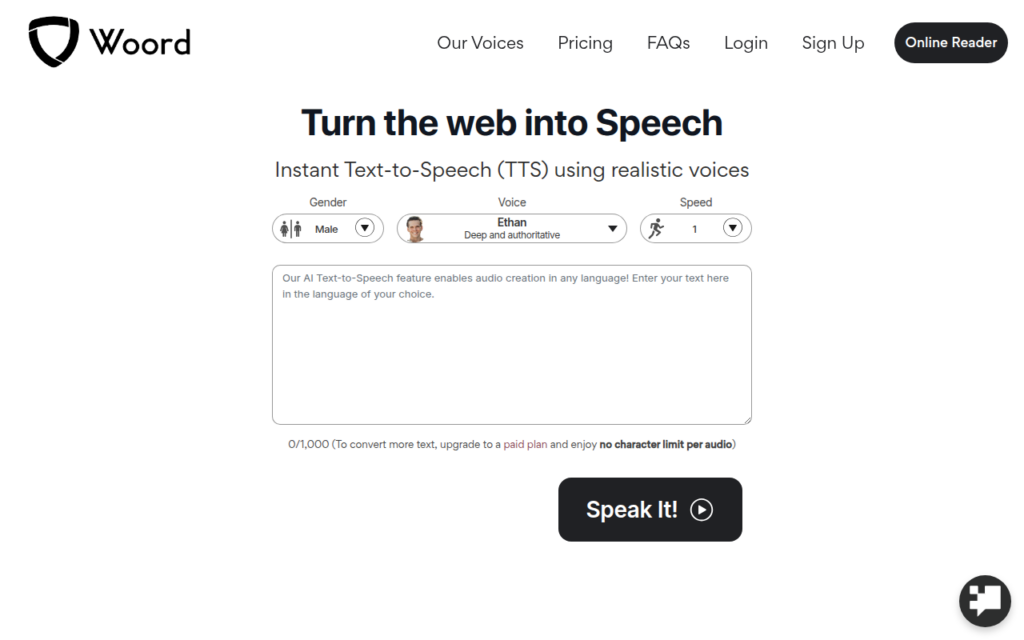
Woord converts text to speech in the browser with no installation, covering the straightforward case of wanting something read aloud: an article, a document, a draft you want to hear back. Its web-to-speech capability extends that to pages directly rather than requiring copy and paste.
The accessibility use is the most valuable one. People with dyslexia, visual impairments or reading fatigue benefit substantially from listening rather than reading, and a free browser tool removes the cost barrier that assistive software often carries. Hearing your own writing read back is also an effective proofreading technique that catches awkward phrasing the eye skips.
It is a simpler and cheaper product than the production-focused voice platforms, with a free tier and trial. For narration you intend to publish, a professional tool will give better results; for listening and proofreading, this covers it well.
Key features
Browser-based text-to-speech with no installation
Reads web pages aloud, not only pasted text
Realistic voices across multiple languages
Free tier plus trial of paid features
Three-step workflow requiring no setup
Screenshots & demo
Pricing
Woord offers a free plan, with paid upgrades for higher limits and more features.
Pricing is provided as a guide. Check the official site for the latest plans.
Is Woord expensive?
Woord has no advertised paid tier. Among the 64 priced tools we list in Audio, the median entry price is $10 a month.
67% of Audio tools in the directory offer a free tier, and this is one of them.
Compared against every priced listing in Audio, recalculated as the catalogue changes. Method and the full market breakdown are in our AI tool pricing study.
Pros & cons
Pros
Genuinely useful for accessibility at no cost
Reading web pages directly avoids copy and paste
Effective proofreading aid for your own writing
Cons
Voice quality trails production-focused platforms
Better suited to listening than to published narration
Chat with an AI cat named Jams about what you're into – deep cuts, moods, genres – and get a personalized Spotify playlist back, free, no login required.