
Freemium

Sigma AI Browser

Private browser with an agent that fills forms and books things, plus an offline local model.

3.8 Productivity
3.8 Good 3.8
A local offline model is what makes the privacy claim credible No pricing published, only a discount code
Reviewed by Challenging Voice Editorial · Updated Aug 2026 How we rate
PricingFree
Free planYes
CompanySigmabrowser OU
PlatformsiOS, Mac, Windows
CategoryProductivity
Last reviewedAug 2026
Ask AI about Sigma AI Browser ChatGPT Claude Perplexity

Overview

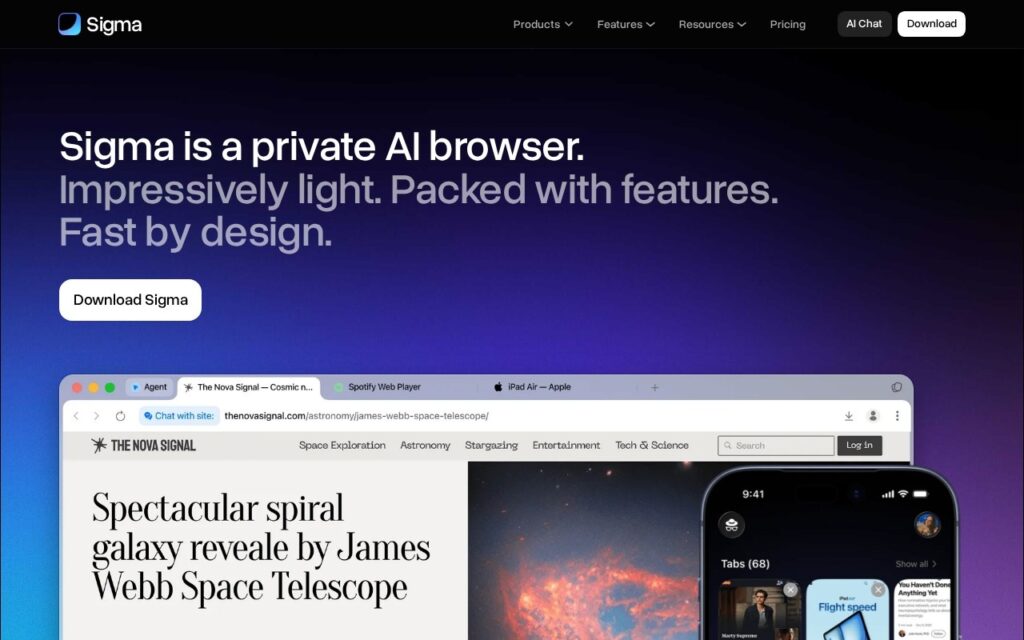
Sigma is a browser with the AI built in rather than bolted on: an agent that automates form filling, booking and data gathering, chat with the current page, deep research across sources, translation in place, and image and text generation. Ad blocking and encrypted private profiles come as standard.

Eclipse, its local offline model, is the feature that matters most given the positioning. A browser assistant sees every page you visit, which is the most revealing dataset most people generate, and running a model on-device rather than sending that stream to a server is the only version of this that a privacy claim can survive.

Sigmabrowser in Estonia ships macOS, Windows and iOS builds with Android on a waitlist and Linux promised. No prices appear, only a 50 percent discount code for Premium. A local model is weaker than a hosted one, an agent with browser control acts inside every session you are logged into, and the Mnemonic blockchain profile is a design decision worth understanding before relying on it.

Key features

  • AI agent for form filling, booking and data gathering
  • Eclipse local model running offline
  • Chat with page and deep research
  • Built-in ad blocker and encrypted private profiles
  • Quick Translate and extension support

Screenshots & demo

Sigma AI Browser screenshot 1

Pricing

Sigma AI Browser offers a free plan, with paid upgrades for higher limits and more features.

  • Pricing modelFreemium
  • Starting priceFree
  • Free planYes
Visit Sigma AI Browser

Pricing is provided as a guide. Check the official site for the latest plans.

Is Sigma AI Browser expensive?

Sigma AI Browser has no advertised paid tier. Among the 187 priced tools we list in Productivity, the median entry price is $10 a month.

71% of Productivity tools in the directory offer a free tier, and this is one of them.

Compared against every priced listing in Productivity, recalculated as the catalogue changes. Method and the full market breakdown are in our AI tool pricing study.

Pros & cons

Pros

  • A local offline model is what makes the privacy claim credible
  • Agent, chat, research and translation in one browser
  • macOS, Windows and iOS builds available now

Cons

  • No pricing published, only a discount code
  • The local model is weaker than a hosted one
  • An agent with browser control acts inside every logged-in session

How it compares

ToolRatingFreeFromBest known for
Sigma AI Browser (this tool)3.8YesFreeAI agent for form filling, booking and data gathering
Anytype4.2Yes$10/moLocal-first architecture with end-to-end encryption
remio4.1Yes$11.6/moAutomatic capture of pages, files, emails and meetings
Voila4.0YesFreeExtensions for Chrome, Firefox, Edge, Brave and Safari

Alternatives to Sigma AI Browser

4 tools matched to Sigma AI Browser on what they do, their category and their price.

Auri

3.5

AI keyboard and system-wide dictation for Apple devices – improve text in any app, on iPhone, iPad, Watch and Mac.

Freemium Productivity

Frequently asked questions

What is Sigma AI Browser?
Sigma AI Browser is a productivity tool. Private browser with an agent that fills forms and books things, plus an offline local model.
Is Sigma AI Browser free?
Yes, Sigma AI Browser offers a free plan. Paid plans unlock more features and higher usage limits.
What are the best Sigma AI Browser alternatives?
The closest matches in the directory are Anytype, remio, and Voila, compared side by side above.

Reviews

3.8 Editorial rating No reviews yet

Write a review

More tools like Sigma AI Browser