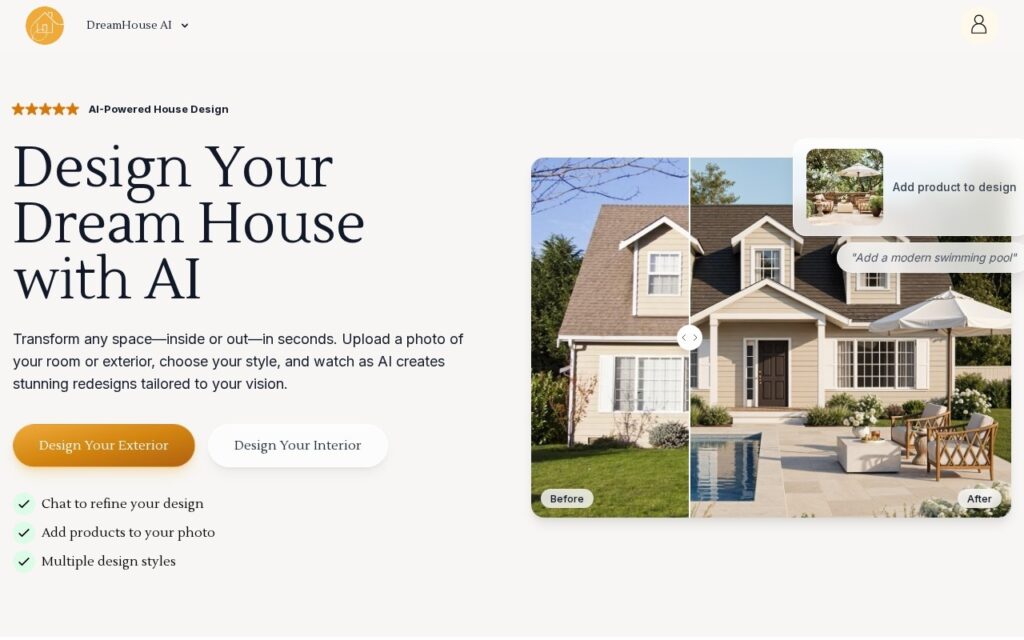
DreamHouse AI redesigns spaces from a photograph – interiors and exteriors both – letting you pick a style, refine the result through chat, and add specific products into the image, with over 10,000 designs generated.
Covering exteriors sets it apart from the crowded interior-only field. Landscaping, facades and extensions are exactly where homeowners struggle most to picture an outcome, and where the decisions are largest and least reversible – you can repaint a room you dislike far more easily than you can undo a driveway.
Adding products into a design is the practically useful feature, since it moves the output from inspiration toward something you could actually buy and build. Two caveats: a render obeys no structural, planning or building regulation constraints – a wall it cheerfully removes may be load-bearing – and generated proportions drift, so treat the image as a conversation starter with a builder rather than a plan.
Key features
Interior and exterior redesign from a photo
Multiple design styles
Chat-based refinement of a design
Specific products added into the scene
Before and after comparison
Free tier to try
Screenshots & demo
Pricing
DreamHouse AI offers a free plan, with paid upgrades for higher limits and more features.
Pricing is provided as a guide. Check the official site for the latest plans.
Is DreamHouse AI expensive?
DreamHouse AI has no advertised paid tier. Among the 122 priced tools we list in Design, the median entry price is $15 a month.
73% of Design tools in the directory offer a free tier, and this is one of them.
Compared against every priced listing in Design, recalculated as the catalogue changes. Method and the full market breakdown are in our AI tool pricing study.
Pros & cons
Pros
Exterior coverage is rarer than interior-only competitors
Product placement moves output from inspiration toward buyable
Chat refinement beats regenerating from scratch
Cons
Renders ignore structural, planning and building regulation reality
Generated proportions drift – not a plan a builder can work from
Style range is broad but not architecturally rigorous
DreamHouse AI redesigns spaces from a photograph – interiors and exteriors both – letting you pick a style, refine the result through chat, and add specific products into the image, with over 10,000 designs generated.
Is DreamHouse AI free?
Yes, DreamHouse AI offers a free plan. Paid plans unlock more features and higher usage limits.
What are the best DreamHouse AI alternatives?
The closest matches in the directory are REimagine Home, ArchitectGPT, and DecorAI, compared side by side above.
Upload a photo of any room or building, get back a photorealistic AI rendering in the style you want – virtual staging and architectural visualization in one tool.
Eight distinct AI design tools in one platform – redesign a room, transform a facade, turn a sketch into a photorealistic render, generate exportable 3D models, or ask ArchiGPT for design advice.