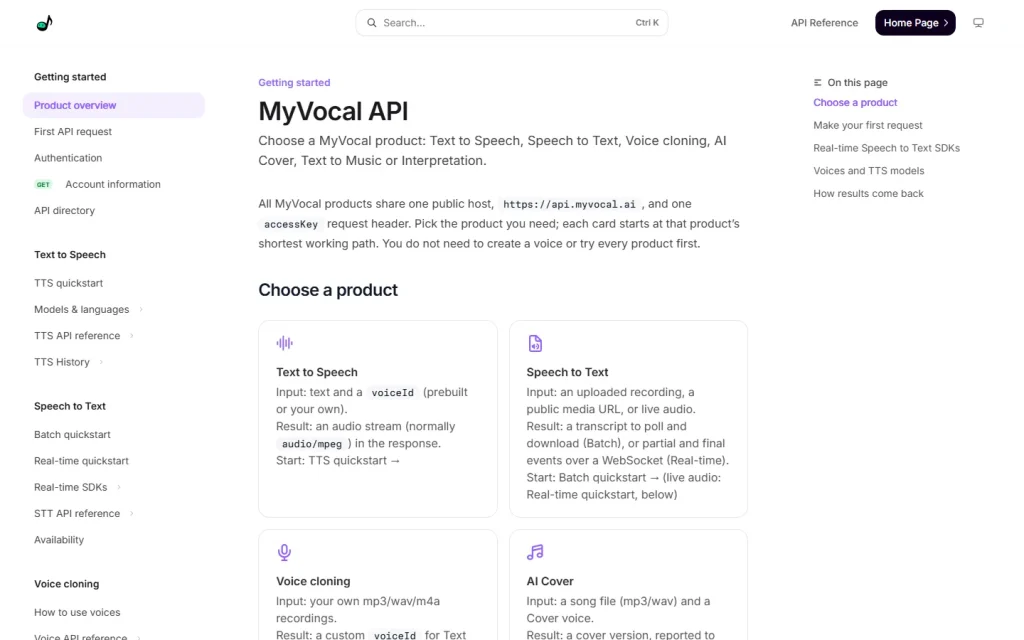
MyVocal is an API platform for audio: text to speech, speech to text, voice cloning, AI covers, text to music and interpretation. It's built for developers, with one public host and one accessKey header across every product. Its documentation, not a polished editor, is the front door.
Six Products Behind One API Key
MyVocal groups its audio features into six products, and each one has a different input and a different result. Start with the output you need, not the whole catalog.
- Text to Speech: text plus a voiceId in, an audio stream (normally audio/mpeg) out.
- Speech to Text: an uploaded recording or public media URL (Batch), or live audio (Real-time), in; a transcript out.
- Voice cloning: your own mp3, wav or m4a recordings in; a custom voiceId out.
- AI Cover: a song file (mp3 or wav) and a Cover voice in; a cover version out.
- Text to Music: a brief with description, genre, moods and duration in; an original song out.
- Interpretation: recorded audio or video through a file API, or live audio through a realtime API, translated.
Cloning is optional. You can use a prebuilt voice for Text to Speech and skip it entirely. That's a good default for a first prototype.
How Results Come Back
MyVocal returns results in four different ways, and that's the part of the integration you'll spend the most time on. Plan for it before you pick a product.
Text to Speech and voice cloning answer directly in the HTTP response. Batch Speech to Text is polled, with an optional signed completion notification. Real-time Speech to Text sends WebSocket events. AI Cover reports to your callbackUrl, and Text to Music is polled.
Real-time Speech to Text has optional server-side SDKs for Python 3.10+, Java 8+ and Go 1.22+. You can also call the REST and WebSocket API directly.
Who MyVocal Suits
MyVocal suits developers who want several audio capabilities from one vendor and one key. A team building a voice agent, a captioning pipeline or a content app with generated narration can stay on one integration instead of stitching three.
Skip it if you want a drag-and-drop studio. The documentation we reviewed describes an API, and we couldn't confirm a no-code editor. Non-developers will likely do better with a consumer voice app.
The AI Cover and Text to Music products also deserve a rights check. Confirm the licensing terms for the voices and generated songs with MyVocal's official documentation or support before you ship anything commercial.
What It Costs
The documentation doesn't state prices, so none are shown here. Speech to Text, Text to Music and Interpretation charge in Characters, which the docs explain on a dedicated billing page, and your plan and balance come back from the Get account information call. Check MyVocal's official site for current pricing, any free tier and Characters rates.
Check the billing rules before you estimate a budget, especially for long recordings. Then browse our Audio category for other voice tools to compare against.