
Freemium Verified

Framer

Started as a designer's prototyping tool, still feels like one

4.4 Design
4.4 Very good 4.4

Bottom line: Framer is a strong design tool, best known for AI-generated starting site from a prompt. It has a free plan.

Genuine design-tool-level control, not just template swapping Steeper learning curve than simpler, non-designer-focused builders
Reviewed by Challenging Voice Editorial · Updated Jul 2026 How we rate
PricingFrom $10/mo
Free planYes
CompanyFramer
PlatformsWeb
Best forDesign
Founded2014
Visits17
Last reviewedJun 2026
UpdatedJul 2026
Ask AI about Framer ChatGPT Claude Perplexity

Overview

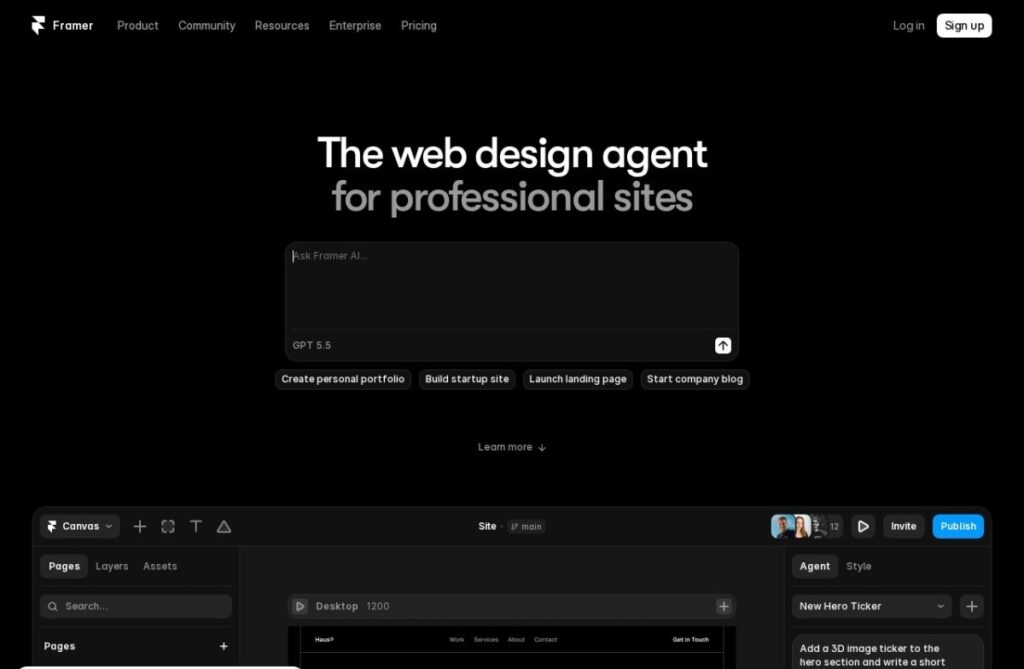
Framer, founded in 2014, began as a code-based interactive prototyping tool built for designers who wanted to test real interactions rather than static mockups, and that design-tool DNA still shows in its current AI website builder: the editing experience feels closer to a professional design tool than a typical drag-and-drop website builder.

AI generation now creates a starting site from a prompt, but the underlying editor retains the fine-grained visual control, real typography, spacing, and animation tools, that Framer's original prototyping-tool audience expected, a meaningfully different editing depth than website builders built primarily for non-designers from the start.

A free tier covers a basic published site, and paid plans start around $10 a month for custom domains and more features. For a designer specifically who wants AI-assisted generation without giving up the fine visual control a proper design tool allows, Framer's prototyping-tool heritage carries directly into a more design-capable website builder than most competitors provide.

Key features

  • AI-generated starting site from a prompt
  • Design-tool-grade visual control over typography and spacing
  • Built-in animation and interaction tools
  • Originated as a code-based prototyping tool for designers
  • Free tier for a basic published site
  • Operating since 2014

Screenshots & demo

Demo video

Screenshots

Framer screenshot 1

Pricing

Free
Free
  • Framer subdomain
  • Basic pages
  • Core design tools
  • Framer banner
Mini
$10/mo
  • Custom domain
  • Single-page sites
  • Remove banner
  • Basic analytics
Basic
$15/mo
  • Multi-page sites
  • CMS pages
  • More bandwidth
  • Custom domain

Pros & cons

Pros

  • Genuine design-tool-level control, not just template swapping
  • Strong animation and interaction capabilities built in
  • Appeals directly to designers wanting more than a basic builder
  • Free tier available for a basic site

Cons

  • Steeper learning curve than simpler, non-designer-focused builders
  • Custom domains and advanced features require a paid plan
  • More capability than a simple business site may actually need

How it compares

ToolRatingFreeFromBest known for
Framer (this tool)4.4Yes$10/moAI-generated starting site from a prompt
Durable4.7Yes$25/moWebsite generation marketed at roughly 30 seconds
Relume4.7Yes$26/moAI-generated wireframes and page structure from a prompt
Canva4.7Yes$15/moMagic Studio suite of AI design tools

Our verdict

4.4 / 5 4.4

Framer is a strong design tool, best known for AI-generated starting site from a prompt. It offers a free plan, with paid upgrades from $10/mo.

What makes it different: Framer stands out for AI-generated starting site from a prompt.

How we score it
Overall 4.4
Value for money 4.7
Feature depth 4.9
Popularity 4.0
Best for ProfessionalsTeamsCreatorsCurious learners

Frequently asked questions

What is Framer?
Framer is a design tool listed in the Challenging Voice directory. Started as a designer's prototyping tool, still feels like one.
Is Framer free?
Yes, Framer offers a free plan. Paid plans unlock more features and higher usage limits, starting at $10/month.
How much does Framer cost?
Framer starts at $10 per month. See the pricing plans above for full details.
What are the best Framer alternatives?
Popular alternatives to Framer include Collov AI, Product Design Studio, and Rodin. Browse them all in the Design category.
Is Framer any good?
Framer scores 4.4 out of 5 based on our editorial review.

Reviews

4.4 No reviews yet

Write a review

Similar tools you might like