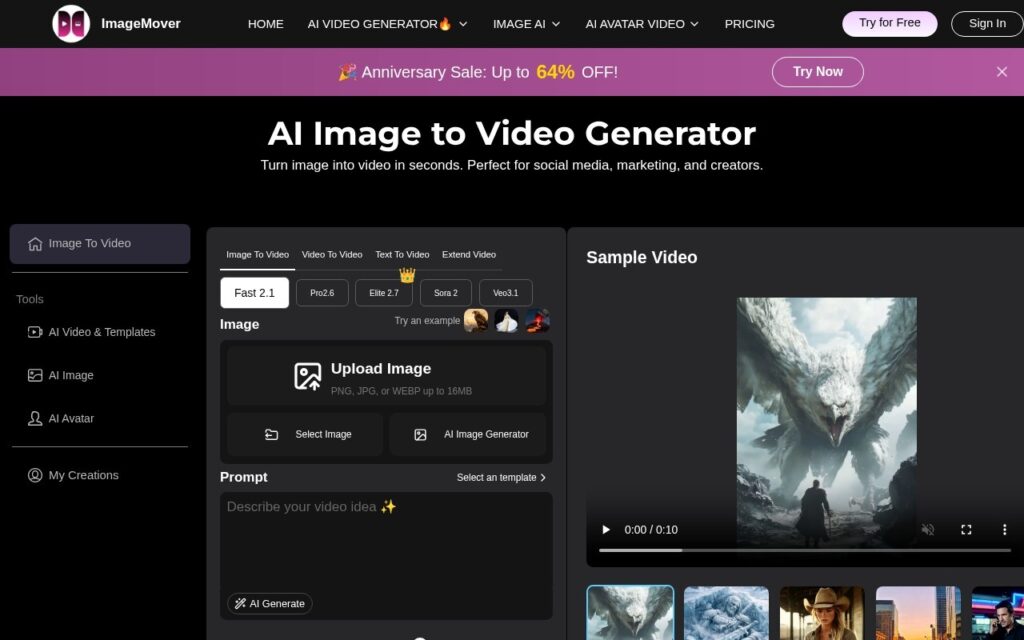
ImageMover converts static images into video, letting users pick from multiple underlying AI models – its own faster Fast 2.1 and higher-fidelity Pro 2.6, alongside Sora 2 and Veo 3.1 – and set custom start and end frames rather than just a single animation prompt. It adds automatic AI-generated sound effects, aims to preserve character and scene consistency across the generated clip, and exports MP4 with no watermark.
Start/end frame control is the detail that separates this from a generic image-to-video button: specifying where a clip begins and ends gives meaningfully more control over the result than a single prompt handed to one model, and having several models to choose from means picking speed over fidelity (or the reverse) per job rather than being locked to one trade-off.
Result quality and consistency will vary by which model handles a given job, and a free tier exists but its limits and the paid-tier pricing weren’t shown on the page checked – worth confirming directly before planning a production workflow around it.
Key features
Image-to-video across Fast 2.1, Pro 2.6, Sora 2 and Veo 3.1
Custom start and end frame control
Automatic AI-generated sound effects
Character and scene consistency preservation
Watermark-free MP4 export
Screenshots & demo
Pricing
ImageMover offers a free plan, with paid upgrades for higher limits and more features.
Pricing is provided as a guide. Check the official site for the latest plans.
Is ImageMover expensive?
ImageMover has no advertised paid tier. Among the 118 priced tools we list in Video, the median entry price is $16 a month.
66% of Video tools in the directory offer a free tier, and this is one of them.
Compared against every priced listing in Video, recalculated as the catalogue changes. Method and the full market breakdown are in our AI tool pricing study.
Pros & cons
Pros
Multiple selectable models for a speed/fidelity trade-off per job
Start/end frame control gives more precision than single-prompt animation
No watermark on exported video
Cons
Output consistency varies by which underlying model handles the job
Free-tier limits and paid pricing weren't shown on the page checked
ImageMover is a solid video tool, best known for image-to-video across Fast 2.1, Pro 2.6, Sora 2 and Veo 3.1. It offers a free plan.
What makes it different: ImageMover stands out for image-to-video across Fast 2.1, Pro 2.6, Sora 2 and Veo 3.1.
How we score it
Overall3.8
Value for money4.7
Feature depth4.9
Popularity3.7
Best forVideo creatorsMarketersAgenciesEducators
Frequently asked questions
What is ImageMover?
ImageMover is a video tool listed in the Challenging Voice directory. Turns a still photo into video with start/end frame control across Sora 2, Veo 3.1, Kling and its own faster models.
Is ImageMover free?
Yes, ImageMover offers a free plan. Paid plans unlock more features and higher usage limits.
What are the best ImageMover alternatives?
Popular alternatives to ImageMover include Focal, Plazmapunk, and VidFlux. Browse them all in the Video category.
Is ImageMover any good?
ImageMover scores 3.8 out of 5 based on our editorial review.
Turn one long video into clips, summaries, blogs, chapters and subtitles – one click, 98%+ transcription accuracy, 120+ languages. The editor lets you cut a clip by selecting text in the transcript.