List your tool
Freemium

Mermaid Viewer

Live Mermaid editing with GPT-4 generation, over a renderer that is free elsewhere.

4.0 Coding
4.0 Very good 4.0
Self-hosted Docker option for diagrams that cannot leave the network Mermaid renders free in GitHub, VS Code, Notion and the official editor
Reviewed by Challenging Voice Editorial · Updated Aug 2026 How we rate
PricingFrom $5.83/mo
Free planYes
CompanyMermaidViewer
PlatformsWeb
CategoryCoding
Last reviewedAug 2026

Is this your tool?

  • Claim this listing. Sign in with an email at mermaidviewer.com to manage it. Claim Mermaid Viewer
  • Get into the top 5 of Coding. 5 of 5 spots open, from $159/month. See positions
  • Something out of date? Owners can request edits from My listings; anyone can tell us.
Ask AI about Mermaid Viewer ChatGPT Claude Perplexity

Overview

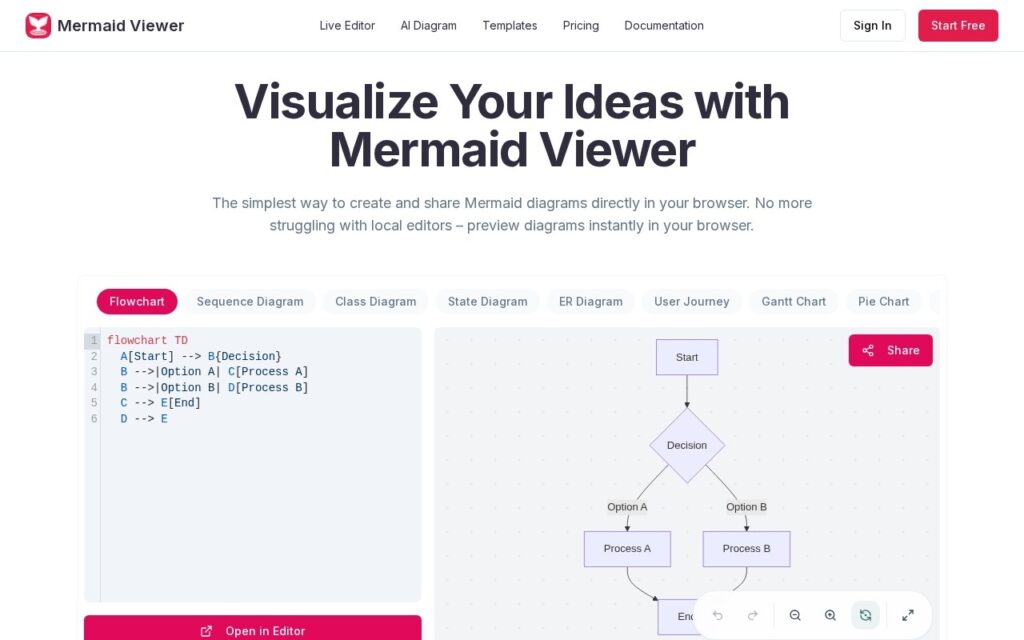
Mermaid Viewer is a browser editor for Mermaid diagrams. Code on one side, live preview on the other, with GPT-4 turning a plain description into Mermaid syntax, syntax error detection with suggested corrections, export to SVG, PNG and PDF at chosen resolutions and themes, shareable editor links for review, and a Docker deployment with access controls for teams that cannot send diagrams to a third party.

Text-defined diagrams are the right answer for anything that lives in a repository, because they diff, review and version like code while a drawn diagram does none of those things. The genuine additions here are the AI generation – Mermaid’s syntax is easy to read and fiddly to write from memory, especially for sequence and state diagrams – and the self-hosted Docker option, which is the difference between usable and prohibited at organisations with architecture diagrams they cannot paste into a website.

The thing to weigh is what is actually being sold. Mermaid itself is open source, and GitHub, GitLab, Notion, Obsidian and VS Code all render it at no cost, as does the official live editor – the paid product here is the AI generation, the export options and the collaboration layer, not the diagrams. Judge it on those. The free tier is tight and watermarks exports: 3 diagrams and 5 AI conversations a day. Paid plans are annual only, Starter $69.99 and Pro $119.99 a year.

Key features

  • Live preview while typing Mermaid code
  • GPT-4 generation from a plain text description
  • Syntax error detection with suggested fixes
  • SVG, PNG and PDF export with resolution and theme control
  • Docker self-hosting with access controls

Screenshots & demo

Mermaid Viewer screenshot 1

Pricing

Mermaid Viewer has a free plan, and paid plans start at $5.83/mo.

  • Pricing modelFreemium
  • Starting priceFrom $5.83/mo
  • Free planYes
Visit Mermaid Viewer

Pricing is provided as a guide. Check the official site for the latest plans.

Is Mermaid Viewer expensive?

Mermaid Viewer starts at $5.83, which is 71% below the Coding median of $20 a month across the 100 priced tools we list in that category.

The cheapest paid option in Coding starts at $1 and the most expensive at $1,500.

64% of Coding tools in the directory offer a free tier, and this is one of them.

Compared against every priced listing in Coding, recalculated as the catalogue changes. Method and the full market breakdown are in our AI tool pricing study.

Pros & cons

Pros

  • Self-hosted Docker option for diagrams that cannot leave the network
  • AI generation covers the syntax people never remember
  • Text-defined diagrams version and review like code

Cons

  • Mermaid renders free in GitHub, VS Code, Notion and the official editor
  • Free tier caps at 3 diagrams and watermarks every export
  • Paid plans are annual only, with no monthly option

How it compares

ToolRatingFreeFromBest known for
Mermaid Viewer (this tool)4.0Yes$5.83/moLive preview while typing Mermaid code
Blink4.0YesFreeApplications generated from a plain-English description
CodingFleet3.9Yes$7/moEleven separate tools: generate, explain, convert, review, test and more
AI Data Modeling3.8No$8.33/moPlain-English to validated database schema via GPT-4

Alternatives to Mermaid Viewer

4 tools matched to Mermaid Viewer on what they do, their category and their price.

Blink

4.0

Builds full-stack web and mobile apps from a chat description, with database, hosting and auth included.

Freemium Coding

Programming Helper

3.3

Describe what you need in plain English and AI generates the function, SQL query, Regex, or Git command – plus code translation, debugging, and time-complexity analysis across languages.

Paid Coding

Frequently asked questions

What is Mermaid Viewer?
Mermaid Viewer is a browser editor for Mermaid diagrams.
Is Mermaid Viewer free?
Yes, Mermaid Viewer offers a free plan. Paid plans unlock more features and higher usage limits, starting at $5.83/month.
How much does Mermaid Viewer cost?
Mermaid Viewer starts at $5.83 per month. See the pricing plans above for full details.
What are the best Mermaid Viewer alternatives?
The closest matches in the directory are Blink, CodingFleet, and AI Data Modeling, compared side by side above.

Reviews

4.0 Editorial rating No reviews yet

Write a review

More tools like Mermaid Viewer

Kodezi

3.6

Debugging intelligence for whole codebases, built around its Chronos model rather than line-by-line autocomplete.

Freemium Coding

Bricabrac

3.2

Text-to-web-app generator that builds small HTML, CSS and JavaScript apps from a description, with free hosting and code export.

Free Trial Coding

Raygun

3.8

Crash reporting, real user monitoring and APM in one platform, with AI Error Resolution suggesting fixes for the errors it catches.

Free Trial Coding