
List your tool
Paid

quiky.email

20+ AI email tools for drafts, replies and follow-ups – works in any email client, no account needed to try, and explicitly never trains on your content.

3.6 Productivity
3.6 Good 3.6
Explicit, stated privacy commitment against training on your email content 20+ tools require some exploration to find the right one for a task
Reviewed by Challenging Voice Editorial · Updated Sep 2026 How we rate
PricingFrom $6/mo
Free planNo
Companyquiky.email
PlatformsChrome Extension, Web
CategoryProductivity
Last reviewedAug 2026
UpdatedSep 2026

Is this your tool?

  • Claim this listing. Sign in with an email at quiky.email to manage it. Claim quiky.email
  • Get into the top 5 of Productivity. 5 of 5 spots open, from $159/month. See positions
  • Something out of date? Owners can request edits from My listings; anyone can tell us.
Ask AI about quiky.email ChatGPT Claude Perplexity

Overview

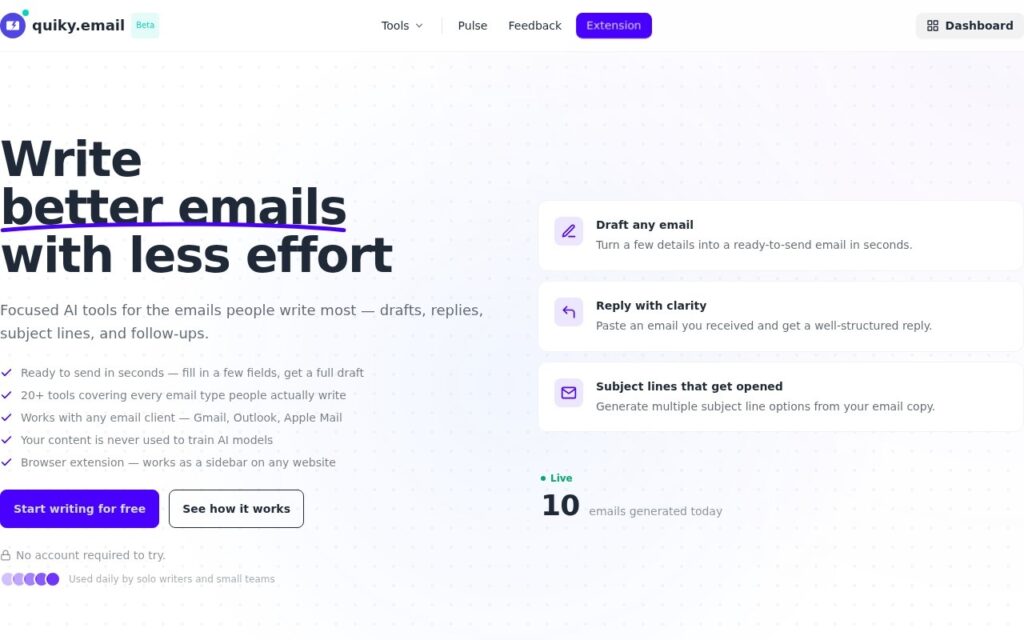
quiky.email generates email drafts, replies, subject lines and follow-ups through 20-plus specialized AI tools, working as a browser-extension sidebar alongside any email client – Gmail, Outlook or Apple Mail – rather than requiring a specific platform. Users can test the tools without creating an account or providing payment information.

An explicit privacy commitment – stated directly, not buried in a policy page – that content is never used to train AI models, combined with no page-content reading or script injection, is a genuinely reassuring design choice for a tool that by definition sits inside someone’s email. Working across any email client, rather than being locked to Gmail specifically, also means it fits whatever a user already has rather than requiring a switch.

20-plus specialized tools for different email types means some initial exploration to find the right one for a specific situation rather than one universal generate button. Pricing is credit-based per email ($6-$24/month for 150-1,500 emails), worth matching to actual email volume before choosing a tier.

Key features

  • 20+ specialized AI email tools: drafts, replies, subject lines, follow-ups
  • Works with any email client via browser sidebar
  • No account required to test
  • Explicit no-training-on-your-content privacy policy
  • No page-content reading or script injection

Screenshots & demo

quiky.email screenshot 1

Pricing

quiky.email is a paid tool, with plans that start at $6/mo.

  • Pricing modelPaid
  • Starting priceFrom $6/mo
  • Free planNo
Visit quiky.email

Pricing is provided as a guide. Check the official site for the latest plans.

Is quiky.email expensive?

quiky.email starts at $6, which is 40% below the Productivity median of $10 a month across the 196 priced tools we list in that category.

The cheapest paid option in Productivity starts at $0.29 and the most expensive at $165.

70% of Productivity tools in the directory offer a free tier, which this one does not.

Compared against every priced listing in Productivity, recalculated as the catalogue changes. Method and the full market breakdown are in our AI tool pricing study.

Pros & cons

Pros

  • Explicit, stated privacy commitment against training on your email content
  • Works across any email client, not locked to one platform
  • Test tools with zero signup or payment info required

Cons

  • 20+ tools require some exploration to find the right one for a task
  • Credit-based pricing needs matching to real email volume
  • Built by an individual developer, not a larger company with a support team

How it compares

ToolRatingFreeFromBest known for
quiky.email (this tool)3.6No$6/mo20+ specialized AI email tools: drafts, replies, subject lines, follow-ups
Ellie3.5No—Learns individual writing voice from sent mail – tone, sign-offs, phrasing
UniJump3.4YesFreeIn-page AI chat access via keyboard shortcut or widget
superReply3.4YesFreeAI reply generation across Gmail, Outlook, WhatsApp, Slack, LinkedIn, Upwork, and Fiverr

Alternatives to quiky.email

4 tools matched to quiky.email on what they do, their category and their price.

Ellie

3.5

Ellie reads your sent mail, learns your tone and sign-offs, then drafts replies overnight in your own voice – ready to review by morning, for Gmail and Outlook.

Free Trial Productivity

UniJump

3.4

Cmd+J anywhere on the web to summarize the page, rewrite a sentence, or translate on the spot – free, open source, no signup, stores no personal data.

superReply

3.4

AI drafts the reply to any email, DM or message across Gmail, Outlook, WhatsApp, Slack, LinkedIn, Upwork and Fiverr – matches your tone, offers several options, 90 free replies a month.

Freemium Productivity

IntelliMail

3.0

Open Gmail, add context, click IntelliMail – a perfectly crafted email drafted in seconds, powered directly by your own OpenAI account.

Frequently asked questions

What is quiky.email?
quiky.email generates email drafts, replies, subject lines and follow-ups through 20-plus specialized AI tools, working as a browser-extension sidebar alongside any email client – Gmail, Outlook or Apple Mail – rather than requiring a specific platform.
Is quiky.email free?
quiky.email does not offer a free plan; paid pricing starts at $6 per month.
How much does quiky.email cost?
quiky.email starts at $6 per month. See the pricing plans above for full details.
What are the best quiky.email alternatives?
The closest matches in the directory are Ellie, UniJump, and superReply, compared side by side above.

Reviews

3.6 Editorial rating No reviews yet

Write a review

More tools like quiky.email

Dokkio

3.4

Centralizes files scattered across cloud storage services and AI instantly recognizes and flags what matters, so search actually works across every drive you use.

Free Trial Productivity

ChaiBar

3.3

ChatGPT and DALL-E combined into one Mac menu-bar assistant – send emails, draft documents, schedule appointments, and generate images without switching apps.