
Freemium

superReply

AI drafts the reply to any email, DM or message across Gmail, Outlook, WhatsApp, Slack, LinkedIn, Upwork and Fiverr – matches your tone, offers several options, 90 free replies a month.

3.4 Productivity
3.4 Good 3.4

Bottom line: AI drafts the reply to any email, DM or message across Gmail, Outlook, WhatsApp, Slack, LinkedIn, Upwork and Fiverr – matches your tone, offers several options, 90 free replies a month. Free plan available.

Covers seven platforms from one extension, not just email Free tier's 90 emails/month is limiting for high-volume users
Reviewed by Challenging Voice Editorial · Updated Sep 2026 How we rate
PricingFree
Free planYes
CompanysuperReply
PlatformsWeb
Best forProductivity
Visits16
Last reviewedAug 2026
UpdatedSep 2026
Ask AI about superReply ChatGPT Claude Perplexity

Overview

superReply is a Chrome extension that generates AI-powered reply suggestions across email and messaging platforms: it produces one-click response options with tone matching (professional, casual, and other registers depending on context), offering multiple suggestions to choose from rather than a single forced draft.

Working across seven distinct platforms – Gmail, Outlook, WhatsApp, Slack, LinkedIn, Upwork, and Fiverr – rather than just one inbox is what makes this useful for people whose communication is genuinely spread across channels: a freelancer replying to a client on Upwork, a prospect on LinkedIn, and a teammate on Slack in the same hour benefits from one consistent reply-assistance tool rather than separate solutions per platform.

superReply targets customer service representatives, sales professionals, freelancers and agencies, and teams managing high email volumes. A free tier covers up to 90 AI-powered emails per month; paid plans unlock unlimited replies and advanced tone controls, billed monthly or annually.
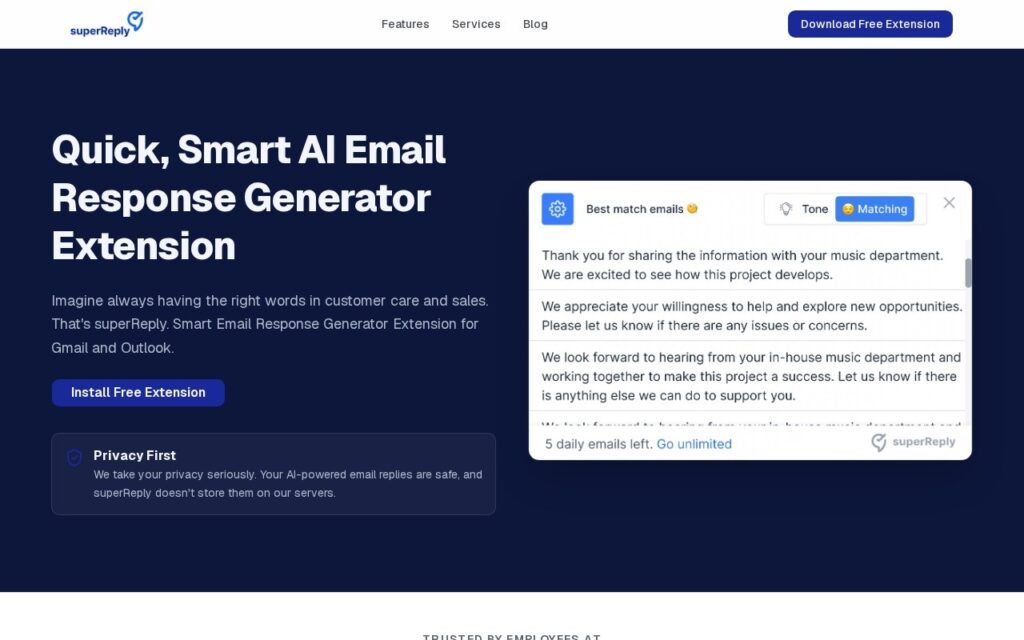

Key features

  • AI reply generation across Gmail, Outlook, WhatsApp, Slack, LinkedIn, Upwork, and Fiverr
  • Tone-matched response suggestions
  • Multiple reply options per message
  • One-click Chrome extension integration
  • 90 free AI-powered emails per month

Screenshots & demo

superReply screenshot 1

Pricing

superReply offers a free plan, with paid upgrades for higher limits and more features.

  • Pricing modelFreemium
  • Starting priceFree
  • Free planYes
Visit superReply

Pricing is provided as a guide. Check the official site for the latest plans.

Is superReply expensive?

superReply has no advertised paid tier. Among the 165 priced tools we list in Productivity, the median entry price is $11.6 a month.

72% of Productivity tools in the directory offer a free tier, and this is one of them.

Compared against every priced listing in Productivity, recalculated as the catalogue changes. Method and the full market breakdown are in our AI tool pricing study.

Pros & cons

Pros

  • Covers seven platforms from one extension, not just email
  • Multiple suggested replies per message, not a single forced draft
  • Meaningful free tier (90/month) before requiring payment

Cons

  • Free tier's 90 emails/month is limiting for high-volume users
  • Chrome-extension-only – no coverage for other browsers or native apps directly
  • AI-suggested replies still need a quick read before sending in sensitive contexts

How it compares

ToolRatingFreeFromBest known for
superReply (this tool)3.4YesFreeAI reply generation across Gmail, Outlook, WhatsApp, Slack, LinkedIn, Upwork, and Fiverr
ConversAI3.3No$15/moAI response generation across Gmail, WhatsApp, Telegram, Discord, Slack, LinkedIn
MailMaestro4.1Yes$12/moAI email drafting with three variation options per prompt
Sheldon3.4YesFreeAI-generated professional email replies with tone customization

Alternatives to superReply

4 tools matched to superReply on what they do, their category and their price.

ConversAI

3.3

AI learns to talk like you, then drafts replies across Gmail, WhatsApp, Telegram, Discord, Slack and LinkedIn – detects the tone of the conversation and matches it, in your language.

Sheldon

3.4

Free Chrome extension AI assistant working inside Gmail, Google Sheets, LinkedIn and Quora – writes professional email replies, builds complex Excel formulas from a description, and generates code snippets.

Frequently asked questions

What is superReply?
superReply is a Chrome extension that generates AI-powered reply suggestions across email and messaging platforms: it produces one-click response options with tone matching (professional, casual, and other registers depending on context), offering multiple suggestions to choose from rather than a single forced draft.
Is superReply free?
Yes, superReply offers a free plan. Paid plans unlock more features and higher usage limits.
What are the best superReply alternatives?
The closest matches in the directory are ConversAI, MailMaestro, and Sheldon, compared side by side above.

Reviews

3.4 No reviews yet

Write a review

More tools like superReply

Jace

3.8

AI email assistant that drafts Gmail replies in a user's own voice and organizes an inbox automatically.

Free Trial Productivity

Ellie

3.5

Ellie reads your sent mail, learns your tone and sign-offs, then drafts replies overnight in your own voice – ready to review by morning, for Gmail and Outlook.

Free Trial Productivity