List your tool
Free

UniJump

Cmd+J anywhere on the web to summarize the page, rewrite a sentence, or translate on the spot – free, open source, no signup, stores no personal data.

3.4 Productivity
3.4 Good 3.4
Open-source code lets anyone verify its no-data-collection claim directly Chrome-only currently, no support for other browsers
Reviewed by Challenging Voice Editorial · Updated Sep 2026 How we rate
PricingFree
Free planYes
CompanyUniJump
PlatformsWeb
CategoryProductivity
Last reviewedAug 2026
UpdatedSep 2026

Is this your tool?

  • Claim this listing. Sign in with an email at unijump.ai to manage it. Claim UniJump
  • Get into the top 5 of Productivity. 5 of 5 spots open, from $159/month. See positions
  • Something out of date? Owners can request edits from My listings; anyone can tell us.
Ask AI about UniJump ChatGPT Claude Perplexity

Overview

UniJump is a browser extension that brings ChatGPT access directly onto any webpage: a keyboard shortcut (Cmd+J) or widget opens quick chat access for summarizing text, rewriting or paraphrasing content, suggesting sentence completions, and changing languages, without navigating away from the current page.

Being open source, with the code publicly available on GitHub, and explicit that it stores no personal data, is a meaningful transparency choice for a browser extension that by nature sees whatever page a user is reading – anyone can verify the no-data-collection claim directly rather than trusting a privacy policy alone. Requiring only a free OpenAI account, with no separate UniJump registration, also keeps the setup friction minimal.

UniJump targets anyone wanting quick AI assistance while browsing, writers wanting in-context improvement suggestions, and privacy-conscious users. It’s completely free with no signup required beyond a free OpenAI account, currently available for Chrome only.
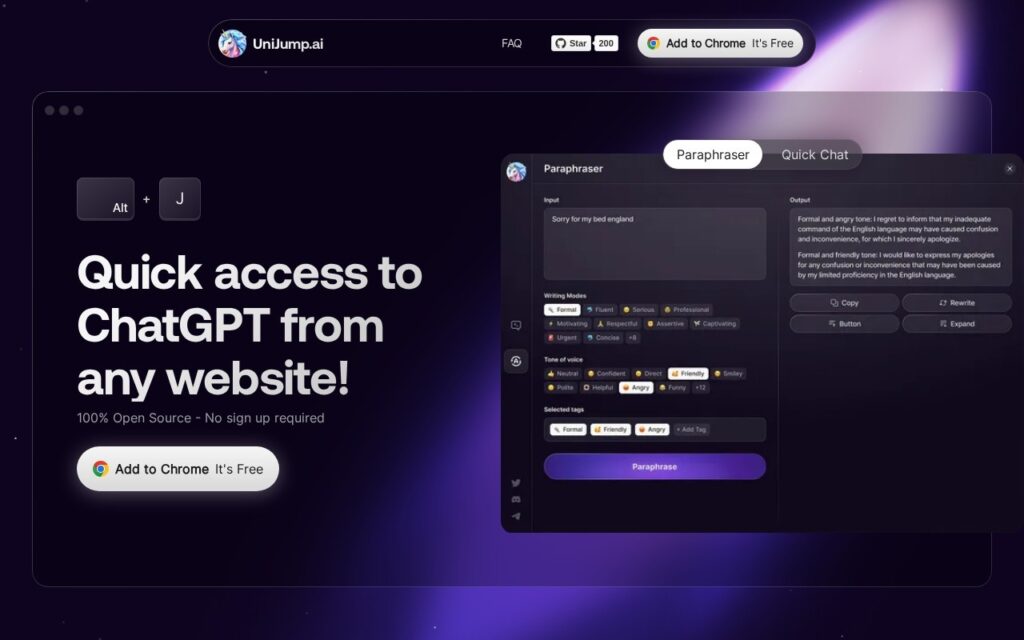

Key features

  • In-page AI chat access via keyboard shortcut or widget
  • Text summarization and paraphrasing
  • Sentence completion suggestions
  • Language translation on the spot
  • Open source, no data collection or storage

Screenshots & demo

UniJump screenshot 1

Pricing

UniJump offers a free plan, with paid upgrades for higher limits and more features.

  • Pricing modelFree
  • Starting priceFree
  • Free planYes
Visit UniJump

Pricing is provided as a guide. Check the official site for the latest plans.

Is UniJump expensive?

UniJump has no advertised paid tier. Among the 196 priced tools we list in Productivity, the median entry price is $10 a month.

71% of Productivity tools in the directory offer a free tier, and this is one of them.

Compared against every priced listing in Productivity, recalculated as the catalogue changes. Method and the full market breakdown are in our AI tool pricing study.

Pros & cons

Pros

  • Open-source code lets anyone verify its no-data-collection claim directly
  • Completely free, only requires a standard free OpenAI account
  • Works in-context on any webpage, no tab-switching required

Cons

  • Chrome-only currently, no support for other browsers
  • Requires a separate OpenAI account and its own usage limits/costs
  • Feature set is intentionally narrow (chat, summarize, rewrite) versus a fuller AI writing suite

How it compares

ToolRatingFreeFromBest known for
UniJump (this tool)3.4YesFreeIn-page AI chat access via keyboard shortcut or widget
HARPA AI3.6YesFreeMulti-model AI access (GPT-5.4, Claude 4.6, Gemini 3.1, DeepSeek, Llama 4) via one shortcut
Merlin4.0Yes$15/moCtrl/Cmd+M shortcut for AI access on any website
Shortkut3.4YesFreeAI-powered shortcuts usable in any input box on the internet

Alternatives to UniJump

4 tools matched to UniJump on what they do, their category and their price.

HARPA AI

3.6

Press Alt+A on any webpage to reach GPT-5.4, Claude 4.6, Gemini 3.1, DeepSeek or Llama – plus browser automation for data extraction, form filling and monitoring, used by 500,000+ professionals.

Freemium Productivity

Shortkut

3.4

A Chrome extension that puts ChatGPT-powered shortcuts into any input box on the internet – build, save, and share AI snippets with your whole team.

IntelliMail

3.0

Open Gmail, add context, click IntelliMail – a perfectly crafted email drafted in seconds, powered directly by your own OpenAI account.

Frequently asked questions

What is UniJump?
UniJump is a browser extension that brings ChatGPT access directly onto any webpage: a keyboard shortcut (Cmd+J) or widget opens quick chat access for summarizing text, rewriting or paraphrasing content, suggesting sentence completions, and changing languages, without navigating away from the current page.
Is UniJump free?
Yes, UniJump offers a free plan. Paid plans unlock more features and higher usage limits.
What are the best UniJump alternatives?
The closest matches in the directory are HARPA AI, Merlin, and Shortkut, compared side by side above.

Reviews

3.4 Editorial rating No reviews yet

Write a review

More tools like UniJump

PaletteBrain

3.4

Select text in any Mac app, hit Space, run a custom AI command, paste the result back – no window switching, bring your own OpenAI key, pay once for lifetime access.