
Freemium

CaptionCreator

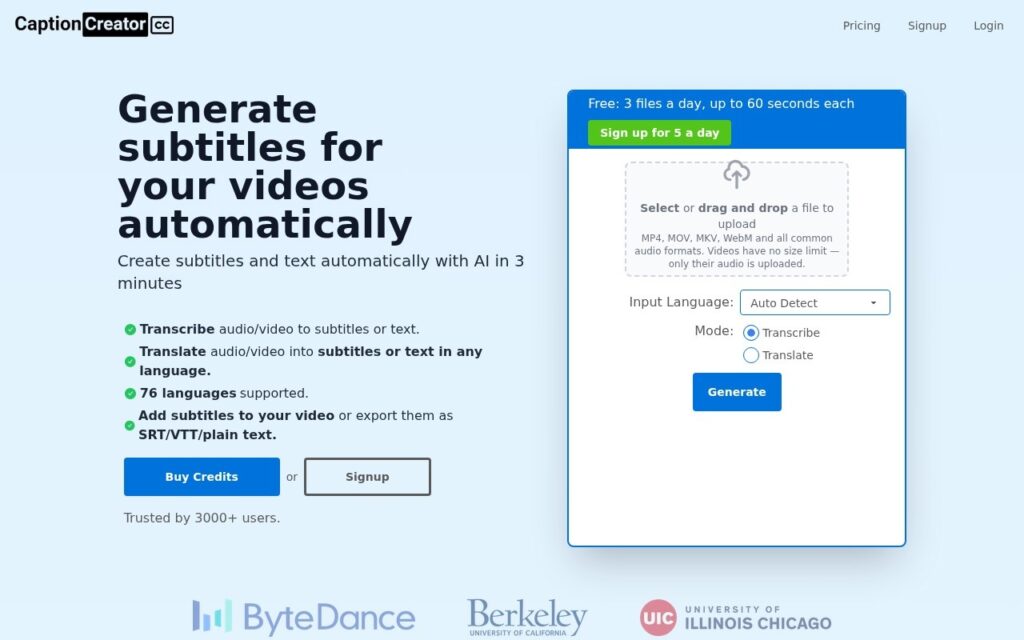
AI transcribes and translates video into subtitles across 76 languages in under 3 minutes – handles noisy audio, multilingual content, and diverse accents.

3.5 Video
3.5 Good 3.5

Bottom line: CaptionCreator is a capable video tool, best known for AI transcription and translation across 76 languages. It has a free plan.

Fast processing (under 3 minutes) regardless of video length Free tier limited to 60-second clips, 5 files per day
Reviewed by Challenging Voice Editorial · Updated Sep 2026 How we rate
PricingFrom $10/mo
Free planYes
CompanyCaptionCreator
PlatformsWeb
Best forVideo
Visits5
Last reviewedAug 2026
UpdatedSep 2026
Ask AI about CaptionCreator ChatGPT Claude Perplexity

Overview

CaptionCreator uses AI to transcribe and translate audio and video into subtitles across 76 supported languages, processing videos in under 3 minutes regardless of length. The underlying model handles noisy audio, multilingual content within the same video, and diverse accents – the specific edge cases that trip up simpler, rule-based transcription tools.

Handling noisy audio and accent diversity specifically is where AI transcription earns its keep over older speech-to-text approaches – real-world video rarely has studio-quality audio, and a transcription tool that only performs well on clean, single-accent English audio fails exactly the content creators most need help with. Auto-language detection removes another manual step, letting the system identify the source language rather than requiring the user to specify it upfront.

CaptionCreator exports to SRT, VTT, and plain text, includes a subtitle editor with customizable styles, and supports burning subtitles directly into video. A free plan includes 5 files per day (60 seconds max each); Basic runs $10/month for 300 minutes, and Pro runs $25/month for 1,000 minutes, with a 30-day refund policy on unused credits for first-time subscribers.

Key features

  • AI transcription and translation across 76 languages
  • Handles noisy audio, multilingual content, and diverse accents
  • Processes videos in under 3 minutes regardless of length
  • Subtitle editor with customizable styles and video burning
  • Export to SRT, VTT, and plain text formats

Screenshots & demo

CaptionCreator screenshot 1

Pricing

CaptionCreator has a free plan, and paid plans start at $10/mo.

  • Pricing modelFreemium
  • Starting priceFrom $10/mo
  • Free planYes
Visit CaptionCreator

Pricing is provided as a guide. Check the official site for the latest plans.

Is CaptionCreator expensive?

CaptionCreator starts at $10, which is 37% below the Video median of $15.95 a month across the 130 priced tools we list in that category.

The cheapest paid option in Video starts at $0.5 and the most expensive at $295.

65% of Video tools in the directory offer a free tier, and this is one of them.

Compared against every priced listing in Video, recalculated as the catalogue changes. Method and the full market breakdown are in our AI tool pricing study.

Pros & cons

Pros

  • Fast processing (under 3 minutes) regardless of video length
  • Handles real-world audio conditions, not just clean studio recordings
  • Free tier lets you test quality before committing to a paid plan

Cons

  • Free tier limited to 60-second clips, 5 files per day
  • 76-language claim still warrants a quality check for less common languages
  • Auto-generated subtitles benefit from a manual accuracy review before publishing

How it compares

ToolRatingFreeFromBest known for
CaptionCreator (this tool)3.5Yes$10/moAI transcription and translation across 76 languages
Synthesia4.5No$29/moAmong the earliest and most established AI avatar tools, operating since 2017
HeyGen4.5Yes$24/moBroadly recognized avatar realism and ease of use
Fliki4.5Yes$21/moLarge library of natural-sounding AI voices across numerous languages

Alternatives to CaptionCreator

4 more tools to compare with CaptionCreator.

Fliki

4.5

Turns a script or article into video, built around a large natural-voice library

Freemium Video

Our verdict

3.5 / 5 3.5

CaptionCreator is a solid video tool, best known for AI transcription and translation across 76 languages. It offers a free plan, with paid upgrades from $10/mo.

What makes it different: CaptionCreator stands out for AI transcription and translation across 76 languages.

How we score it
Overall 3.5
Value for money 4.7
Feature depth 4.9
Popularity 3.7
Best for Video creatorsMarketersAgenciesEducators

Frequently asked questions

What is CaptionCreator?
CaptionCreator is a video tool listed in the Challenging Voice directory. AI transcribes and translates video into subtitles across 76 languages in under 3 minutes – handles noisy audio, multilingual content, and diverse accents.
Is CaptionCreator free?
Yes, CaptionCreator offers a free plan. Paid plans unlock more features and higher usage limits, starting at $10/month.
How much does CaptionCreator cost?
CaptionCreator starts at $10 per month. See the pricing plans above for full details.
What are the best CaptionCreator alternatives?
Popular alternatives to CaptionCreator include Vidu AI, Luma AI, and Niomake. Browse them all in the Video category.
Is CaptionCreator any good?
CaptionCreator scores 3.5 out of 5 based on our editorial review.

Reviews

3.5 No reviews yet

Write a review

Similar tools you might like

D-ID

4.3

The category's original pioneer, animating a single static photo since 2017

Free Trial Video

Vidon.ai

3.7

Automate and scale video marketing – generate a batch of videos for one topic at once, trusted by VMware, Hyatt, Semrush and Siemens.

Free Trial Video