
List your tool
Freemium

CaptionCreator

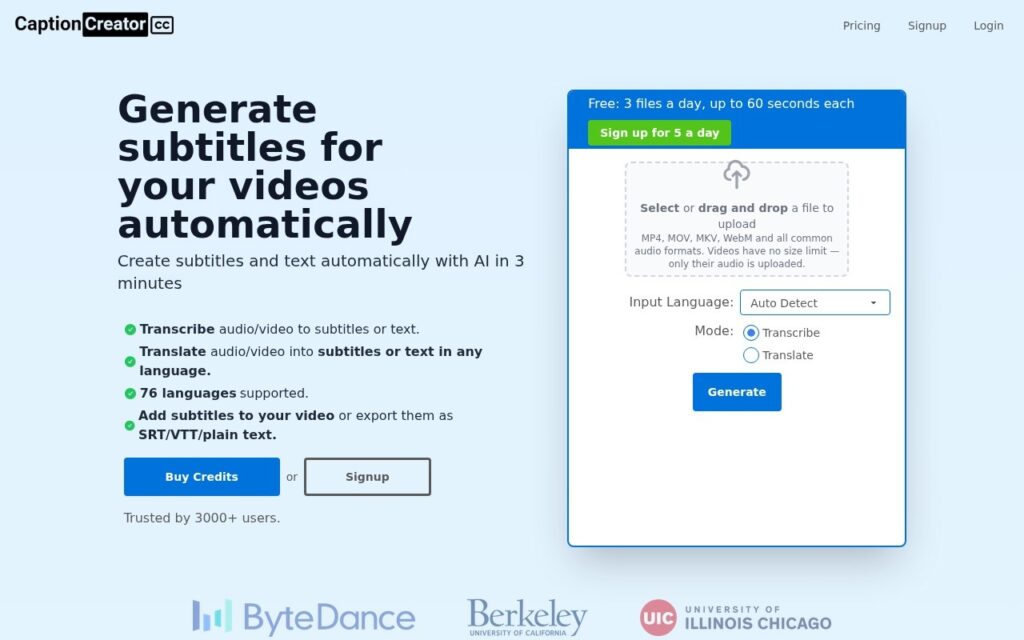
AI transcribes and translates video into subtitles across 76 languages in under 3 minutes – handles noisy audio, multilingual content, and diverse accents.

3.5 Video
3.5 Good 3.5
Fast processing (under 3 minutes) regardless of video length Free tier limited to 60-second clips, 5 files per day
Reviewed by Challenging Voice Editorial · Updated Oct 2026 How we rate
PricingFrom $10/mo
Free planYes
CompanyCaptionCreator
PlatformsWeb
CategoryVideo
Last reviewedAug 2026
UpdatedOct 2026

Is this your tool?

  • Claim this listing. Sign in with an email at captioncreator.cc to manage it. Claim CaptionCreator
  • Get into the top 5 of Video. 5 of 5 spots open, from $159/month. See positions
  • Something out of date? Owners can request edits from My listings; anyone can tell us.
Ask AI about CaptionCreator ChatGPT Claude Perplexity

Overview

CaptionCreator is an AI subtitle tool that transcribes video and audio and translates the result into subtitles in 76 supported languages. It is built for creators who need captions quickly: the vendor says videos process in under 3 minutes regardless of length. You can start on a free plan to check quality before paying.

Real-world video rarely has studio-quality audio, so a captioning tool has to cope with background noise, accents and mixed languages. CaptionCreator is built for those cases, and its automatic language detection means you do not have to name the source language before you upload. Check the output for less common languages, since accuracy varies by language.

Once the transcript is ready, you can edit the text, adjust subtitle styles, and export to SRT, VTT or plain text. You can also burn the subtitles directly into the video. Plans and limits are listed in the pricing section of this page.

How do you create subtitles with CaptionCreator?

You upload a video, the AI transcribes it and can translate it, and you review the result in the editor before exporting. The review step matters, because automatic subtitles can misread names, jargon and overlapping speech.

  1. Upload your video or audio file.
  2. Let the tool detect the spoken language, or choose the target language for translation.
  3. Correct errors and set the subtitle style in the editor.
  4. Export an SRT or VTT file, or burn the subtitles into the video.

Use SRT or VTT when a platform lets you upload caption files, and burned-in subtitles when the video will be shared where captions cannot be added separately.

Key features

  • AI transcription and translation across 76 languages
  • Handles noisy audio, multilingual content, and diverse accents
  • Processes videos in under 3 minutes regardless of length
  • Subtitle editor with customizable styles and video burning
  • Export to SRT, VTT, and plain text formats

Screenshots & demo

CaptionCreator screenshot 1

Pricing

Free
$0
  • 5 files per day, up to 120 seconds each (with a free account)
Basic
$10/month
  • 300 minutes per month
Pro
$25/month
  • 1,000 minutes per month

Is CaptionCreator expensive?

CaptionCreator starts at $10, which is 37% below the Video median of $15.95 a month across the 144 priced tools we list in that category.

The cheapest paid option in Video starts at $0.5 and the most expensive at $295.

64% of Video tools in the directory offer a free tier, and this is one of them.

Compared against every priced listing in Video, recalculated as the catalogue changes. Method and the full market breakdown are in our AI tool pricing study.

Pros & cons

Pros

  • Fast processing (under 3 minutes) regardless of video length
  • Handles real-world audio conditions, not just clean studio recordings
  • Free tier lets you test quality before committing to a paid plan

Cons

  • Free tier limited to 60-second clips, 5 files per day
  • 76-language claim still warrants a quality check for less common languages
  • Auto-generated subtitles benefit from a manual accuracy review before publishing

How it compares

ToolRatingFreeFromBest known for
CaptionCreator (this tool)3.5Yes$10/moAI transcription and translation across 76 languages
EasySub3.2YesFree90%+ recognition accuracy audio-recognition AI
SubtitlesDog3.9No$9.99/moWhole-film style analysis for consistent terminology across a video
AI Dubbing3.9YesFreeAutomatic speech detection, transcription and translation

Alternatives to CaptionCreator

4 tools matched to CaptionCreator on what they do, their category and their price.

EasySub

3.2

150+ languages, 90%+ recognition accuracy, all in the browser – AI subtitle generation, transcription, and translation with a free 30-minute tier and $0.20/minute after that.

Freemium Video

SubtitlesDog

3.9

GPT-4-based subtitle translation that analyzes a whole film for consistent terminology, not line-by-line – a 1-hour video in about 3 minutes.

Paid Video

AI Dubbing

3.9

Studio-grade lip-synced dubbing across 170+ languages, with voice cloning to keep the original speaker's voice.

Freemium Video

Frequently asked questions

What is CaptionCreator?
CaptionCreator is an AI subtitle tool that transcribes video and audio and translates the result into subtitles in 76 supported languages.
Is CaptionCreator free?
Yes, CaptionCreator offers a free plan. Paid plans unlock more features and higher usage limits, starting at $10/month.
How much does CaptionCreator cost?
CaptionCreator plans: Free $0; Basic $10/month; Pro $25/month.
What are the best CaptionCreator alternatives?
The closest matches in the directory are EasySub, SubtitlesDog, and AI Dubbing, compared side by side above.

Reviews

3.5 Editorial rating No reviews yet

Write a review

More tools like CaptionCreator

KineMaster

4.0

Mobile video editor for iOS and Android with AI auto captions in 36 languages, AI voice, super resolution, object tracking, AI style filters and AI background removal.

Freemium Video