Freemium Verified

Hemingway Editor

A readability grader, not a content generator

4.4 Writing
4.4 Very good 4.4
Free web version is fully usable with no account needed Doesn't generate content, only grades what's already written
Reviewed by Challenging Voice Editorial · Updated Jul 2026 How we rate
PricingFrom $10/mo
Free planYes
CompanyBoondoggle Studio, LLC
PlatformsMac, Web, Windows
CategoryWriting
Founded2013
Visits29
Last reviewedJun 2026
UpdatedJul 2026
Ask AI about Hemingway Editor ChatGPT Claude Perplexity

Overview

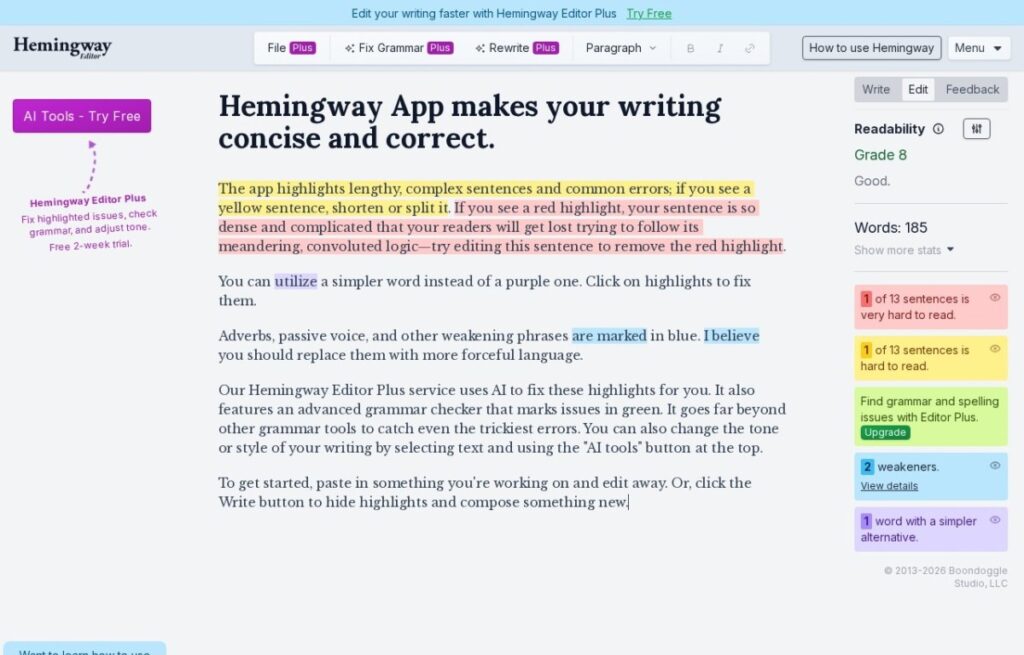
Hemingway Editor is named for a reason: it flags the exact habits that make prose harder to read, run-on sentences, passive voice, adverbs, complex phrasing, and color-codes them directly in the text, borrowing its standard from Ernest Hemingway's famously terse style. Unlike nearly everything else in this category, it wasn't built to generate content at all; it was built to grade what you already wrote.

That distinction matters for who should use it. Writers who already have a draft and want a blunt, mechanical read on sentence complexity get more from Hemingway than from a generation tool, since there's no prompt to write and no output to fact-check, just a scored pass over existing text. The free web app covers this core grading with no login required, which is unusual generosity in a market full of gated trials.

A paid desktop app, historically a one-time purchase rather than a subscription, adds offline use, PDF/Word export, and light formatting tools, and a newer AI-powered Plus tier layers in generative rewriting suggestions for people who want both the grading and some drafting help in one place. Students, bloggers, and non-native English writers tend to get the most out of it, less so anyone who wants a tool to write the first draft for them.

Key features

  • Real-time readability grading with color-coded issues
  • Flags passive voice, adverbs, and run-on sentences
  • Free web app, no account required
  • One-time-purchase desktop app option
  • PDF, Word, and Markdown export from desktop
  • Optional AI-powered rewrite suggestions on Plus

Screenshots & demo

Demo video

Screenshots

Hemingway Editor screenshot 1

Pricing

Free
$0
  • Highlights lengthy, hard-to-read sentences
  • Flags adverbs and passive voice
  • Flags complicated words and phrases
  • Free browser-based editor
Desktop App
$19.99 one-time
  • Mac and Windows desktop app
  • Distraction-free writing mode
  • Publish directly to WordPress/Medium
  • Export to PDF, Word, HTML/Markdown

Is Hemingway Editor expensive?

Hemingway Editor starts at $10, which is right at the Writing median of $11 a month across the 88 priced tools we list in that category.

The cheapest paid option in Writing starts at $1.95 and the most expensive at $390.

68% of Writing tools in the directory offer a free tier, and this is one of them.

Compared against every priced listing in Writing, recalculated as the catalogue changes. Method and the full market breakdown are in our AI tool pricing study.

Pros & cons

Pros

  • Free web version is fully usable with no account needed
  • Desktop app is a one-time purchase, not locked to a subscription
  • Genuinely different utility from generation-first tools
  • Simple, distraction-free interface

Cons

  • Doesn't generate content, only grades what's already written
  • Readability score can feel reductive for nuanced or technical writing
  • AI Plus tier is newer and less proven than the core grader

How it compares

ToolRatingFreeFromBest known for
Hemingway Editor (this tool)4.4Yes$10/moReal-time readability grading with color-coded issues
Outwrite3.3YesFreeAI-powered grammar, spelling, and punctuation correction
ZeroGPT.cc2.9YesFreeSentence-by-sentence AI-detection with color-coded highlighting
ProWritingAid4.5Yes$10/moIn-depth style reports (pacing, sentence variation, overused words)

Alternatives to Hemingway Editor

4 tools matched to Hemingway Editor on what they do, their category and their price.

Outwrite

3.3

Grammar, style, paraphrasing, and passive-voice fixes with readability scoring – across Chrome, Word, Docs, Gmail, and more.

Freemium Writing

ZeroGPT.cc

2.9

Paste text, get sentence-by-sentence AI-detection with color-coded highlighting – free, unlimited checks against GPT, Claude, Gemini, and more, no relation to zerogpt.com.

Free Writing

Frequently asked questions

What is Hemingway Editor?
Hemingway Editor is named for a reason: it flags the exact habits that make prose harder to read, run-on sentences, passive voice, adverbs, complex phrasing, and color-codes them directly in the text, borrowing its standard from Ernest Hemingway's famously terse style.
Is Hemingway Editor free?
Yes, Hemingway Editor offers a free plan. Paid plans unlock more features and higher usage limits, starting at $10/month.
How much does Hemingway Editor cost?
Hemingway Editor plans: Free $0; Desktop App $19.99 one-time.
What are the best Hemingway Editor alternatives?
The closest matches in the directory are Outwrite, ZeroGPT.cc, and ProWritingAid, compared side by side above.

Reviews

4.4 No reviews yet

Write a review

More tools like Hemingway Editor

Netus AI

3.6

AI paraphrasing and humanizing tool that rewrites text to read as human-written and pass AI detection.

Freemium Writing

Winston AI

3.5

AI content and image detection claimed accurate 99.98% of the time – sentence-level highlights, plagiarism checks, and deepfake detection in one report.

Freemium Writing