
Freemium Featured Verified

Cursor

The AI-native editor most competitors now get compared against

4.7 Coding
4.7 Excellent 4.7

Bottom line: Cursor is a top-tier coding tool, best known for multi-line Tab autocomplete predicting full edits. It has a free plan.

Widely regarded as the category's leading AI-native editor by adoption Higher usage requires a paid subscription fairly quickly
Reviewed by Challenging Voice Editorial · Updated Jul 2026 How we rate
PricingFrom $20/mo
Free planYes
CompanyAnysphere
PlatformsMac, Windows
Best forCoding
Founded2022
Visits66
Last reviewedJun 2026
UpdatedJul 2026
Ask AI about Cursor ChatGPT Claude Perplexity

Overview

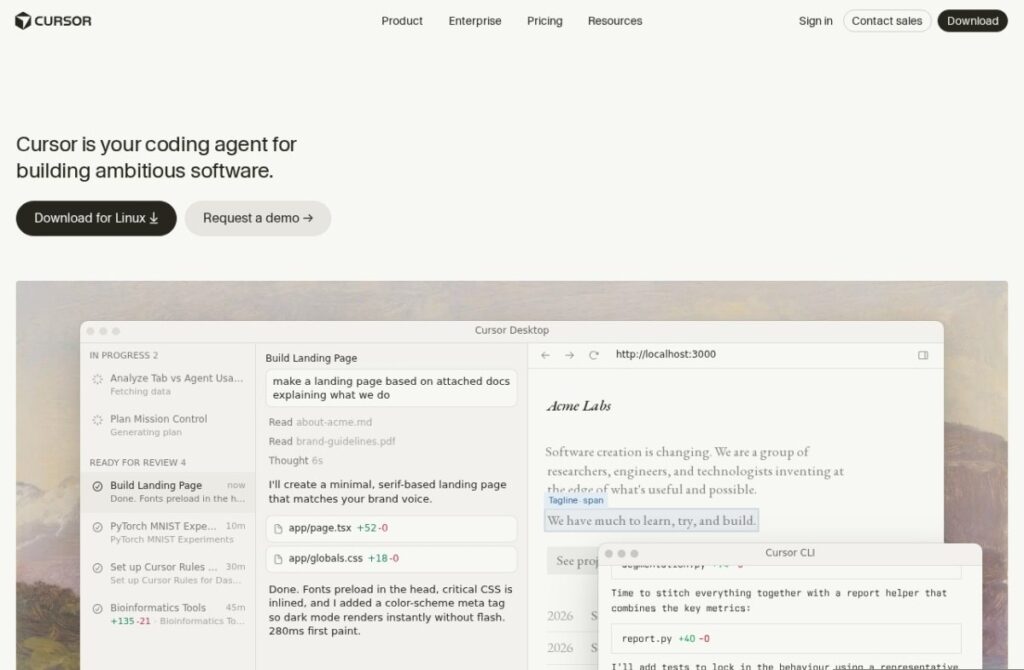
Cursor, built by Anysphere since 2022, forks VS Code and rebuilds the editing experience around AI from the ground up rather than adding it as a plugin, and it has become the specific editor most other AI-native coding tools in this category get measured against, in adoption, valuation, and feature parity alike.

Its Tab autocomplete predicts and applies multi-line edits across a change rather than only the next few tokens, and Composer, its agent mode, handles multi-file changes across a codebase from a single natural-language request, running tests and iterating on failures as part of the same session. Multiple underlying models are available rather than locking users to one.

A free tier covers limited usage, and paid plans start around $20 a month for much higher limits and priority access to newer models. For a developer choosing an AI-native editor without a strong existing preference, Cursor's scale, adoption, and continuously updated feature set make it the default starting point most others in this category are compared against.

Key features

  • Multi-line Tab autocomplete predicting full edits
  • Composer agent mode for multi-file changes
  • Choice of multiple underlying AI models
  • Built as a full VS Code fork, not a plugin
  • Free tier with limited usage
  • Iterative testing and failure correction within agent sessions

Screenshots & demo

Demo video

Screenshots

Cursor screenshot 1

Pricing

Hobby
Free
  • Limited agent requests
  • Basic completions
  • Core editor features
Pro
$20/mo
  • Expanded usage limits
  • Agent and chat access
  • Advanced model options

Pros & cons

Pros

  • Widely regarded as the category's leading AI-native editor by adoption
  • Composer handles genuinely complex, multi-file tasks well
  • Model choice avoids lock-in to a single AI provider
  • Frequent updates keep it near the front of new capabilities

Cons

  • Higher usage requires a paid subscription fairly quickly
  • Popularity has driven pricing changes some long-time users have pushed back on
  • Fork-based editor requires migrating settings from plain VS Code

How it compares

ToolRatingFreeFromBest known for
Cursor (this tool)4.7Yes$20/moMulti-line Tab autocomplete predicting full edits
Aider4.6YesFreeTerminal-based, no IDE required
GitHub Copilot4.6Yes$10/moOriginal AI coding autocomplete, launched in 2021
Zed4.5Yes$10/moBuilt natively rather than as an Electron/VS Code fork

Our verdict

4.7 / 5 4.7

Cursor is an excellent coding tool, best known for multi-line Tab autocomplete predicting full edits. It offers a free plan, with paid upgrades from $20/mo.

What makes it different: Cursor stands out for multi-line Tab autocomplete predicting full edits.

How we score it
Overall 4.7
Value for money 4.7
Feature depth 4.9
Popularity 4.6
Best for DevelopersEngineering teamsStudentsIndie hackers

Frequently asked questions

What is Cursor?
Cursor is a coding tool listed in the Challenging Voice directory. The AI-native editor most competitors now get compared against.
Is Cursor free?
Yes, Cursor offers a free plan. Paid plans unlock more features and higher usage limits, starting at $20/month.
How much does Cursor cost?
Cursor starts at $20 per month. See the pricing plans above for full details.
What are the best Cursor alternatives?
Popular alternatives to Cursor include AI App Generator by UI Bakery, Flowblock, and GPTConsole. Browse them all in the Coding category.
Is Cursor any good?
Cursor scores 4.7 out of 5 based on our editorial review.

Reviews

4.7 No reviews yet

Write a review

Similar tools you might like