Freemium

Image Candy

Browser-based image editor from Icecream Apps for converting, compressing, resizing, and cleaning up photos without installing software.

3.8 Image Generation
3.8 Good 3.8

Bottom line: Image Candy is a capable image generation tool, best known for single-purpose tools for resize, compress, convert, and rotate tasks. It has a free plan.

Free to use for its core toolkit without requiring an account Splitting tools across separate pages means switching tabs for multi-step edits
Reviewed by Challenging Voice Editorial · Updated Aug 2026 How we rate
PricingFrom $79/mo
Free planYes
CompanyIcecream Apps
PlatformsWeb
Best forImage Generation
Founded2022
Visits2
Last reviewedAug 2026
UpdatedAug 2026
Ask AI about Image Candy ChatGPT Claude Perplexity

Overview

Image Candy is a browser-based image editing toolkit covering conversion, compression, resizing, background removal, and watermarking. Icecream Apps, the team behind PDF Candy (launched 2016) and Video Candy (launched 2021), released the Image Candy sites in 2022 as the image-focused member of its 'Candy' suite of free web tools.

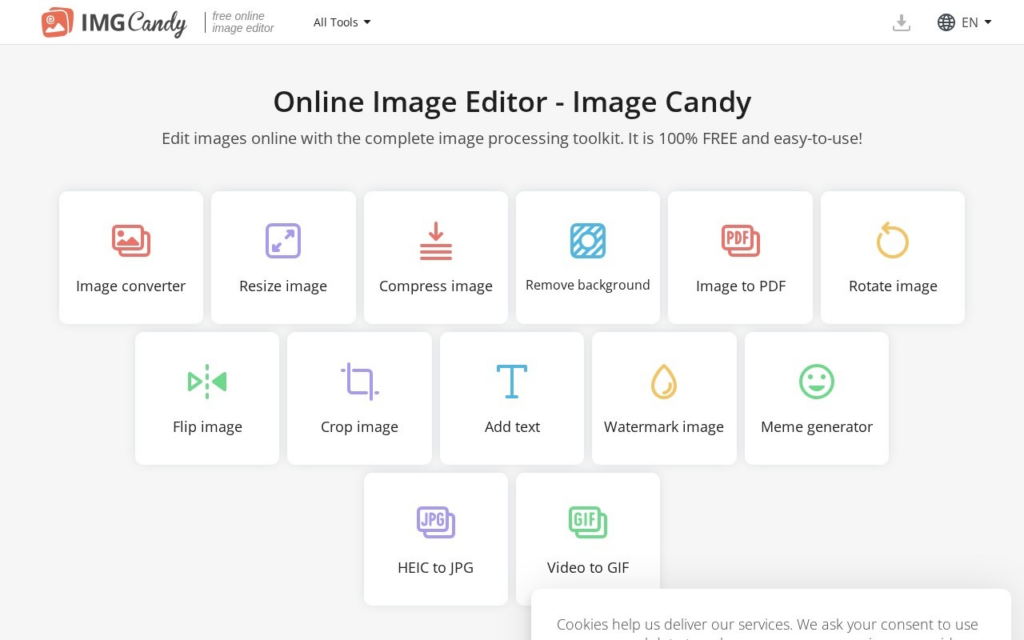
Rather than one monolithic editor, Image Candy splits its functionality into single-purpose tools, a resize page, a background remover, a HEIC-to-JPG converter, a meme generator, so a user lands directly on the tool they need instead of navigating a full editing suite. Processing happens through the browser with no account required for the free tools, following the same no-install approach Icecream Apps uses across its PDF and video products.

Image Candy suits people who need occasional image edits, resizing for a marketplace listing, compressing a file for email, without justifying a subscription to a full design app like Photoshop. The core toolkit is free to use; a Lifetime plan at $79 as a one-time payment removes limitations for users who rely on the tools on a recurring basis, alongside monthly and yearly subscription options.

Key features

  • Single-purpose tools for resize, compress, convert, and rotate tasks
  • AI background removal for product and portrait photos
  • HEIC-to-JPG and other format conversion without desktop software
  • Watermark addition and removal tools
  • Meme generator with text overlay controls
  • No-account access to core tools directly in the browser

Screenshots & demo

Demo video

Screenshots

Image Candy screenshot 1

Pricing

Image Candy has a free plan, and paid plans start at $79/mo.

  • Pricing modelFreemium
  • Starting priceFrom $79/mo
  • Free planYes
Visit Image Candy

Pricing is provided as a guide. Check the official site for the latest plans.

Pros & cons

Pros

  • Free to use for its core toolkit without requiring an account
  • Single-purpose tool pages get users to the specific edit they need without a cluttered interface
  • Backed by Icecream Apps' established track record with PDF Candy and Video Candy
  • One-time Lifetime payment option avoids an ongoing subscription for regular users

Cons

  • Splitting tools across separate pages means switching tabs for multi-step edits
  • Feature depth trails dedicated AI photo editors focused on one task, like background removal specialists
  • Monthly and yearly subscription prices aren't published up front, only the lifetime rate
  • Browser-based processing can lag on large batches compared to desktop software

How it compares

ToolRatingFreeFromBest known for
Image Candy (this tool)3.8Yes$79/moSingle-purpose tools for resize, compress, convert, and rotate tasks
DreamStudio4.1Yes$10/moOfficial Stable Diffusion interface from Stability AI
Civitai4.4Yes$5/moCommunity library of Stable Diffusion checkpoints and LoRAs
Artbreeder4.2Yes$8/moImage blending and crossbreeding sliders

Our verdict

3.8 / 5 3.8

Image Candy is a solid image generation tool, best known for single-purpose tools for resize, compress, convert, and rotate tasks. It offers a free plan, with paid upgrades from $79/mo.

What makes it different: Image Candy stands out for single-purpose tools for resize, compress, convert, and rotate tasks.

How we score it
Overall 3.8
Value for money 4.7
Feature depth 4.9
Popularity 3.7
Best for DesignersMarketersSocial media managersArtists

Frequently asked questions

What is Image Candy?
Image Candy is an image generation tool listed in the Challenging Voice directory. Browser-based image editor from Icecream Apps for converting, compressing, resizing, and cleaning up photos without installing software.
Is Image Candy free?
Yes, Image Candy offers a free plan. Paid plans unlock more features and higher usage limits, starting at $79/month.
How much does Image Candy cost?
Image Candy starts at $79 per month. See the pricing plans above for full details.
What are the best Image Candy alternatives?
Popular alternatives to Image Candy include ON1 Photo RAW, Wix Logo Maker, and Aragon AI. Browse them all in the Image Generation category.
Is Image Candy any good?
Image Candy scores 3.8 out of 5 based on our editorial review.

Reviews

3.8 No reviews yet

Write a review

Similar tools you might like