Freemium

ImageToVideoAI

One still plus a motion prompt, routed through ten-plus video models.

3.6 Video
3.6 Good 3.6

Bottom line: ImageToVideoAI is a capable video tool, best known for still images animated from a motion prompt. It has a free plan.

Camera direction in the prompt is what makes the output a shot No pricing figures and no company entity named
Reviewed by Challenging Voice Editorial · Updated Sep 2026 How we rate
PricingFree
Free planYes
CompanyImageToVideoAI
PlatformsWeb
Best forVideo
Visits6
Last reviewedAug 2026
UpdatedSep 2026
Ask AI about ImageToVideoAI ChatGPT Claude Perplexity

Overview

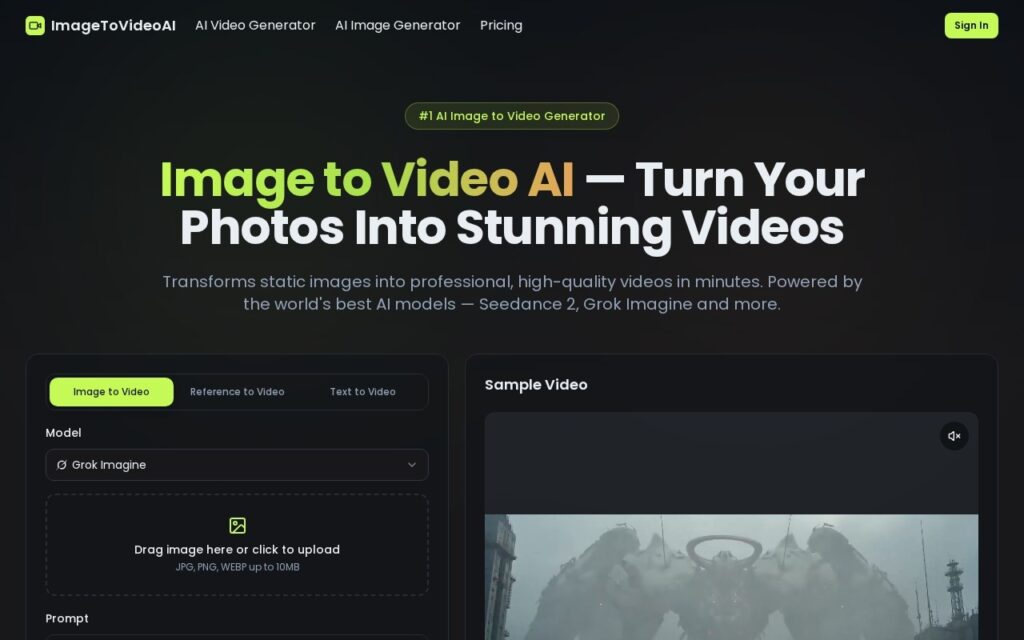
ImageToVideoAI animates a still photograph from a text prompt describing the motion, style and camera work. It runs more than ten models including Seedance 2, Grok Imagine, Veo 3 and Kling, outputs up to 1080p in the browser with nothing to install, and accepts JPG, PNG and WebP up to 10MB.

Describing the camera separately from the subject is the part that produces usable results. Most image-to-video output fails because the model animates everything at once – the subject moves, the background drifts and the frame wanders – whereas a prompt that specifies a slow push in on a static subject gives the model one job. Camera language is the vocabulary that turns a moving image into a shot.

The stated uses are ecommerce product video, marketing, education and social, which is honest about where a five-second animated still is actually enough. It starts free with no card and pricing sits on a separate page with no figures on the landing page, and no company entity is named. Ten-plus models behind one interface means the ceiling is whichever model you picked rather than the product, 10MB rules out high-resolution source photography, and animating a still invents motion that was never in the frame.

Key features

  • Still images animated from a motion prompt
  • 10+ models including Seedance 2, Grok Imagine, Veo 3 and Kling
  • Camera angle and style control in the prompt
  • Up to 1080p output in the browser
  • JPG, PNG and WebP input up to 10MB

Screenshots & demo

ImageToVideoAI screenshot 1

Pricing

ImageToVideoAI offers a free plan, with paid upgrades for higher limits and more features.

  • Pricing modelFreemium
  • Starting priceFree
  • Free planYes
Visit ImageToVideoAI

Pricing is provided as a guide. Check the official site for the latest plans.

Is ImageToVideoAI expensive?

ImageToVideoAI has no advertised paid tier. Among the 124 priced tools we list in Video, the median entry price is $15.95 a month.

65% of Video tools in the directory offer a free tier, and this is one of them.

Compared against every priced listing in Video, recalculated as the catalogue changes. Method and the full market breakdown are in our AI tool pricing study.

Pros & cons

Pros

  • Camera direction in the prompt is what makes the output a shot
  • Ten-plus models behind one interface
  • Free to start with nothing to install

Cons

  • No pricing figures and no company entity named
  • 10MB input rules out high-resolution source photography
  • The ceiling is whichever model you picked, not the product

How it compares

ToolRatingFreeFromBest known for
ImageToVideoAI (this tool)3.6YesFreeStill images animated from a motion prompt
Synthesia4.5No$29/moAmong the earliest and most established AI avatar tools, operating since 2017
HeyGen4.5Yes$24/moBroadly recognized avatar realism and ease of use
Fliki4.5Yes$21/moLarge library of natural-sounding AI voices across numerous languages

Alternatives to ImageToVideoAI

4 tools our editors picked as direct alternatives to ImageToVideoAI.

Fliki

4.5

Turns a script or article into video, built around a large natural-voice library

Freemium Video

Our verdict

3.6 / 5 3.6

ImageToVideoAI is a solid video tool, best known for still images animated from a motion prompt. It offers a free plan.

What makes it different: ImageToVideoAI stands out for still images animated from a motion prompt.

How we score it
Overall 3.6
Value for money 4.7
Feature depth 4.9
Popularity 3.7
Best for Video creatorsMarketersAgenciesEducators

Frequently asked questions

What is ImageToVideoAI?
ImageToVideoAI is a video tool listed in the Challenging Voice directory. One still plus a motion prompt, routed through ten-plus video models.
Is ImageToVideoAI free?
Yes, ImageToVideoAI offers a free plan. Paid plans unlock more features and higher usage limits.
What are the best ImageToVideoAI alternatives?
Popular alternatives to ImageToVideoAI include AI Baby Dance Generator, Glam AI, and BeatViz.ai. Browse them all in the Video category.
Is ImageToVideoAI any good?
ImageToVideoAI scores 3.6 out of 5 based on our editorial review.

Reviews

3.6 No reviews yet

Write a review

Similar tools you might like

Loom

4.5

Screen and webcam recorder that turns work updates into shareable video messages with AI transcripts and summaries.

Freemium Video

Eklipse

3.4

AI automatically detects the best moments in your gaming stream, clips them, and turns them into TikTok-ready shorts with memes and captions added.

Freemium Video

7ART

3.3

One logline becomes a full vertical drama series, at an intro rate that more than doubles.

Paid Video

CloneDub

3.5

Automated video dubbing across 27+ languages, with FastDub for parallelised processing of long-form podcast and YouTube content.

Free Trial Video