List your tool
Freemium

FluxMov

Guides AI video with an actual reference clip – pose, timing and camera move – instead of hoping a text prompt lands the same way twice.

3.9 Video
3.9 Good 3.9
Reference-video control is more reliable than describing motion in text Reference clips need reasonable quality (720p+) for good motion transfer
Reviewed by Challenging Voice Editorial · Updated Sep 2026 How we rate
PricingFree
Free planYes
CompanyFluxMov
PlatformsWeb
CategoryVideo
Last reviewedAug 2026
UpdatedSep 2026

Is this your tool?

  • Claim this listing. Sign in with an email at fluxmov.com to manage it. Claim FluxMov
  • Get into the top 5 of Video. 5 of 5 spots open, from $159/month. See positions
  • Something out of date? Owners can request edits from My listings; anyone can tell us.
Ask AI about FluxMov ChatGPT Claude Perplexity

Overview

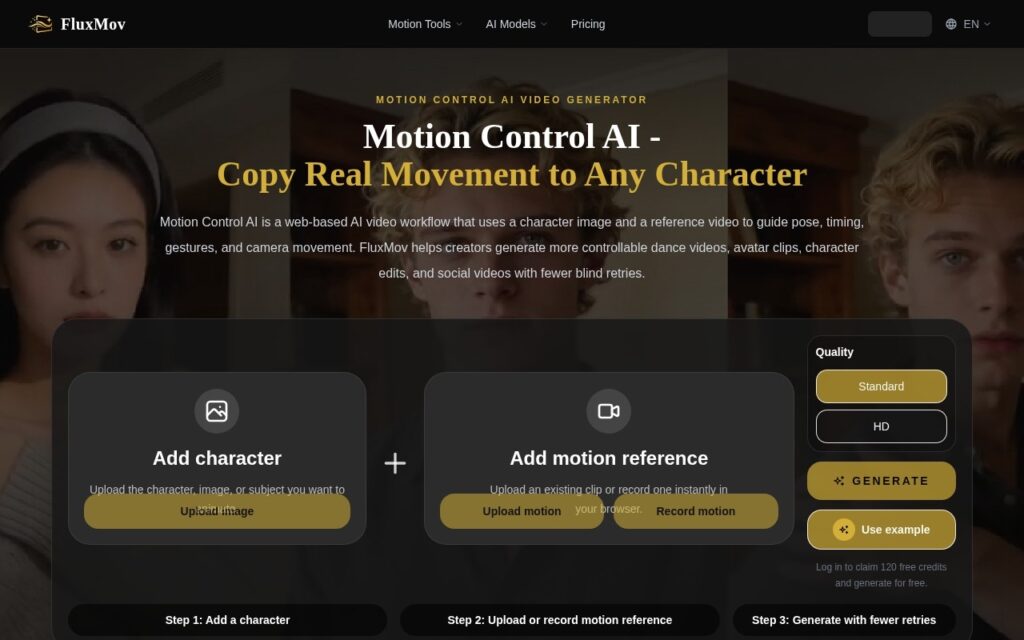
FluxMov generates controllable AI video by combining a character image with a motion reference video, rather than relying on text description alone – pose, timing, gestures and camera movement are guided by the uploaded reference footage. A Replace Character tool swaps the subject while preserving the original motion, and the platform routes generation across multiple underlying video models (Kling, Gemini, Grok) depending on the job.

Reference-driven motion control addresses a specific, real frustration with text-to-video: describing precise pose, timing and camera movement in words is genuinely hard, and results vary run to run even with an identical prompt. Feeding in actual reference footage instead is a materially more reliable way to get a specific, repeatable motion, and Replace Character – keeping the motion while swapping who’s performing it – is a workflow generic text-to-video tools don’t offer at all.

Reference clips need to be reasonably clean (5-10 seconds, 720p or higher) for the motion transfer to read well, so this isn’t a fix for a low-quality source video. Pricing is credit-based and scales with volume ($7.90 to $47.90/month), worth modeling against real batch-processing needs before committing to a tier.

Key features

  • Motion transfer from a reference video onto a character image
  • Replace Character: swap the subject while keeping the original motion
  • Multi-model routing across Kling, Gemini and Grok
  • Batch processing and priority queue on higher tiers
  • Built-in audio generation

Screenshots & demo

FluxMov screenshot 1

Pricing

FluxMov offers a free plan, with paid upgrades for higher limits and more features.

  • Pricing modelFreemium
  • Starting priceFree
  • Free planYes
Visit FluxMov

Pricing is provided as a guide. Check the official site for the latest plans.

Is FluxMov expensive?

FluxMov has no advertised paid tier. Among the 145 priced tools we list in Video, the median entry price is $15.9 a month.

65% of Video tools in the directory offer a free tier, and this is one of them.

Compared against every priced listing in Video, recalculated as the catalogue changes. Method and the full market breakdown are in our AI tool pricing study.

Pros & cons

Pros

  • Reference-video control is more reliable than describing motion in text
  • Replace Character workflow has no equivalent in generic text-to-video tools
  • 120 free credits for new users to test quality first

Cons

  • Reference clips need reasonable quality (720p+) for good motion transfer
  • Credit costs scale with volume – model against real batch needs
  • Multi-model routing means output style can vary by which model handles a job

How it compares

ToolRatingFreeFromBest known for
FluxMov (this tool)3.9YesFreeMotion transfer from a reference video onto a character image
Viggle AI4.1Yes$8/moMotion transfer from a reference video onto a different character
Motion Control AI3.9No$15.9/moMotion transfer from reference video to a still character
VidFlux3.7No$4.98/moText-to-video, image-to-video and video-to-video modes

Alternatives to FluxMov

4 tools matched to FluxMov on what they do, their category and their price.

Dreamlux

3.9

Browser-based AI video generator that turns text prompts and still images into short, watermark-free clips.

Freemium Video

Frequently asked questions

What is FluxMov?
FluxMov generates controllable AI video by combining a character image with a motion reference video, rather than relying on text description alone – pose, timing, gestures and camera movement are guided by the uploaded reference footage.
Is FluxMov free?
Yes, FluxMov offers a free plan. Paid plans unlock more features and higher usage limits.
What are the best FluxMov alternatives?
The closest matches in the directory are Viggle AI, Motion Control AI, and VidFlux, compared side by side above.

Reviews

3.9 Editorial rating No reviews yet

Write a review

More tools like FluxMov