

Free

MetadataKit

Views, edits and strips EXIF/IPTC/ID3/XMP metadata entirely in-browser – files never leave your device.

4.0 Productivity
4.0 Very good 4.0

Bottom line: MetadataKit is a strong productivity tool, best known for metadata viewer for camera, GPS and shutter-count data. It has a free plan.

Files never leave your device – privacy by architecture, not just policy Very large batch jobs are limited by your own device's resources
Reviewed by Challenging Voice Editorial · Updated Aug 2026 How we rate
PricingFree
Free planYes
CompanyMetadataKit
PlatformsWeb
Best forProductivity
Visits5
Last reviewedAug 2026
UpdatedAug 2026
Ask AI about MetadataKit ChatGPT Claude Perplexity

Overview

MetadataKit is a browser-based toolkit for viewing, editing and removing hidden metadata in digital files – camera settings, GPS coordinates, shutter count, author names, creation dates – across more than 500 file formats spanning photos, video, documents and audio. It processes everything client-side via WebAssembly, so files are never uploaded to a server, and it handles gigabyte-scale files with batch processing.

100% client-side processing is the feature that actually matters here: a metadata tool that strips GPS coordinates or author names for privacy reasons is only as trustworthy as its promise not to see that data itself, and running entirely in the browser removes the question rather than requiring you to take a privacy policy’s word for it. Supporting the standard metadata formats (Exif, IPTC, ID3, XMP) rather than just one file type also makes it a single tool for a job usually split across several format-specific utilities.

Client-side WebAssembly processing means very large batch jobs are bounded by your own device’s memory and CPU, not a server’s, which can be slower for genuinely huge batches even though it’s better for privacy. It’s also a utility, not an editor – it exposes and manages metadata, it doesn’t alter the actual image or audio content itself.
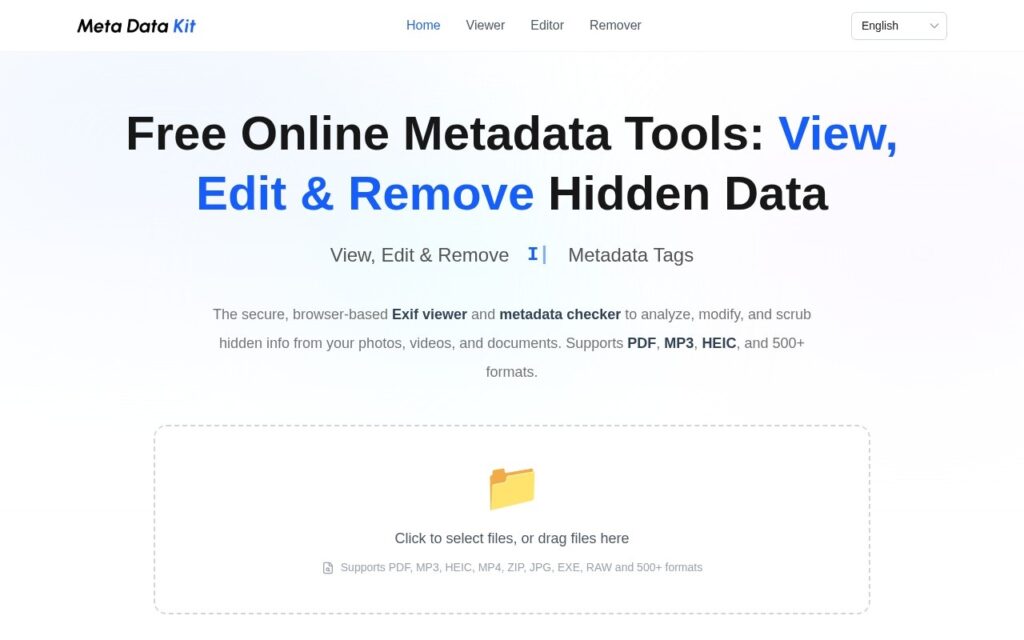
Key features

  • Metadata viewer for camera, GPS and shutter-count data
  • Metadata editor for MP3 tags, creation dates and file info
  • Metadata remover for GPS and author-name privacy stripping
  • Support for Exif, IPTC, ID3 and XMP across 500+ formats
  • 100% client-side WebAssembly processing, no server uploads

Screenshots & demo

MetadataKit screenshot 1

Pricing

MetadataKit offers a free plan, with paid upgrades for higher limits and more features.

  • Pricing modelFree
  • Starting priceFree
  • Free planYes
Visit MetadataKit

Pricing is provided as a guide. Check the official site for the latest plans.

Is MetadataKit expensive?

MetadataKit has no advertised paid tier. Among the 136 priced tools we list in Productivity, the median entry price is $12 a month.

71% of Productivity tools in the directory offer a free tier, and this is one of them.

Compared against every priced listing in Productivity, recalculated as the catalogue changes. Method and the full market breakdown are in our AI tool pricing study.

Pros & cons

Pros

  • Files never leave your device – privacy by architecture, not just policy
  • Free with no ads or paywall on core features
  • Wide format coverage in one tool instead of several single-format utilities

Cons

  • Very large batch jobs are limited by your own device's resources
  • Manages metadata only – doesn't edit the underlying image or audio content
  • No cloud sync between devices, by design

How it compares

ToolRatingFreeFromBest known for
MetadataKit (this tool)4.0YesFreeMetadata viewer for camera, GPS and shutter-count data
Obsidian4.6Yes$4/moNotes stored as local, plain Markdown text files
Google Translate4.6YesFreeGemini-powered text translation that captures idioms and context, not literal word substitution
Trello4.5Yes$5/moAtlassian Intelligence writing assistant built into card descriptions and comments

Our verdict

4.0 / 5 4.0

MetadataKit is a strong productivity tool, best known for metadata viewer for camera, GPS and shutter-count data. It offers a free plan.

What makes it different: MetadataKit stands out for metadata viewer for camera, GPS and shutter-count data.

How we score it
Overall 4.0
Value for money 4.7
Feature depth 4.9
Popularity 3.7
Best for ProfessionalsTeamsFoundersFreelancers

Frequently asked questions

What is MetadataKit?
MetadataKit is a productivity tool listed in the Challenging Voice directory. Views, edits and strips EXIF/IPTC/ID3/XMP metadata entirely in-browser – files never leave your device.
Is MetadataKit free?
Yes, MetadataKit offers a free plan. Paid plans unlock more features and higher usage limits.
What are the best MetadataKit alternatives?
Popular alternatives to MetadataKit include Findle, AtlasFuse, and PrometAI. Browse them all in the Productivity category.
Is MetadataKit any good?
MetadataKit scores 4.0 out of 5 based on our editorial review.

Reviews

4.0 No reviews yet

Write a review

Similar tools you might like