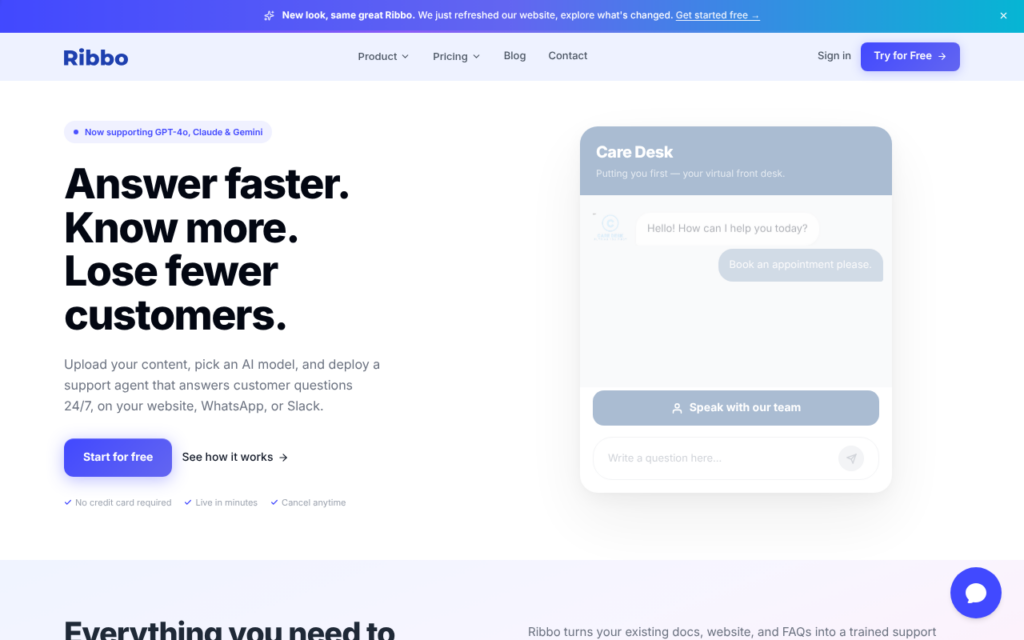
Ribbo builds a support agent from your existing documentation and embeds it on your website. The framing on its own site is precise about what that means: your docs, your brand, your support agent, rather than a generic assistant bolted onto a page.
Training from documentation is what makes this practical for small teams. Building a support knowledge base from scratch is the task that stops most support automation projects before they start, and a company that already maintains docs has effectively already done the work.
The obvious dependency is documentation quality: the agent can only be as accurate as what it was trained on, so gaps in the docs become gaps in the answers. That is actually a useful side effect, since it surfaces where the documentation is thin. There is a free tier to test it against your own content.
Key features
Agent trained directly on your existing documentation
Embeddable widget matching your own branding
Answers grounded in your content rather than general knowledge
Setup without building a knowledge base from scratch
Free tier for testing against real docs
Screenshots & demo
Demo video
Screenshots
Pricing
Ribbo offers a free plan, with paid upgrades for higher limits and more features.
Pricing is provided as a guide. Check the official site for the latest plans.
Is Ribbo expensive?
Ribbo has no advertised paid tier. Among the 69 priced tools we list in Chatbots, the median entry price is $15 a month.
71% of Chatbots tools in the directory offer a free tier, and this is one of them.
Compared against every priced listing in Chatbots, recalculated as the catalogue changes. Method and the full market breakdown are in our AI tool pricing study.
Pros & cons
Pros
Uses documentation you already maintain
Brand-matched embed rather than a generic assistant
Free tier makes evaluation straightforward
Cons
Answer accuracy is capped by documentation quality
Less capable on account-specific or complex queries