List your tool
Free Trial

Switchboard Canvas

Image generation as an API call – design a template once, then produce thousands of on-brand variations from data via code or Zapier.

3.5 Image Generation
3.5 Good 3.5
Solves bulk repeatable image production rather than one-off generation Not a creative or generative tool – it fills templates
Reviewed by Challenging Voice Editorial · Updated Sep 2026 How we rate
PricingFree Trial
Free planNo
CompanySwitchboard Canvas
PlatformsWeb
CategoryImage Generation
Last reviewedSep 2026

Is this your tool?

  • Claim this listing. Sign in with an email at switchboard.ai to manage it. Claim Switchboard Canvas
  • Get into the top 5 of Image Generation. 5 of 5 spots open, from $159/month. See positions
  • Something out of date? Owners can request edits from My listings; anyone can tell us.
Ask AI about Switchboard Canvas ChatGPT Claude Perplexity

Overview

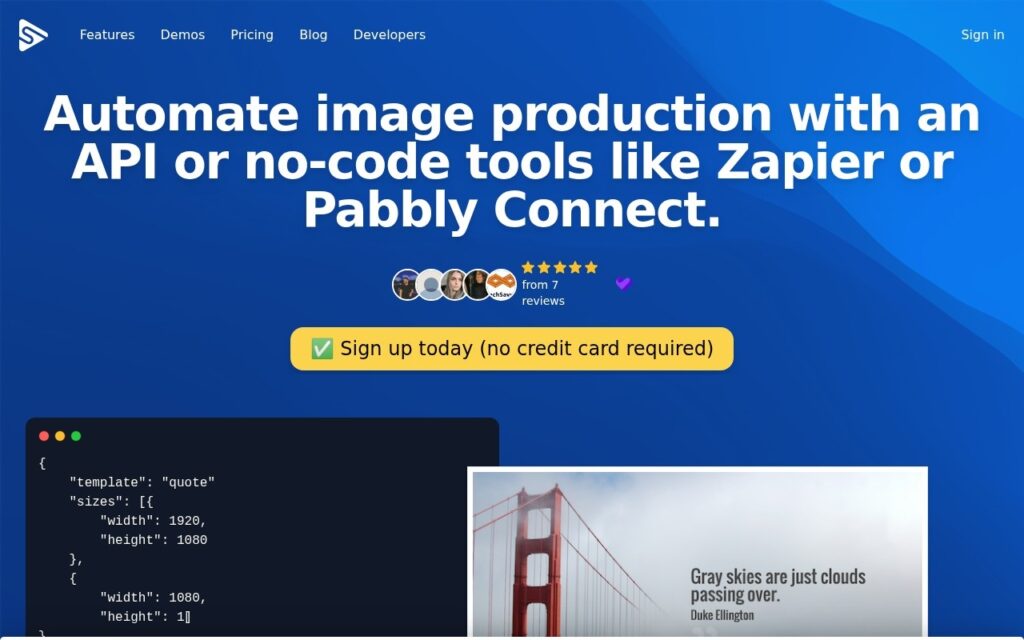
Switchboard Canvas automates image production: design a template, then generate images from data through an API or a no-code connector like Zapier or Pabbly Connect.

This is a different problem from the one generative image tools solve. Nobody needs an original illustration for the 4,000th product card, social preview or certificate – they need the same layout with different text and images, produced reliably and without a designer opening a file. Template-plus-data has been the answer to that for decades; making it an API call is what removes the manual step.

The no-code route matters, because the people who need bulk images are often in marketing rather than engineering. There is a free trial with no card required. Note the naming: the product is Switchboard Canvas, and the specific preset outputs (Twitter headers, tweet-to-image) track a platform that has since renamed and changed its API terms.
Key features

  • Image generation API driven by templates and data
  • Visual template designer
  • Zapier and Pabbly Connect integration for no-code use
  • Preset outputs including tweet-to-image and headers
  • Bulk generation of on-brand variations
  • Free trial with no card required

Screenshots & demo

Switchboard Canvas screenshot 1

Pricing

Visit the Switchboard Canvas website for current plans and pricing.

  • Pricing modelFree Trial
  • Starting priceCustom
  • Free planNo
Visit Switchboard Canvas

Pricing is provided as a guide. Check the official site for the latest plans.

Pros & cons

Pros

  • Solves bulk repeatable image production rather than one-off generation
  • No-code path for marketing teams without engineering support
  • Template-driven output stays on-brand by construction

Cons

  • Not a creative or generative tool – it fills templates
  • Some preset outputs track a social platform that has since renamed
  • Template design work still has to happen up front

How it compares

ToolRatingFreeFromBest known for
Switchboard Canvas (this tool)3.5No—Image generation API driven by templates and data
AI2image3.6No—Written description to finished image
Canva Magic Media4.3Yes$15/moGeneration directly inside the Canva design editor
Photosonic3.9Yes$13/moIntegrated with Writesonic's content and copywriting suite

Alternatives to Switchboard Canvas

4 tools matched to Switchboard Canvas on what they do, their category and their price.

Frequently asked questions

What is Switchboard Canvas?
Switchboard Canvas automates image production: design a template, then generate images from data through an API or a no-code connector like Zapier or Pabbly Connect.
Is Switchboard Canvas free?
Switchboard Canvas does not offer a free plan.
What are the best Switchboard Canvas alternatives?
The closest matches in the directory are AI2image, Canva Magic Media, and Photosonic, compared side by side above.

Reviews

3.5 Editorial rating No reviews yet

Write a review

More tools like Switchboard Canvas

Brandwork.ai

3.4

20 transparent logo variations plus matching icons for your MVP – expert prompt-engineering handles the AI generation so you don't burn hours refining mediocre output yourself.