
Freemium

Himedia

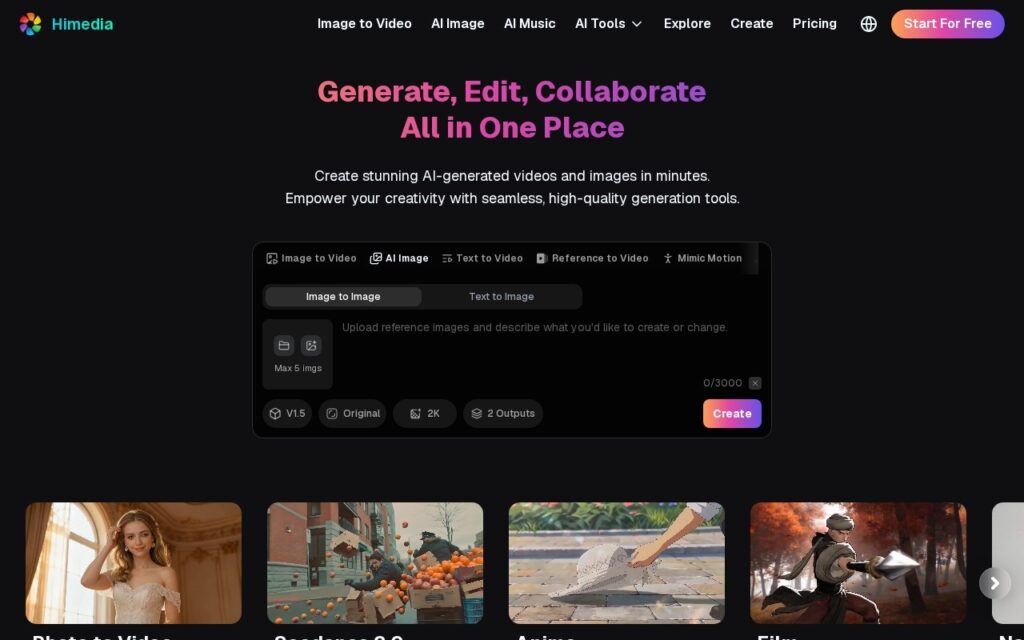
Image to video, reference to video and Mimic Motion in one 2K workspace.

3.7 Video
3.7 Good 3.7

Bottom line: Himedia is a capable video tool, best known for image to video, text to video and reference to video. It has a free plan.

Five reference images is what holds a subject consistent between shots No pricing figures and no company named
Reviewed by Challenging Voice Editorial · Updated Aug 2026 How we rate
PricingFree
Free planYes
CompanyHimedia
PlatformsWeb
Best forVideo
Visits1
Last reviewedAug 2026
UpdatedAug 2026
Ask AI about Himedia ChatGPT Claude Perplexity

Overview

Himedia is a generation workspace covering image to video, text to video, reference to video and image to image, with Mimic Motion for movement transfer and AI music alongside. Reference input takes up to five images at once, output runs to 2K with multiple variants per generation, and a shared Explore feed shows what others have made across photo-to-video, Seedance 2.0, anime and film styles.

Taking five reference images rather than one is the specification worth noticing. A single reference gives a model one angle of a subject and it invents the rest, which is why generated characters change between shots; five gives it enough to hold a face or a product consistent. That is the difference between a sequence and a set of unrelated clips, and it costs nothing extra to offer.

Generating two outputs per request by default is the other sensible touch, since the first result is rarely the one you keep. There is a free start, a pricing page and a collaboration pitch in the headline, though no figures appear on the landing page and no company is named. Mimic Motion applied to a real person’s movement raises the same consent question as every motion-transfer tool, 2K is short of delivery resolution for broadcast work, and a shared Explore feed means thinking about what is public by default.

Key features

  • Image to video, text to video and reference to video
  • Up to five reference images per generation
  • Mimic Motion for movement transfer
  • 2K output with multiple variants per request
  • AI music and a shared Explore feed

Screenshots & demo

Himedia screenshot 1

Pricing

Himedia offers a free plan, with paid upgrades for higher limits and more features.

  • Pricing modelFreemium
  • Starting priceFree
  • Free planYes
Visit Himedia

Pricing is provided as a guide. Check the official site for the latest plans.

Is Himedia expensive?

Himedia has no advertised paid tier. Among the 95 priced tools we list in Video, the median entry price is $17 a month.

70% of Video tools in the directory offer a free tier, and this is one of them.

Compared against every priced listing in Video, recalculated as the catalogue changes. Method and the full market breakdown are in our AI tool pricing study.

Pros & cons

Pros

  • Five reference images is what holds a subject consistent between shots
  • Two outputs per request by default
  • Free to start with no card

Cons

  • No pricing figures and no company named
  • Motion transfer from a real person is a consent question
  • 2K is short of broadcast delivery resolution

How it compares

ToolRatingFreeFromBest known for
Himedia (this tool)3.7YesFreeImage to video, text to video and reference to video
DaVinci Resolve4.5Yes$295/moCombined editing, color grading, VFX (Fusion), and audio post (Fairlight) in one application
Fliki4.5Yes$21/moLarge library of natural-sounding AI voices across numerous languages
Synthesia4.5No$29/moAmong the earliest and most established AI avatar tools, operating since 2017

Our verdict

3.7 / 5 3.7

Himedia is a solid video tool, best known for image to video, text to video and reference to video. It offers a free plan.

What makes it different: Himedia stands out for image to video, text to video and reference to video.

How we score it
Overall 3.7
Value for money 4.7
Feature depth 4.9
Popularity 3.7
Best for Video creatorsMarketersAgenciesEducators

Frequently asked questions

What is Himedia?
Himedia is a video tool listed in the Challenging Voice directory. Image to video, reference to video and Mimic Motion in one 2K workspace.
Is Himedia free?
Yes, Himedia offers a free plan. Paid plans unlock more features and higher usage limits.
What are the best Himedia alternatives?
Popular alternatives to Himedia include LiveSwap, CreatOK, and ASMR Videos. Browse them all in the Video category.
Is Himedia any good?
Himedia scores 3.7 out of 5 based on our editorial review.

Reviews

3.7 No reviews yet

Write a review

Similar tools you might like

AutoEdit

3.6

A Claude-powered Premiere Pro plugin builds talking-head rough cuts by understanding what a creator said.

Freemium Video

EbSynth

4.1

Desktop tool that repaints entire video sequences from a single hand-painted keyframe using example-based synthesis.

Freemium Video