
Free Verified

Microsoft Designer

Microsoft's Canva competitor, backed by DALL-E image generation

4.1 Design
4.1 Very good 4.1

Bottom line: Microsoft Designer is a strong design tool, best known for template-first design editing similar to Canva's approach. It has a free plan.

Completely free with no paid tier required Smaller template library than more established competitors like Canva
Reviewed by Challenging Voice Editorial · Updated Aug 2026 How we rate
PricingFree
Free planYes
CompanyMicrosoft
PlatformsWeb
Best forDesign
Founded2023
Visits14
Last reviewedJun 2026
UpdatedAug 2026
Ask AI about Microsoft Designer ChatGPT Claude Perplexity

Overview

Microsoft Designer, launched in 2023, follows the same template-first, fast-editing approach Canva popularized, but ties directly into Microsoft's broader ecosystem: DALL-E-powered image generation, the same underlying technology behind Bing Image Creator covered elsewhere in this directory, is built directly into the design workflow.

That Microsoft backing shows in distribution too: Designer is accessible through Microsoft 365 and integrated into products a huge number of people already use daily, giving it a built-in audience without requiring a new account or app download the way a standalone competitor would.

Designer is free to use, funded through Microsoft's broader ecosystem rather than a direct subscription. For a Microsoft 365 user who wants Canva-style template design with DALL-E image generation built directly in, rather than paying for or learning a separate standalone design tool, Designer's Microsoft integration and free access are the specific draw.
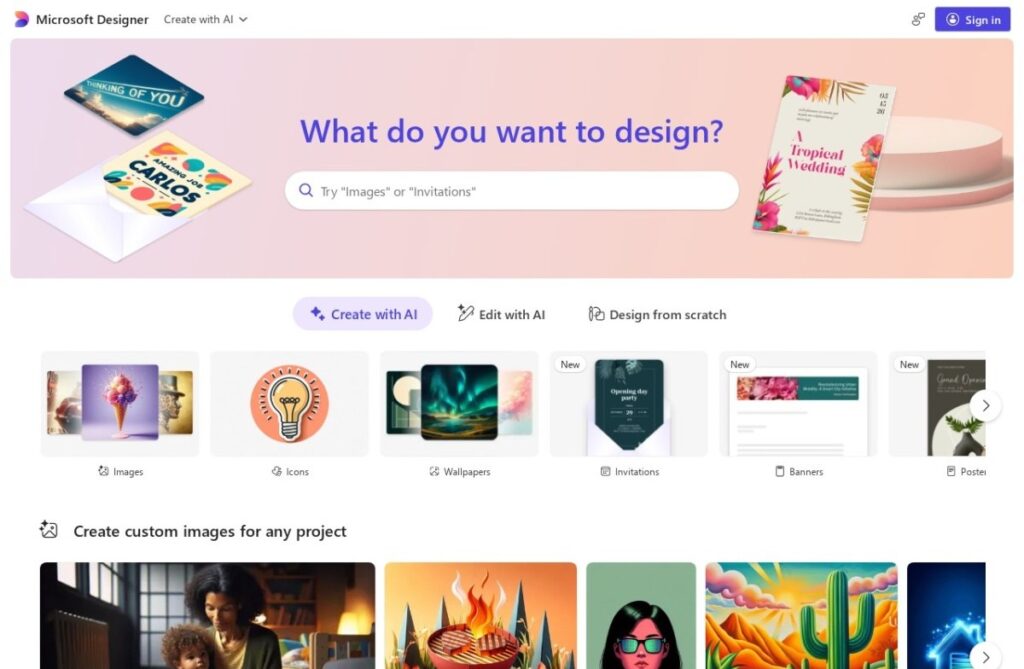

Key features

  • Template-first design editing similar to Canva's approach
  • Built-in DALL-E image generation
  • Integrated into Microsoft 365
  • Completely free to use
  • Accessible without a new account for existing Microsoft users
  • Launched in 2023

Screenshots & demo

Demo video

Screenshots

Microsoft Designer screenshot 1

Pricing

Microsoft Designer offers a free plan, with paid upgrades for higher limits and more features.

  • Pricing modelFree
  • Starting priceFree
  • Free planYes
Visit Microsoft Designer

Pricing is provided as a guide. Check the official site for the latest plans.

Pros & cons

Pros

  • Completely free with no paid tier required
  • Built-in DALL-E generation without a separate image tool
  • Direct integration into Microsoft 365 for existing users
  • No new account needed for users already in Microsoft's ecosystem

Cons

  • Smaller template library than more established competitors like Canva
  • Less differentiated for users outside the Microsoft ecosystem
  • Fewer advanced brand and team features than dedicated business design platforms

How it compares

ToolRatingFreeFromBest known for
Microsoft Designer (this tool)4.1YesFreeTemplate-first design editing similar to Canva's approach
Durable4.7Yes$25/moWebsite generation marketed at roughly 30 seconds
Relume4.7Yes$26/moAI-generated wireframes and page structure from a prompt
Canva4.7Yes$15/moMagic Studio suite of AI design tools

Our verdict

4.1 / 5 4.1

Microsoft Designer is a strong design tool, best known for template-first design editing similar to Canva's approach. It offers a free plan.

What makes it different: Microsoft Designer stands out for template-first design editing similar to Canva's approach.

How we score it
Overall 4.1
Value for money 4.7
Feature depth 4.9
Popularity 4.0
Best for ProfessionalsTeamsCreatorsCurious learners

Frequently asked questions

What is Microsoft Designer?
Microsoft Designer is a design tool listed in the Challenging Voice directory. Microsoft's Canva competitor, backed by DALL-E image generation.
Is Microsoft Designer free?
Yes, Microsoft Designer offers a free plan. Paid plans unlock more features and higher usage limits.
What are the best Microsoft Designer alternatives?
Popular alternatives to Microsoft Designer include Collov AI, Product Design Studio, and Rodin. Browse them all in the Design category.
Is Microsoft Designer any good?
Microsoft Designer scores 4.1 out of 5 based on our editorial review.

Reviews

4.1 No reviews yet

Write a review

Similar tools you might like

Layer AI

4.2

AI creative platform where game studios generate and edit 2D, 3D, and video assets in one workspace.

Freemium Design