Freemium Verified

Microsoft Power Automate

Cloud flows plus desktop RPA and AI agents together

4.3 Automation
4.3 Very good 4.3

Bottom line: Microsoft Power Automate is a strong automation tool, best known for cloud flows connecting apps and services. It has a free plan.

Free tier for cloud flows Premium connectors need paid plans
Reviewed by Challenging Voice Editorial · Updated Jul 2026 How we rate
PricingFrom $15/mo
Free planYes
CompanyMicrosoft
PlatformsAPI, Web, Windows
Best forAutomation
Founded2016
Visits5
Last reviewedJul 2026
UpdatedJul 2026
Ask AI about Microsoft Power Automate ChatGPT Claude Perplexity

Overview

Microsoft Power Automate is a workflow automation service that combines cloud based flows, desktop robotic process automation, and AI capabilities. Cloud flows connect apps and services to move data and trigger actions automatically, while desktop flows record and replay interactions with legacy and web applications. AI features add document processing and agent style automation to handle less structured work. As part of the Power Platform, it integrates tightly with Microsoft 365, Dynamics, and hundreds of connectors so users can automate tasks across many business tools.

The service is aimed at business users, IT teams, and organizations already using Microsoft products who want to automate repetitive tasks without heavy development. It suits people automating approvals, notifications, data syncing, and document workflows, as well as teams building attended and unattended RPA bots. Its low code designer makes it approachable for non developers, while pro developers can extend flows with custom connectors and expressions. Enterprises use it for governed, organization wide automation that spans both modern cloud apps and older desktop software.

In practice, users build flows from triggers and actions, connect them to apps through connectors, and let them run automatically or on a schedule. Desktop flows automate screen based tasks, and AI models extract data from documents. Central administration handles monitoring, security, and sharing across the organization.

Key features

Screenshots & demo

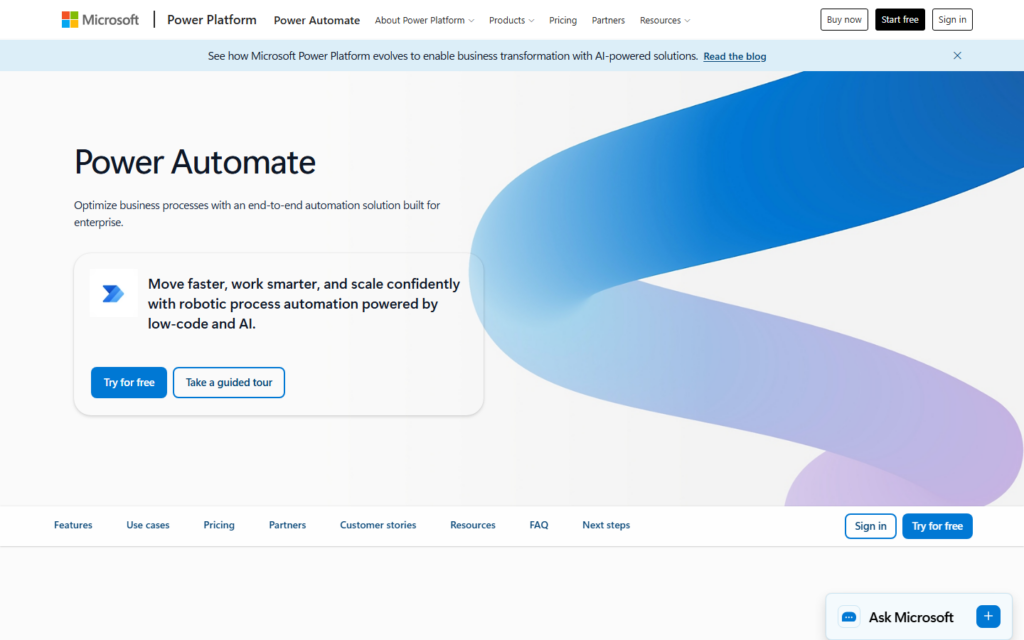
Microsoft Power Automate screenshot 1

Pricing

Microsoft Power Automate has a free plan, and paid plans start at $15/mo.

  • Pricing modelFreemium
  • Starting priceFrom $15/mo
  • Free planYes
Visit Microsoft Power Automate

Pricing is provided as a guide. Check the official site for the latest plans.

Pros & cons

Pros

  • Free tier for cloud flows
  • Extensive connector and app support
  • Combines cloud and desktop automation
  • Deep Microsoft ecosystem integration

Cons

  • Premium connectors need paid plans
  • Licensing structure can be confusing
  • Complex flows require careful maintenance

How it compares

ToolRatingFreeFromBest known for
Microsoft Power Automate (this tool)4.3Yes$15/moCloud flows connecting apps and services
Magical4.6Yes$10/moText expansion with saved shortcuts
Pipedream4.6Yes$45/moCode and no-code workflow steps
Browser Use4.5Yes$29/moOpen source AI browser agent framework

Our verdict

4.3 / 5 4.3

Microsoft Power Automate is a strong automation tool, best known for cloud flows connecting apps and services. It offers a free plan, with paid upgrades from $15/mo.

What makes it different: Microsoft Power Automate stands out for cloud flows connecting apps and services.

How we score it
Overall 4.3
Value for money 4.7
Feature depth 4.9
Popularity 3.7
Best for ProfessionalsTeamsCreatorsCurious learners

Frequently asked questions

What is Microsoft Power Automate?
Microsoft Power Automate is an automation tool listed in the Challenging Voice directory. Cloud flows plus desktop RPA and AI agents together.
Is Microsoft Power Automate free?
Yes, Microsoft Power Automate offers a free plan. Paid plans unlock more features and higher usage limits, starting at $15/month.
How much does Microsoft Power Automate cost?
Microsoft Power Automate starts at $15 per month. See the pricing plans above for full details.
What are the best Microsoft Power Automate alternatives?
Popular alternatives to Microsoft Power Automate include Clay, Lindy AI, and Relevance AI. Browse them all in the Automation category.
Is Microsoft Power Automate any good?
Microsoft Power Automate scores 4.3 out of 5 based on our editorial review.

Reviews

4.3 No reviews yet

Write a review

Similar tools you might like