
List your tool
Freemium

Ayanza

Team workspace combining objectives, projects, tasks, notes, wiki, newsfeed and chat, free for up to 5 users and $6 per user a month with AI.

3.8 Productivity
3.8 Good 3.8
Free tier is genuinely usable, including SSO that competitors paywall Free plan caps at 5 users and 200 docs
Reviewed by Challenging Voice Editorial · Updated Oct 2026 How we rate
PricingFrom $6/mo
Free planYes
CompanyAyanza
PlatformsWeb
CategoryProductivity
Last reviewedAug 2026
UpdatedOct 2026

Is this your tool?

  • Claim this listing. Sign in with an email at ayanza.com to manage it. Claim Ayanza
  • Get into the top 5 of Productivity. 5 of 5 spots open, from $159/month. See positions
  • Something out of date? Owners can request edits from My listings; anyone can tell us.
Ask AI about Ayanza ChatGPT Claude Perplexity

Overview

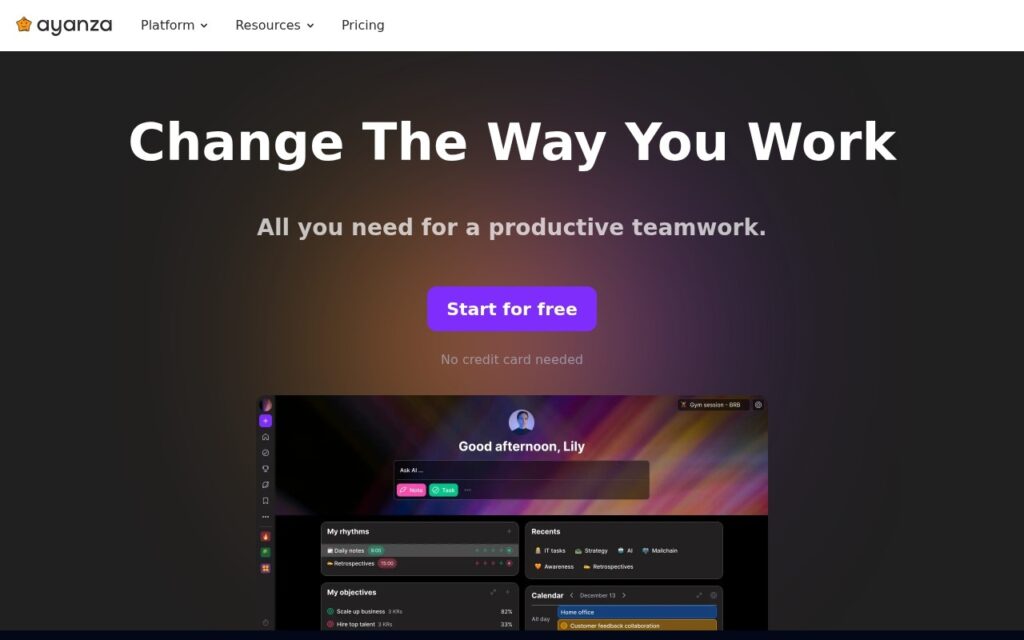
Ayanza is a team workspace that keeps goals and the work behind them in one place. It combines objectives, projects and tasks with notes, a wiki, a newsfeed and team chat, so a small team can set targets and track progress without switching tools. It has a free plan and paid plans with AI assistance.

Ayanza’s free plan covers the core of the product: objectives, projects and tasks, plus notes, a wiki, a newsfeed and chat, with full-text search, templates, and both Google SSO and Microsoft login. Single sign-on is often reserved for paid tiers in other tools, so its presence here is a real point in its favour. AI assistance is limited to the paid tiers.

Pricing is public. The free plan is capped at 5 users and 200 docs, and Premium lifts those limits and adds AI. Check the plan table on this page and the official site for current prices before you commit.

Who is Ayanza best suited to?

Ayanza suits small teams that want one tool for goals, tasks and shared knowledge instead of separate apps for each. It works best when you value having everything connected over the depth of a specialist tool.

If your team already relies on a dedicated project management tool or a full wiki, with advanced reporting or complex workflows, the lighter modules here may feel limiting. If you are starting fresh with five people or fewer, the free plan lets you test the whole workflow before paying.

How does the objectives-to-tasks approach work?

Ayanza links objectives to the projects and tasks that deliver them. You set a goal, break it into projects, and assign tasks, while notes, wiki pages and chat sit alongside for context and discussion. The aim is that progress on the work stays visible against the goal it supports.

Frequently asked questions

Is Ayanza free?

Yes. Ayanza has a free plan for up to 5 users and 200 docs. Paid plans remove those limits and add AI assistance.

What does Ayanza include?

Ayanza includes objectives, projects, tasks, notes, a wiki, a newsfeed and team chat. It also offers full-text search and templates.

Does Ayanza support single sign-on?

Yes. Google SSO and Microsoft login are listed on the free plan. Confirm this on the official site, as plan details can change.

Does Ayanza have AI features?

Yes, but AI assistance is offered on the paid tiers only, not on the free plan.

Who should use Ayanza?

Small teams that want goals, tasks and shared documents in one workspace will get the most from it. Teams needing deep, specialist project or wiki features may prefer dedicated tools.

Key features

  • Objectives, projects and tasks in one workspace
  • Notes, wiki, newsfeed and team chat included
  • AI assistance on paid tiers
  • Full-text search and templates
  • Google SSO and Microsoft login on the free plan

Screenshots & demo

Ayanza screenshot 1

Pricing

Free
$0
  • Up to 5 users and 200 docs; objectives, projects, tasks, notes, wiki, newsfeed, chat, full-text search, templates, Google SSO and Microsoft login
Premium
$6 per user per month
  • Unlimited users and docs, plus an AI assistant powered by GPT-3.5
Ultra
$15 per user per month
  • Unlimited users and docs, with all Premium features plus an AI assistant powered by GPT-4

Is Ayanza expensive?

Ayanza starts at $6, which is 40% below the Productivity median of $10 a month across the 197 priced tools we list in that category.

The cheapest paid option in Productivity starts at $0.29 and the most expensive at $165.

70% of Productivity tools in the directory offer a free tier, and this is one of them.

Compared against every priced listing in Productivity, recalculated as the catalogue changes. Method and the full market breakdown are in our AI tool pricing study.

Pros & cons

Pros

  • Free tier is genuinely usable, including SSO that competitors paywall
  • $6 per user per month undercuts most comparable workspaces
  • Goals and execution live together instead of in separate tools

Cons

  • Free plan caps at 5 users and 200 docs
  • AI features require upgrading from free
  • Breadth over depth – each module is lighter than a dedicated tool

How it compares

ToolRatingFreeFromBest known for
Ayanza (this tool)3.8Yes$6/moObjectives, projects and tasks in one workspace
Bit.ai3.6YesFreeDocuments, wikis and unlimited workspaces
Alpine3.9YesFreeDocuments, tasks and chat in one workspace
Notion AI4.5Yes$10/moAI writing, summarization, and Q&A grounded in existing workspace content

Alternatives to Ayanza

4 tools matched to Ayanza on what they do, their category and their price.

Frequently asked questions

What is Ayanza?
Ayanza is a team workspace that keeps goals and the work behind them in one place.
Is Ayanza free?
Yes, Ayanza offers a free plan. Paid plans unlock more features and higher usage limits, starting at $6/month.
How much does Ayanza cost?
Ayanza plans: Free $0; Premium $6 per user per month; Ultra $15 per user per month.
What are the best Ayanza alternatives?
The closest matches in the directory are Bit.ai, Alpine, and Notion AI, compared side by side above.

Reviews

3.8 Editorial rating No reviews yet

Write a review

More tools like Ayanza

MeisterTask

3.7

Kanban-based work management with a built-in Notes knowledge base and Meister AI for finding and drafting inside it, positioned on security.

Freemium Productivity