Freemium Verified

Integrity

Workspace combining notes, visual canvases and AI chat in one project brain

3.7 Productivity
3.7 Good 3.7
Assistant reads project context instead of pasted excerpts Consolidation only pays off after migrating from an existing notes tool

Reviewed by Challenging Voice Editorial · Updated Aug 2026 How we rate
PricingFrom $12/mo
Free planYes
CompanyIntegrity
PlatformsWeb
CategoryProductivity
Last reviewedAug 2026
Ask AI about Integrity ChatGPT Claude Perplexity

Overview

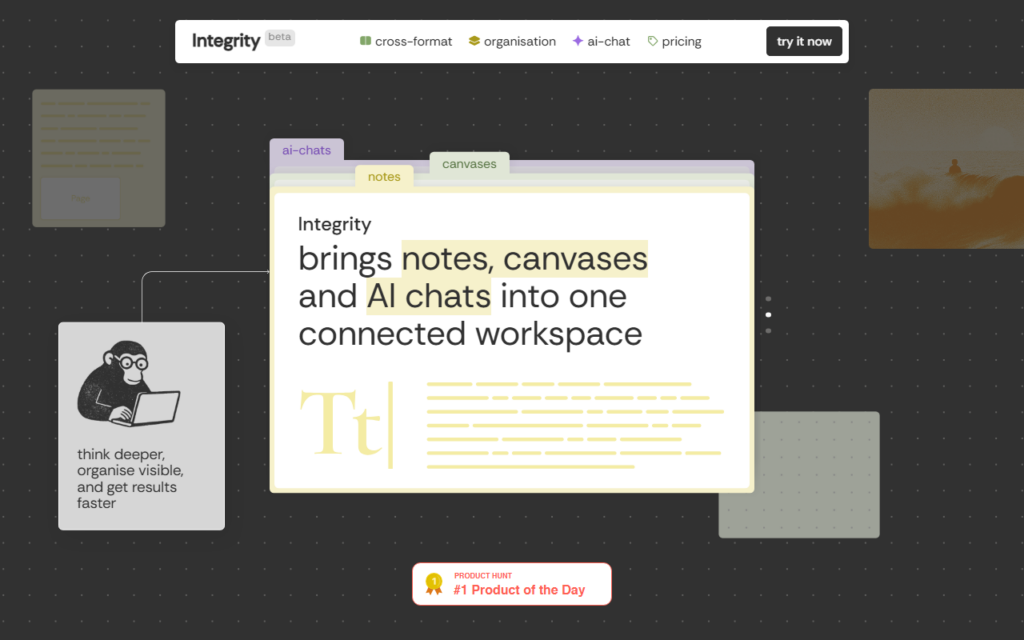
Integrity collapses three tools into one surface: structured notes, an infinite canvas for visual thinking, and AI chat that reads both. The target is the common stack of a document tool, a whiteboard and a separate assistant, where context has to be pasted between them at every step.

Because the assistant sits inside the workspace, it can reason over the notes and canvas the user already built rather than over a pasted excerpt. That is the practical gain — a chat that knows the project without being briefed each session.

Adoption cost is the usual objection to any consolidation play: teams already invested in an existing notes tool have to migrate to feel the benefit. A free tier and low entry pricing make trialling it on a single project reasonable before any migration decision.

Key features

  • Structured notes and infinite canvas in one workspace
  • AI chat with access to notes and canvas context
  • Project-level organisation across formats
  • Linked hierarchy connecting documents and visual work
  • Free tier plus low-cost paid plans
  • Cross-format search over a project

Screenshots & demo

Integrity screenshot 1

Pricing

Integrity has a free plan, and paid plans start at $12/mo.

  • Pricing modelFreemium
  • Starting priceFrom $12/mo
  • Free planYes
Visit Integrity

Pricing is provided as a guide. Check the official site for the latest plans.

Is Integrity expensive?

Integrity starts at $12, which is 20% above the Productivity median of $10 a month across the 187 priced tools we list in that category.

The cheapest paid option in Productivity starts at $0.29 and the most expensive at $165.

71% of Productivity tools in the directory offer a free tier, and this is one of them.

Compared against every priced listing in Productivity, recalculated as the catalogue changes. Method and the full market breakdown are in our AI tool pricing study.

Pros & cons

Pros

  • Assistant reads project context instead of pasted excerpts
  • Removes tool switching between notes, whiteboard and chat
  • Cheap enough to trial on one project

Cons

  • Consolidation only pays off after migrating from an existing notes tool

  • Younger product than the incumbents it replaces

How it compares

ToolRatingFreeFromBest known for
Integrity (this tool)3.7Yes$12/moStructured notes and infinite canvas in one workspace
Ideamap3.8Yes$7/moInfinite canvas for real-time, multi-participant brainstorming sessions
Ayanza3.8Yes$6/moObjectives, projects and tasks in one workspace
AFFiNE4.2Yes$8/moCombined documents, whiteboard, and database in one workspace

Alternatives to Integrity

4 tools matched to Integrity on what they do, their category and their price.

Ayanza

3.8

Team workspace combining objectives, projects, tasks, notes, wiki, newsfeed and chat, free for up to 5 users and $6 per user a month with AI.

Freemium Productivity

Frequently asked questions

What is Integrity?
Integrity collapses three tools into one surface: structured notes, an infinite canvas for visual thinking, and AI chat that reads both.
Is Integrity free?
Yes, Integrity offers a free plan. Paid plans unlock more features and higher usage limits, starting at $12/month.
How much does Integrity cost?
Integrity starts at $12 per month. See the pricing plans above for full details.
What are the best Integrity alternatives?
The closest matches in the directory are Ideamap, Ayanza, and AFFiNE, compared side by side above.

Reviews

3.7 Editorial rating No reviews yet

Write a review

More tools like Integrity

Slatebox

3.7

AI presentation and diagramming tool that turns a text prompt into editable infographics, mind maps, timelines and pitch decks on an infinite canvas.

Freemium Productivity

Pixno

3.8

Snap a photo of a textbook page or lecture slide, get an organized note in seconds – exports straight to Notion, Obsidian or Google Docs.

Freemium Productivity