
List your tool
Freemium

Lightning AI

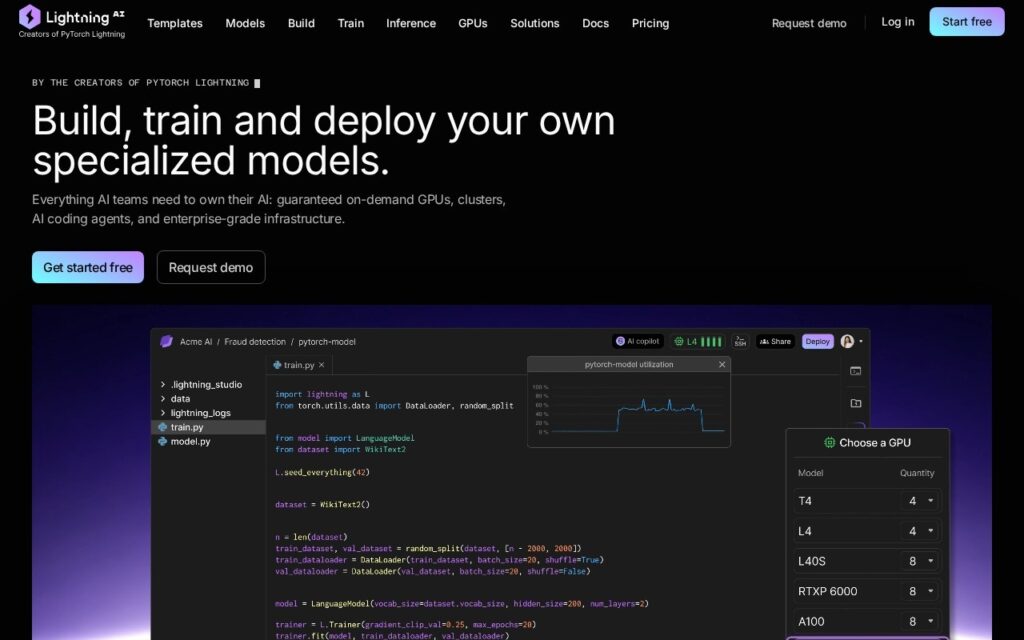
Browser-based platform from the PyTorch Lightning creators to code, train and serve AI models with multi-GPU support

3.7 Good 3.7
Automates the error-prone parts of distributed training (checkpointing, multi-GPU setup) Team pricing ($140/user/month) is a real cost for larger organizations
Reviewed by Challenging Voice Editorial · Updated Oct 2026 How we rate
PricingFree
Free planYes
CompanyLightning AI
PlatformsWeb
CategoryAI Infrastructure & Agent Tooling
Last reviewedAug 2026
UpdatedOct 2026

Is this your tool?

  • Claim this listing. Sign in with an email at lightning.ai to manage it. Claim Lightning AI
  • Get into the top 5 of AI Infrastructure & Agent Tooling. 5 of 5 spots open, from $159/month. See positions
  • Something out of date? Owners can request edits from My listings; anyone can tell us.
Ask AI about Lightning AI ChatGPT Claude Perplexity

Overview

Lightning AI is a cloud platform from the creators of PyTorch Lightning that lets ML engineers and research teams code, train and serve models from the browser without local setup. It handles checkpointing and multi-GPU or multi-machine distributed training automatically, so teams spend their time on the model rather than the infrastructure.

Manually configuring distributed training and making sure a long run survives an interruption is infrastructure work that has little to do with the modeling problem itself. Lightning AI automates both. Built-in logging and visualization show training progress, and APIs cover the surrounding work: data ingestion, preprocessing, version control and resource monitoring.

Lightning AI is aimed at ML engineers and research teams building and deploying models at any scale. Pricing is freemium: a free tier with monthly credits, paid individual and team plans, and custom Enterprise plans. Check Lightning AI’s official pricing page for current plan names, prices and credit amounts.

Who Lightning AI fits best

Lightning AI suits teams that already use PyTorch or PyTorch Lightning and want to move from a notebook to multi-GPU training and deployment without managing servers. If you only run small experiments on a single local GPU, the platform adds less value.

Training and serving models depends on compute, storage and networking behind the scenes. For background on how that layer works, read our guide to AI infrastructure behind every AI tool. If you are comparing ways to connect AI steps into repeatable processes, see our comparison of AI automation tools.

Key features

  • Browser-based coding, training, and model serving with zero setup
  • Automatic checkpointing and multi-GPU distributed training
  • Built-in logging and training-progress visualization
  • DevOps APIs for data ingestion, preprocessing, and resource monitoring
  • Built on PyTorch Lightning by its original creators

Screenshots & demo

Lightning AI screenshot 1

Pricing

Lightning AI offers a free plan, with paid upgrades for higher limits and more features.

  • Pricing modelFreemium
  • Starting priceFree
  • Free planYes
Visit Lightning AI

Pricing is provided as a guide. Check the official site for the latest plans.

Is Lightning AI expensive?

Lightning AI has no advertised paid tier. Among the 76 priced tools we list in AI Infrastructure & Agent Tooling, the median entry price is $29 a month.

54% of AI Infrastructure & Agent Tooling tools in the directory offer a free tier, and this is one of them.

Compared against every priced listing in AI Infrastructure & Agent Tooling, recalculated as the catalogue changes. Method and the full market breakdown are in our AI tool pricing study.

Pros & cons

Pros

  • Automates the error-prone parts of distributed training (checkpointing, multi-GPU setup)
  • Zero local setup – full workflow runs from the browser
  • Free tier available with monthly credits before committing to a paid plan

Cons

  • Team pricing ($140/user/month) is a real cost for larger organizations
  • Best suited to users already working with PyTorch/PyTorch Lightning specifically
  • Serious model training still requires genuine ML expertise, not just the platform

How it compares

ToolRatingFreeFromBest known for
Lightning AI (this tool)3.7YesFreeBrowser-based coding, training, and model serving with zero setup
Modal4.5YesFreeServerless GPU inference with OpenAI-compatible endpoints
Apache SINGA3.6YesFreeDistributed deep learning training across multiple GPUs
Metaflow3.9YesFreeAutomatic versioning and tracking of ML workflow variables and data

Alternatives to Lightning AI

4 tools matched to Lightning AI on what they do, their category and their price.

Modal

4.5

Serverless cloud platform for running AI workloads, with GPU inference, fine-tuning and training, sandboxes for agents, batch jobs and multi-node clusters, billed per second with $30 of free compute a month.

Frequently asked questions

What is Lightning AI?
Lightning AI is a cloud platform from the creators of PyTorch Lightning that lets ML engineers and research teams code, train and serve models from the browser without local setup.
Is Lightning AI free?
Yes, Lightning AI offers a free plan. Paid plans unlock more features and higher usage limits.
What are the best Lightning AI alternatives?
The closest matches in the directory are Modal, Apache SINGA, and Metaflow, compared side by side above.

Reviews

3.7 Editorial rating No reviews yet

Write a review

More tools like Lightning AI