
List your tool
Contact for Pricing

NVIDIA Deep Learning SDK

GPU-accelerated libraries for training and deploying deep learning models

4.1 Very good 4.1
Free to download and tuned by the maker of the GPUs Runs only on NVIDIA GPUs, which creates hardware lock-in
Reviewed by Challenging Voice Editorial · Updated Nov 2026 How we rate
PricingFree
Free planYes
CompanyNVIDIA
PlatformsAPI, Windows
CategoryAI Infrastructure & Agent Tooling
Founded1993
Last reviewedNov 2026

Is this your tool?

Ask AI about NVIDIA Deep Learning SDK ChatGPT Claude Perplexity

Overview

The NVIDIA Deep Learning SDK is a collection of GPU-accelerated libraries, led by cuDNN, TensorRT and NCCL, that speeds up training and deployment of neural networks. It's built for developers and ML engineers, not casual users. Most teams already use it indirectly through PyTorch or TensorFlow.

What Is the NVIDIA Deep Learning SDK?

The NVIDIA Deep Learning SDK is not one download. It's a family of libraries from NVIDIA that sit on top of CUDA, the company's GPU programming platform, and handle the heavy math behind deep learning. NVIDIA has since folded these under its broader CUDA-X branding, and its developer site now presents them as the CUDA-X AI stack, including libraries such as cuDNN, TensorRT, NCCL, DALI and NeMo.

Think of it as plumbing. You rarely call it directly, but every training run on an NVIDIA GPU leans on it.

How the Libraries Fit Together

Each library in the NVIDIA Deep Learning SDK owns one stage of a model's life. cuDNN accelerates layers such as convolutions. NCCL moves data between GPUs. TensorRT shrinks and speeds up a trained model, and Triton Inference Server serves it.
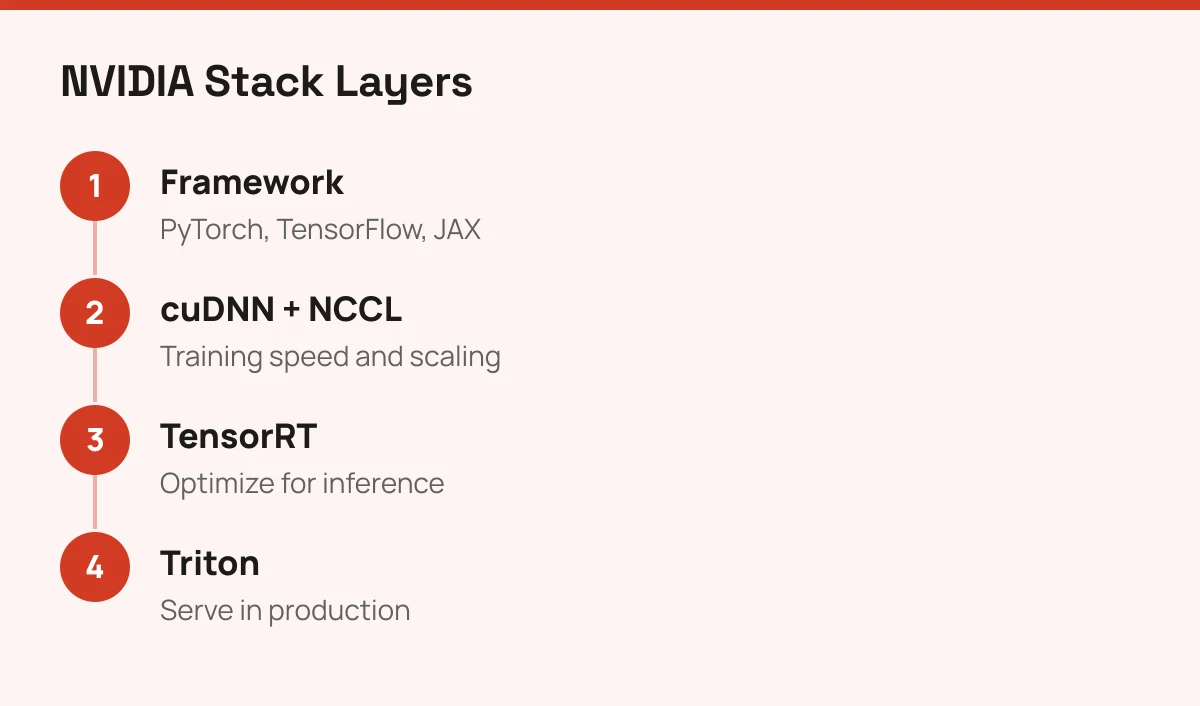
Flow from deep learning framework through cuDNN and NCCL to TensorRT and Triton serving

That split is the useful part. You can adopt one stage without the others.

  • cuDNN: primitives that frameworks call during training and inference.
  • NCCL: collective communication for multi-GPU and multi-node jobs.
  • TensorRT: optimization and runtime for low-latency inference.
  • DALI and RAPIDS: faster data loading and GPU data science.

Who Should Use It Directly

Most readers should skip direct use. If you train in PyTorch on an NVIDIA GPU, cuDNN is already working for you, and installing a matching version is the only task.

Go direct when inference cost or latency is your problem. TensorRT is the usual first step: export a trained model, optimize it, and measure. Teams scaling beyond one machine should learn NCCL's behavior, because it decides how well extra GPUs actually pay off.

If you want a visual, no-code route instead, look at Deep Learning Studio. For the wider picture of where these libraries land in practice, see what machine learning is used for and our ranking of machine learning software.

Where It Runs and What It Locks You Into

The SDK runs on NVIDIA GPUs only. That's the real cost of choosing it: your optimized engines, kernels and tuning don't move to AMD or other accelerators without rework.

The libraries are free to download from NVIDIA's developer site, but you pay for hardware, and production support comes through NVIDIA AI Enterprise. For current pricing, check NVIDIA's AI Enterprise page. Check each library's license before bundling it in a product.

How to Start

Install a framework build that matches your driver and CUDA version first. Version mismatches cause most first-day failures.

Then benchmark one model before and after TensorRT. If the gain is small, stay with your framework. NVIDIA's own site at nvidia.com lists current developer resources, and our machine learning software ranking helps if you're comparing platforms around the SDK.
Key features

  • cuDNN: GPU primitives for neural network layers such as convolutions and attention
  • TensorRT: inference optimizer and runtime for lower latency deployment
  • NCCL: multi-GPU and multi-node communication for distributed training
  • CUDA-X ecosystem including RAPIDS for data science and DALI for data loading
  • Integration with PyTorch, TensorFlow and JAX
  • Triton Inference Server for serving models in production

Screenshots & demo

Demo video

Screenshots

NVIDIA Deep Learning SDK screenshot 1

Pricing

Core libraries (cuDNN, TensorRT, NCCL)
Free to download; requires NVIDIA GPU hardware. Check license terms on NVIDIA's developer site
  • Developer downloads and documentation
NVIDIA AI Enterprise
Contact NVIDIA for pricing
  • Supported production software stack with enterprise support

Is NVIDIA Deep Learning SDK expensive?

NVIDIA Deep Learning SDK has no advertised paid tier. Among the 76 priced tools we list in AI Infrastructure & Agent Tooling, the median entry price is $29 a month.

54% of AI Infrastructure & Agent Tooling tools in the directory offer a free tier, and this is one of them.

Compared against every priced listing in AI Infrastructure & Agent Tooling, recalculated as the catalogue changes. Method and the full market breakdown are in our AI tool pricing study.

Pros & cons

Pros

  • Free to download and tuned by the maker of the GPUs
  • Works underneath PyTorch, TensorFlow and JAX, so most teams already benefit
  • Covers the full path from training to inference serving
  • Extensive documentation and a large developer community

Cons

  • Runs only on NVIDIA GPUs, which creates hardware lock-in
  • Version matching between CUDA, cuDNN and drivers can be fiddly
  • Not a no-code product; it needs engineering skill
  • The SDK is free but the GPUs and enterprise support are not

Frequently asked questions

What is NVIDIA Deep Learning SDK?
The NVIDIA Deep Learning SDK is a collection of GPU-accelerated libraries, led by cuDNN, TensorRT and NCCL, that speeds up training and deployment of neural networks.
Is NVIDIA Deep Learning SDK free?
Yes, NVIDIA Deep Learning SDK offers a free plan. Paid plans unlock more features and higher usage limits.
How much does NVIDIA Deep Learning SDK cost?
NVIDIA Deep Learning SDK plans: Core libraries (cuDNN, TensorRT, NCCL) Free to download; requires NVIDIA GPU hardware. Check license terms on NVIDIA's developer site; NVIDIA AI Enterprise Contact NVIDIA for pricing.

Reviews

4.1 Editorial rating No reviews yet

Write a review