
List your tool
Freemium

VideoGen

Text, a blog or an article becomes a finished video with voiceover in 40-plus languages.

3.9 Video
3.9 Good 3.9
Article-to-video turns existing written content into a new channel Auto-selected b-roll is generic and sometimes wrong for the line
Reviewed by Challenging Voice Editorial · Updated Aug 2026 How we rate
PricingFrom $12/mo
Free planYes
CompanyVideoGen
PlatformsWeb
CategoryVideo
Founded2022
Last reviewedAug 2026

Is this your tool?

  • Claim this listing. Sign in with an email at videogen.io to manage it. Claim VideoGen
  • Get into the top 5 of Video. 5 of 5 spots open, from $159/month. See positions
  • Something out of date? Owners can request edits from My listings; anyone can tell us.
Ask AI about VideoGen ChatGPT Claude Perplexity

Overview

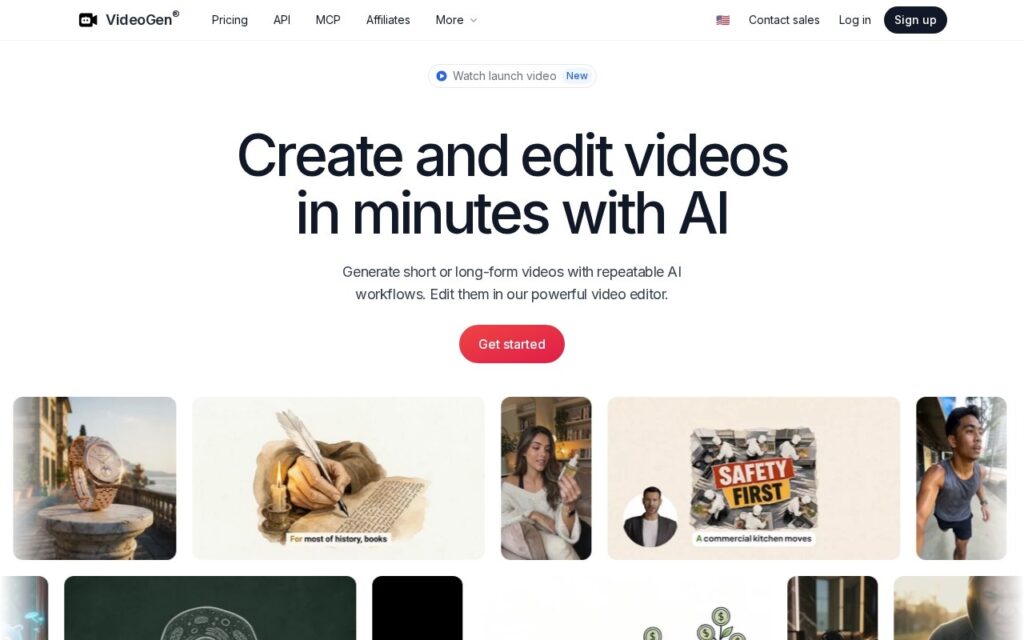
VideoGen generates short and long-form video from text, a blog post or an article, assembling the whole thing: text-to-speech voiceover across 40-plus languages, automatic subtitles, AI-selected b-roll and stock footage, matched background music and output sized for TikTok, YouTube Shorts and Instagram Reels.

Article-to-video is the input that matters for most buyers. Marketing teams have years of written content and no video, and the conversion job is mechanical enough to automate: the argument already exists, what is missing is footage, voice and timing. Video translation extends the same logic to markets a company already writes for.

The company was founded in 2022 and claims over 5 million creators, free to start with premium from $12 a month. Automatically selected b-roll is generic by nature and sometimes wrong for the sentence it sits under, synthetic voiceover across 40 languages varies considerably, and article-to-video output looks like every other article-to-video output.

Key features

  • Video generated from text, blogs or articles
  • Voiceover in 40-plus languages
  • Automatic subtitles and captions
  • AI b-roll and stock footage selection
  • TikTok, Shorts and Reels formats with video translation

Screenshots & demo

VideoGen screenshot 1

Pricing

VideoGen has a free plan, and paid plans start at $12/mo.

  • Pricing modelFreemium
  • Starting priceFrom $12/mo
  • Free planYes
Visit VideoGen

Pricing is provided as a guide. Check the official site for the latest plans.

Is VideoGen expensive?

VideoGen starts at $12, which is 25% below the Video median of $15.9 a month across the 145 priced tools we list in that category.

The cheapest paid option in Video starts at $0.5 and the most expensive at $295.

65% of Video tools in the directory offer a free tier, and this is one of them.

Compared against every priced listing in Video, recalculated as the catalogue changes. Method and the full market breakdown are in our AI tool pricing study.

Pros & cons

Pros

  • Article-to-video turns existing written content into a new channel
  • 40-plus language voiceover and translation from one tool
  • Free tier with premium from $12

Cons

  • Auto-selected b-roll is generic and sometimes wrong for the line
  • Synthetic voiceover quality varies widely across 40 languages
  • Output resembles every other article-to-video tool

How it compares

ToolRatingFreeFromBest known for
VideoGen (this tool)3.9Yes$12/moVideo generated from text, blogs or articles
Levio3.9Yes$18/moAutomatic first-pass editing from raw talking-head footage
Woxo3.9Yes$25/moPrompt to script, visuals, voiceover and captions
InVideo AI4.2Yes$25/moGenerates a complete video, script, voiceover, and footage, from one prompt

Alternatives to VideoGen

4 tools matched to VideoGen on what they do, their category and their price.

Levio

3.9

AI video editing agent that turns raw talking-head footage into an edited draft through chat commands.

Freemium Video

Woxo

3.9

AI video tool for faceless YouTube Shorts that turns a one-line prompt into a script, AI visuals, a voiceover and captions, then publishes or schedules the finished video to YouTube.

Freemium Video

Frequently asked questions

What is VideoGen?
VideoGen generates short and long-form video from text, a blog post or an article, assembling the whole thing: text-to-speech voiceover across 40-plus languages, automatic subtitles, AI-selected b-roll and stock footage, matched background music and output sized for TikTok, YouTube Shorts and Instagram Reels.
Is VideoGen free?
Yes, VideoGen offers a free plan. Paid plans unlock more features and higher usage limits, starting at $12/month.
How much does VideoGen cost?
VideoGen starts at $12 per month. See the pricing plans above for full details.
What are the best VideoGen alternatives?
The closest matches in the directory are Levio, Woxo, and InVideo AI, compared side by side above.

Reviews

3.9 Editorial rating No reviews yet

Write a review

More tools like VideoGen

Submagic

4.0

123-language captions at 99% accuracy, Magic Clips to pull several shorts from one long video – trusted by 4M+ businesses including Shopify and Uber.

Freemium Video

Exemplary AI

3.6

Turn one long video into clips, summaries, blogs, chapters and subtitles – one click, 98%+ transcription accuracy, 120+ languages. The editor lets you cut a clip by selecting text in the transcript.

Freemium Video