
List your tool
Free Trial

Lxi

A collaborative AI canvas for research, planning and writing, built as an alternative to the chat window. Beta.

3.4 Productivity
3.4 Good 3.4
Canvas format fits non-linear work (research, planning) better than chat scrollback Still in beta testing, and no pricing is published on lxi.ai
Reviewed by Challenging Voice Editorial · Updated Oct 2026 How we rate
PricingFree
Free planYes
CompanyLxi
PlatformsWeb
CategoryProductivity
Last reviewedAug 2026
UpdatedOct 2026

Is this your tool?

  • Claim this listing. Sign in with an email at lxi.ai to manage it. Claim Lxi
  • Get into the top 5 of Productivity. 5 of 5 spots open, from $159/month. See positions
  • Something out of date? Owners can request edits from My listings; anyone can tell us.
Ask AI about Lxi ChatGPT Claude Perplexity

Overview

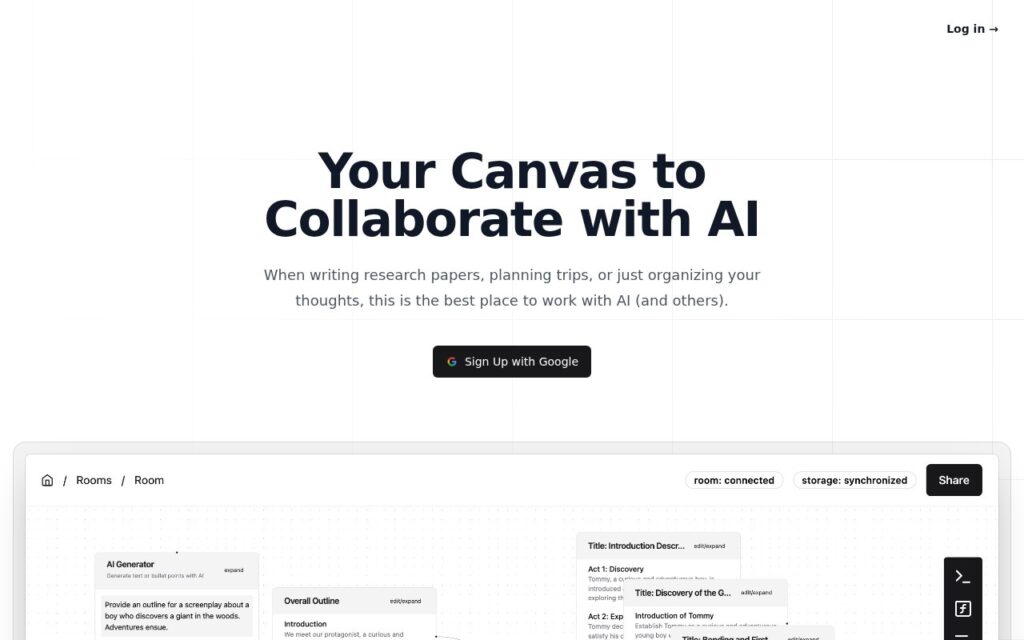
Lxi is a collaborative AI canvas: a shared workspace where you research, plan and write with AI instead of scrolling a chat transcript. You can work on it live with teammates, save generated content by dragging it into place, and run one prompt across many inputs with function nodes. It suits non-linear tasks such as research writing, trip planning and organizing ideas.

Lxi bets that much real work is not linear. On a canvas, generated content sits next to the document you are building, so you do not hunt back through a chat history for something produced earlier. Teammates can edit the same space at once.

Function nodes apply one prompt to several inputs, for example the same summary request across a set of sources, which a chat window handles awkwardly. Choose Lxi if your work involves gathering and arranging many pieces. A plain chat tool is likely enough for quick one-off questions.

Lxi has been described as an early beta, so expect features and stability to change. The lxi.ai site says it is currently in beta testing, and it does not publish pricing, so check lxi.ai for current details. Try it on a small project first before relying on it for important work.

Key features

  • Collaborative canvas for working with AI, not a linear chat
  • Real-time team collaboration on the same canvas
  • Function nodes: apply one prompt across multiple inputs
  • In-context generation without switching to a separate chat window
  • Drag-and-drop saving of generated content

Screenshots & demo

Lxi screenshot 1

Pricing

Lxi offers a free plan, with paid upgrades for higher limits and more features.

  • Pricing modelFree Trial
  • Starting priceFree
  • Free planYes
Visit Lxi

Pricing is provided as a guide. Check the official site for the latest plans.

Is Lxi expensive?

Lxi has no advertised paid tier. Among the 197 priced tools we list in Productivity, the median entry price is $10 a month.

70% of Productivity tools in the directory offer a free tier, and this is one of them.

Compared against every priced listing in Productivity, recalculated as the catalogue changes. Method and the full market breakdown are in our AI tool pricing study.

Pros & cons

Pros

  • Canvas format fits non-linear work (research, planning) better than chat scrollback
  • Real-time collaboration lets a team work the same space together
  • Function nodes support real batch-style prompting

Cons

  • Still in beta testing, and no pricing is published on lxi.ai
  • Feature set and stability may change before a full launch
  • Smaller ecosystem and fewer public reviews than established AI tools

How it compares

ToolRatingFreeFromBest known for
Lxi (this tool)3.4YesFreeCollaborative canvas for working with AI, not a linear chat
Shortkut3.4YesFreeAI-powered shortcuts usable in any input box on the internet
IdeaBuddy3.9No$15/moAI Buddy that drafts business plan sections and financial assumptions from founder input
GeniePM3.1No$9.99/moUser stories, tasks and descriptions generated from a project brief

Alternatives to Lxi

4 tools matched to Lxi on what they do, their category and their price.

Shortkut

3.4

A Chrome extension that puts ChatGPT-powered shortcuts into any input box on the internet – build, save, and share AI snippets with your whole team.

GeniePM

3.1

AI project-management assistant that writes user stories, tasks and descriptions from a project brief and exports them to Jira, Linear, Notion and ClickUp.

Free Trial Productivity

Frequently asked questions

What is Lxi?
Lxi is a collaborative AI canvas: a shared workspace where you research, plan and write with AI instead of scrolling a chat transcript.
Is Lxi free?
Yes, Lxi offers a free plan. Paid plans unlock more features and higher usage limits.
What are the best Lxi alternatives?
The closest matches in the directory are Shortkut, IdeaBuddy, and GeniePM, compared side by side above.

Reviews

3.4 Editorial rating No reviews yet

Write a review

More tools like Lxi

Fabric

3.5

Personal AI workspace from WFHLAND, Inc. that holds files, notes, meeting transcripts and tasks in one searchable space, free to start.

Freemium Productivity