List your tool
Contact for Pricing

AnyDocsAI

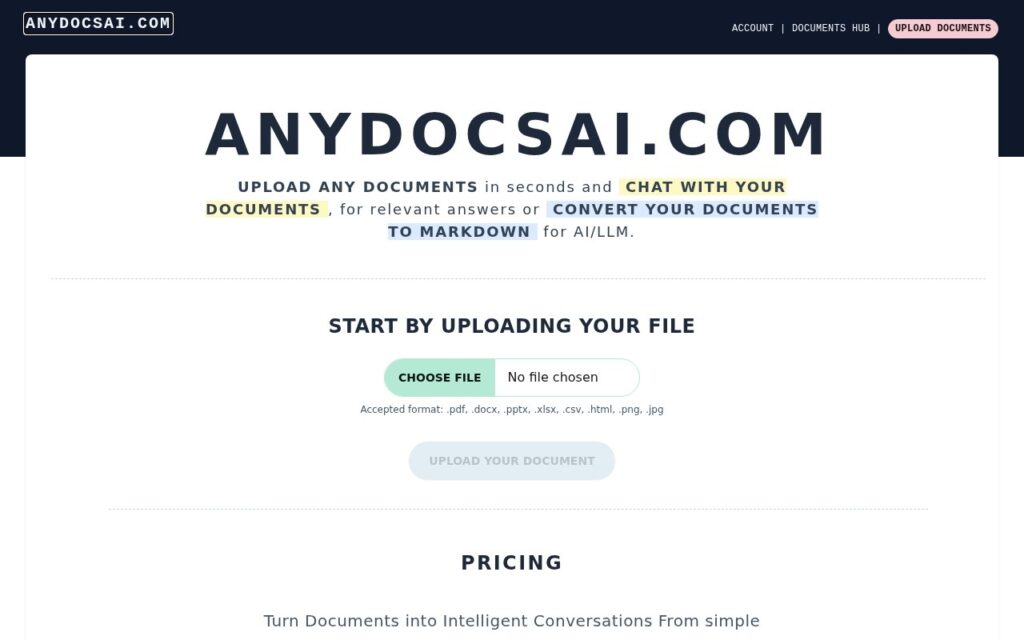
Chat with a PDF or Word document, or convert it to clean Markdown for feeding into your own AI/LLM workflow.

3.4 Productivity
3.4 Good 3.4
Markdown output specifically optimized for LLM/AI pipelines, not just human reading Company details and pricing weren't disclosed on the page checked
Reviewed by Challenging Voice Editorial · Updated Sep 2026 How we rate
PricingContact for Pricing
Free planNo
CompanyAnyDocsAI
PlatformsWeb
CategoryProductivity
Last reviewedAug 2026
UpdatedSep 2026

Is this your tool?

  • Claim this listing. Sign in with an email at anydocsai.com to manage it. Claim AnyDocsAI
  • Get into the top 5 of Productivity. 5 of 5 spots open, from $159/month. See positions
  • Something out of date? Owners can request edits from My listings; anyone can tell us.
Ask AI about AnyDocsAI ChatGPT Claude Perplexity

Overview

AnyDocsAI lets users chat conversationally with uploaded PDF and Word documents, process embedded images, and convert documents into Markdown format specifically optimized for downstream LLM and AI application use, rather than a plain-text or PDF export.

Markdown conversion aimed specifically at LLM consumption, not just a generic export format, is the detail that separates this from an ordinary document-chat tool: anyone building a RAG pipeline or feeding documents into another AI system needs clean, structured Markdown more than a human-readable PDF, and producing that directly saves a real preprocessing step developers would otherwise script themselves.

The page checked was thin on specifics beyond the core feature list – company details and pricing weren’t disclosed, worth confirming directly before relying on it for a production document pipeline.

Key features

  • Conversational chat with PDF and Word documents
  • Document image processing
  • Conversion to LLM-optimized Markdown format
  • Multi-format document compatibility

Screenshots & demo

AnyDocsAI screenshot 1

Pricing

AnyDocsAI uses custom pricing. Contact their team for a quote based on your needs.

  • Pricing modelContact for Pricing
  • Starting priceCustom
  • Free planNo
Visit AnyDocsAI

Pricing is provided as a guide. Check the official site for the latest plans.

Pros & cons

Pros

  • Markdown output specifically optimized for LLM/AI pipelines, not just human reading
  • Handles both PDF and Word formats
  • Saves a real preprocessing step for anyone building a RAG or AI document workflow

Cons

  • Company details and pricing weren't disclosed on the page checked
  • Thin page overall – confirm current capabilities directly before production use
  • No stated file size or volume limits

How it compares

ToolRatingFreeFromBest known for
AnyDocsAI (this tool)3.4No—Conversational chat with PDF and Word documents
GenPPT AI3.8YesFreePresentations generated from a text prompt
InstantMind3.7Yes$8/moMind maps from 30+ file formats including video and webpages
MindMap AI3.8YesFreeMaps from PDFs, audio, video, transcripts, CSV or webpages

Alternatives to AnyDocsAI

4 tools matched to AnyDocsAI on what they do, their category and their price.

Frequently asked questions

What is AnyDocsAI?
AnyDocsAI lets users chat conversationally with uploaded PDF and Word documents, process embedded images, and convert documents into Markdown format specifically optimized for downstream LLM and AI application use, rather than a plain-text or PDF export.
Is AnyDocsAI free?
AnyDocsAI does not offer a free plan.
What are the best AnyDocsAI alternatives?
The closest matches in the directory are GenPPT AI, InstantMind, and MindMap AI, compared side by side above.

Reviews

3.4 Editorial rating No reviews yet

Write a review

More tools like AnyDocsAI