Freemium

pdf.net

Browser-based PDF editor covering signing, annotation, merging, conversion, and AI tools

3.8 Productivity
3.8 Good 3.8

Bottom line: pdf.net is a capable productivity tool, best known for edit text directly inside an existing PDF. It has a free plan.

No installation needed for occasional PDF work Documents are uploaded to a third-party service, which suits confidential files poorly
Reviewed by Challenging Voice Editorial · Updated Jul 2026 How we rate
PricingFree
Free planYes
Companypdf.net
PlatformsWeb
Best forProductivity
Last reviewedJul 2026
UpdatedJul 2026
Ask AI about pdf.net ChatGPT Claude Perplexity

Overview

pdf.net is an online PDF editor that runs entirely in the browser, covering the operations that otherwise require desktop software: editing text inside an existing PDF, merging and splitting documents, rearranging pages, signing, annotating, and converting between formats.

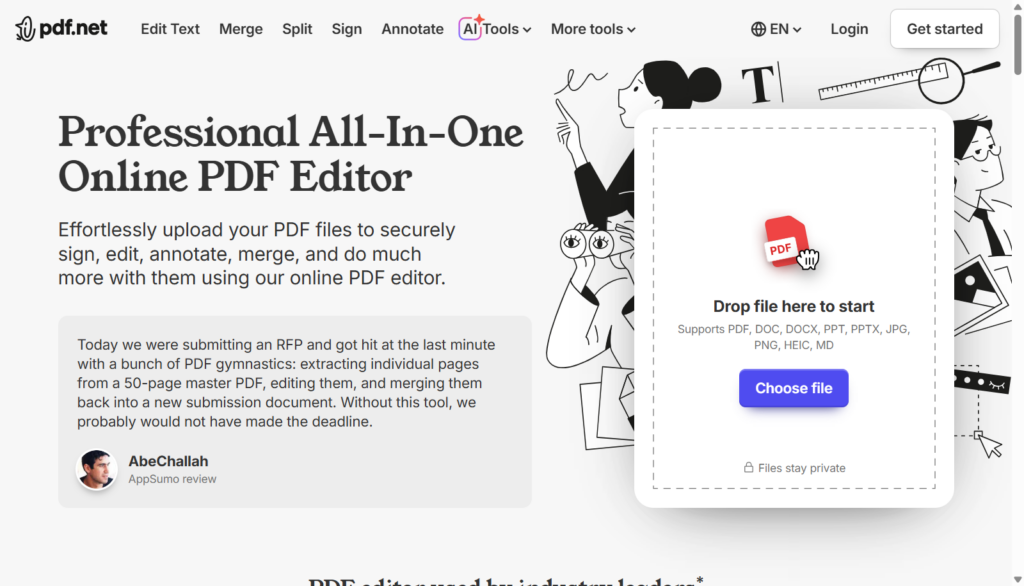
Input is not limited to PDFs. The editor accepts DOC, DOCX, PPT, PPTX, JPG, PNG, HEIC, and Markdown, which matters when the source document arrives in whatever format the sender had to hand. A set of AI tools sits alongside the manual editing features.

The practical appeal is not needing an installed application for occasional document work. That convenience carries the usual trade-off of any browser-based document tool: files are uploaded to a third-party service, so anyone handling confidential contracts or regulated records should confirm the provider’s data-handling terms before use.

Key features

  • Edit text directly inside an existing PDF
  • Merge, split, and rearrange pages
  • Electronic signing and annotation
  • Conversion across DOC, DOCX, PPT, PPTX, JPG, PNG, HEIC, and Markdown
  • AI-assisted document tools
  • Runs in the browser with no installation

Screenshots & demo

pdf.net screenshot 1

Pricing

pdf.net offers a free plan, with paid upgrades for higher limits and more features.

  • Pricing modelFreemium
  • Starting priceFree
  • Free planYes
Visit pdf.net

Pricing is provided as a guide. Check the official site for the latest plans.

Pros & cons

Pros

  • No installation needed for occasional PDF work
  • Accepts a wide range of input formats beyond PDF
  • Covers signing and annotation alongside editing
  • Free tier available

Cons

  • Documents are uploaded to a third-party service, which suits confidential files poorly
  • Browser-based editing is slower than desktop software on large files
  • Company background and founding details are not publicly documented

How it compares

ToolRatingFreeFromBest known for
pdf.net (this tool)3.8YesFreeEdit text directly inside an existing PDF
Obsidian4.6Yes$4/moNotes stored as local, plain Markdown text files
Guru4.5Yes$15/moExpert verification workflow for knowledge cards
Fathom4.5YesFreeMeeting recording and AI summarization across Zoom, Meet, and Teams

Our verdict

3.8 / 5 3.8

pdf.net is a solid productivity tool, best known for edit text directly inside an existing PDF. It offers a free plan.

What makes it different: pdf.net stands out for edit text directly inside an existing PDF.

How we score it
Overall 3.8
Value for money 4.7
Feature depth 4.9
Popularity 3.7
Best for ProfessionalsTeamsFoundersFreelancers

Frequently asked questions

What is pdf.net?
pdf.net is a productivity tool listed in the Challenging Voice directory. Browser-based PDF editor covering signing, annotation, merging, conversion, and AI tools.
Is pdf.net free?
Yes, pdf.net offers a free plan. Paid plans unlock more features and higher usage limits.
What are the best pdf.net alternatives?
Popular alternatives to pdf.net include AI Manga Translator, Circleback.ai, and Merlin. Browse them all in the Productivity category.
Is pdf.net any good?
pdf.net scores 3.8 out of 5 based on our editorial review.

Reviews

3.8 No reviews yet

Write a review

Similar tools you might like