
Free

EzRemove

Free background removal in under 5 seconds, with mode-specific processing for logos, text and anime art, plus a Magic Eraser for cleanup.

3.8 Design
3.8 Good 3.8

Bottom line: EzRemove is a capable design tool, best known for background removal in under 5 seconds. It has a free plan.

Completely free with batch processing included, not paywalled Free-with-no-limits offerings sometimes introduce paid tiers later – worth monitoring
Reviewed by Challenging Voice Editorial · Updated Aug 2026 How we rate
PricingFree
Free planYes
CompanyEzRemove
PlatformsWeb
Best forDesign
Visits11
Last reviewedAug 2026
UpdatedAug 2026
Ask AI about EzRemove ChatGPT Claude Perplexity

Overview

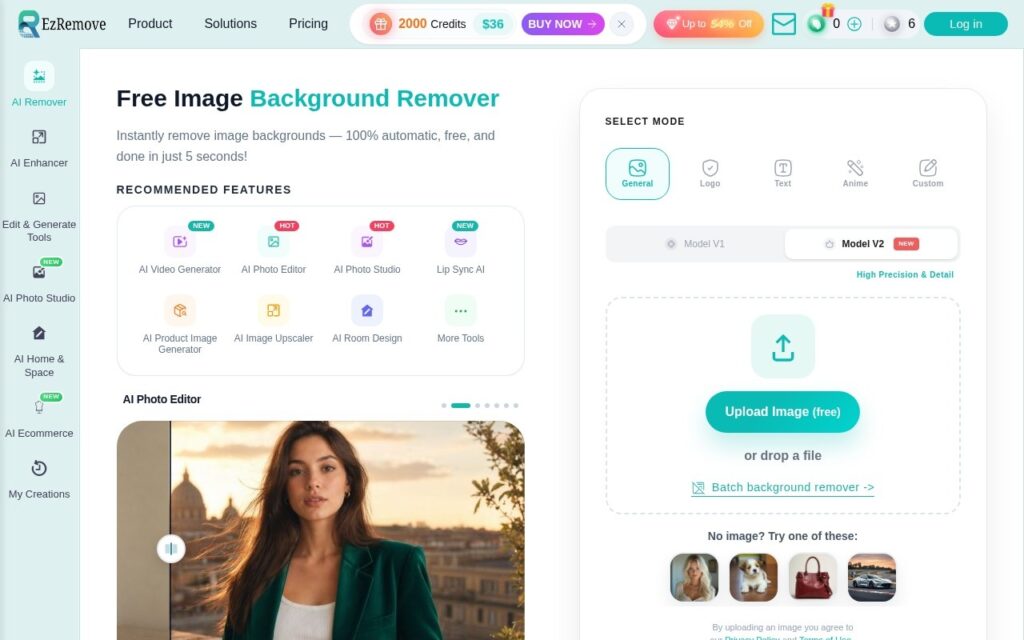
EzRemove strips backgrounds from images in under five seconds, producing transparent PNGs, with separate processing modes tuned for General, Logo, Text, Anime and Custom content rather than one generic algorithm applied to everything. A Magic Eraser tool handles removing unwanted objects beyond just the background, and batch processing covers multiple images at once.

Mode-specific processing is the detail that separates this from a generic background remover: a logo with hard edges, anime line art, and a photo of a person each fail differently under a one-size-fits-all algorithm, and tuning the model per content type produces meaningfully cleaner edges than a single general-purpose pass. Being completely free with no subscription is also unusual for a tool this capable in a category that often gates batch processing behind a paywall.

Free with no stated limits is worth watching for how it’s sustained over time – tools offered this way sometimes introduce limits or a paid tier later, so it’s worth checking current terms if building a workflow that depends on it long-term.

Key features

  • Background removal in under 5 seconds
  • Mode-specific processing: General, Logo, Text, Anime, Custom
  • Magic Eraser for removing unwanted objects
  • Batch processing for multiple images
  • AI-generated or solid-color background replacement

Screenshots & demo

EzRemove screenshot 1

Pricing

EzRemove offers a free plan, with paid upgrades for higher limits and more features.

  • Pricing modelFree
  • Starting priceFree
  • Free planYes
Visit EzRemove

Pricing is provided as a guide. Check the official site for the latest plans.

Is EzRemove expensive?

EzRemove has no advertised paid tier. Among the 100 priced tools we list in Design, the median entry price is $15 a month.

73% of Design tools in the directory offer a free tier, and this is one of them.

Compared against every priced listing in Design, recalculated as the catalogue changes. Method and the full market breakdown are in our AI tool pricing study.

Pros & cons

Pros

  • Completely free with batch processing included, not paywalled
  • Content-specific modes produce cleaner results than one generic algorithm
  • Magic Eraser adds object removal beyond just background stripping

Cons

  • Free-with-no-limits offerings sometimes introduce paid tiers later – worth monitoring
  • Mode selection requires knowing which mode fits your image type
  • No stated file size or resolution ceiling on the page checked

How it compares

ToolRatingFreeFromBest known for
EzRemove (this tool)3.8YesFreeBackground removal in under 5 seconds
Canva4.7Yes$15/moMagic Studio suite of AI design tools
Relume4.7Yes$26/moAI-generated wireframes and page structure from a prompt
Durable4.7Yes$25/moWebsite generation marketed at roughly 30 seconds

Alternatives to EzRemove

4 tools our editors picked as direct alternatives to EzRemove.

Our verdict

3.8 / 5 3.8

EzRemove is a solid design tool, best known for background removal in under 5 seconds. It offers a free plan.

What makes it different: EzRemove stands out for background removal in under 5 seconds.

How we score it
Overall 3.8
Value for money 4.7
Feature depth 4.9
Popularity 4.0
Best for ProfessionalsTeamsCreatorsCurious learners

Frequently asked questions

What is EzRemove?
EzRemove is a design tool listed in the Challenging Voice directory. Free background removal in under 5 seconds, with mode-specific processing for logos, text and anime art, plus a Magic Eraser for cleanup.
Is EzRemove free?
Yes, EzRemove offers a free plan. Paid plans unlock more features and higher usage limits.
What are the best EzRemove alternatives?
Popular alternatives to EzRemove include Phygital+, MakeLanding, and IconifyAI. Browse them all in the Design category.
Is EzRemove any good?
EzRemove scores 3.8 out of 5 based on our editorial review.

Reviews

3.8 No reviews yet

Write a review

Similar tools you might like