
Free

InPlaceText

Edit the text inside a photo or screenshot by boxing the words and typing new ones, with AI redrawing them in the original font, colour and style.

3.6 Design
3.6 Good 3.6
Two free edits a day with no sign-up or watermark Free tier is capped at two edits a day
Reviewed by Challenging Voice Editorial · Updated Oct 2026 How we rate
PricingFree
Free planYes
CompanyInPlaceText
PlatformsWeb
CategoryDesign
Founded2026
Last reviewedOct 2026
Ask AI about InPlaceText ChatGPT Claude Perplexity

Overview

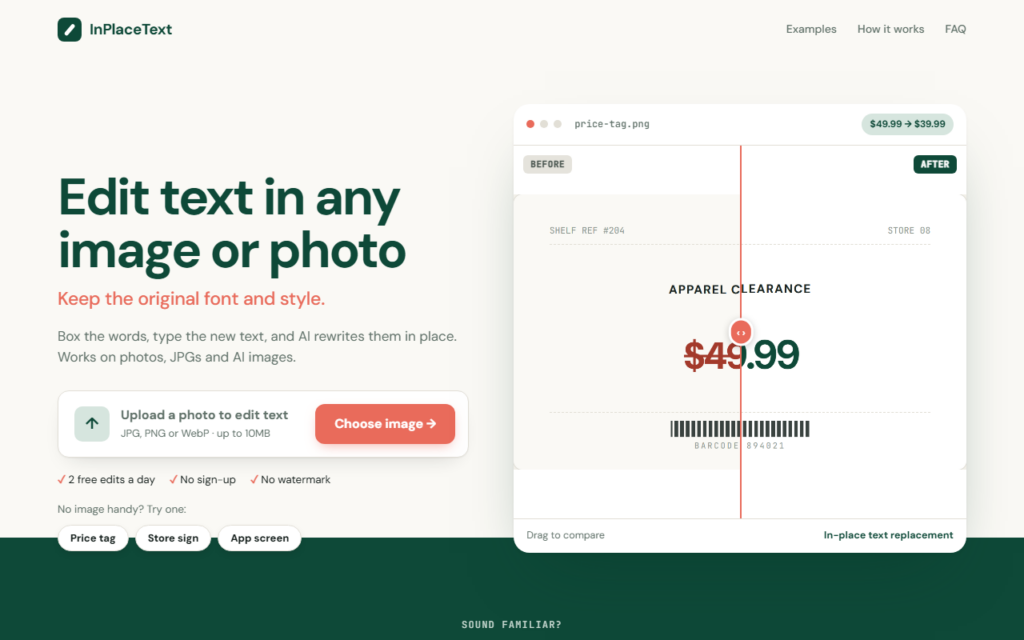
InPlaceText is a web tool for changing wording inside an image when no source file exists. A user uploads a photo, JPG or AI-generated image, draws a box around the words to change, types the replacement and clicks Generate, and the AI redraws the text to match the surrounding font, colour and style.

The site frames the use cases around everyday fixes: updating a price on a menu board, changing a date on a flyer someone sent as a JPG, or correcting the garbled text that AI image generators produce. Original text can be entered to improve accuracy, and font family, weight and alignment can be adjusted before generating, with undo, reset and a before-and-after comparison slider.

Uploads are limited to JPG, PNG or WebP files up to 10 MB. The homepage advertises two free edits a day with no sign-up and no watermark, and says nothing is uploaded until Generate is clicked.

The details on this page come from InPlaceText’s own website, read on 7 October 2026. Plans, limits and features change, so confirm the current terms on the vendor’s site before you pay.

Key features

  • Box-and-replace text editing inside any image
  • Matches original font, colour and style
  • Adjustable font family, weight and alignment
  • Undo, reset and before-and-after comparison
  • Fixes garbled text in AI-generated images

Screenshots & demo

InPlaceText screenshot 1

Pricing

InPlaceText offers a free plan, with paid upgrades for higher limits and more features.

  • Pricing modelFree
  • Starting priceFree
  • Free planYes
Visit InPlaceText

Pricing is provided as a guide. Check the official site for the latest plans.

Is InPlaceText expensive?

InPlaceText has no advertised paid tier. Among the 119 priced tools we list in Design, the median entry price is $15 a month.

73% of Design tools in the directory offer a free tier, and this is one of them.

Compared against every priced listing in Design, recalculated as the catalogue changes. Method and the full market breakdown are in our AI tool pricing study.

Pros & cons

Pros

  • Two free edits a day with no sign-up or watermark
  • Works on photos, screenshots and AI images
  • Nothing is uploaded until Generate is clicked

Cons

  • Free tier is capped at two edits a day
  • Paid options are not listed on the homepage
  • Altering text in images can be misused, so edited files should not be passed off as originals

How it compares

ToolRatingFreeFromBest known for
InPlaceText (this tool)3.6YesFreeBox-and-replace text editing inside any image
Photopea4.2YesFreeOne-click AI background removal
Blur Background3.5No$2.99/moLocal, in-browser background blur with no account or server upload required
AI Vector3.8YesFreePNG/JPG/WEBP to SVG conversion in 5-10 seconds

Alternatives to InPlaceText

4 tools matched to InPlaceText on what they do, their category and their price.

Photopea

4.2

Free browser-based photo editor that works with PSD, RAW, SVG and 40+ other formats, with AI for one-click background removal and for replacing any part of an image from a text description.

Free Design

AI Vector

3.8

Free, unlimited PNG-to-SVG conversion in under 10 seconds – no signup, no watermark, no credit system at all.

Free Design

Frequently asked questions

What is InPlaceText?
InPlaceText is a web tool for changing wording inside an image when no source file exists.
Is InPlaceText free?
Yes, InPlaceText offers a free plan. Paid plans unlock more features and higher usage limits.
What are the best InPlaceText alternatives?
The closest matches in the directory are Photopea, Blur Background, and AI Vector, compared side by side above.

Reviews

3.6 Editorial rating No reviews yet

Write a review

More tools like InPlaceText

Logo.com

3.6

AI logo generator that produces custom icons from a business name and packages the result as a brand kit.

Freemium Design