Free

Photopea

Free browser-based photo editor that works with PSD, RAW, SVG and 40+ other formats, with AI for one-click background removal and for replacing any part of an image from a text description.

4.2 Design
4.2 Very good 4.2
Free to use with no download Plan, price and AI usage limits could not be confirmed beyond a free claim
Reviewed by Challenging Voice Editorial · Updated Oct 2026 How we rate
PricingFree
Free planYes
CompanyPhotopea
PlatformsWeb
CategoryDesign
Last reviewedOct 2026
Ask AI about Photopea ChatGPT Claude Perplexity

Overview

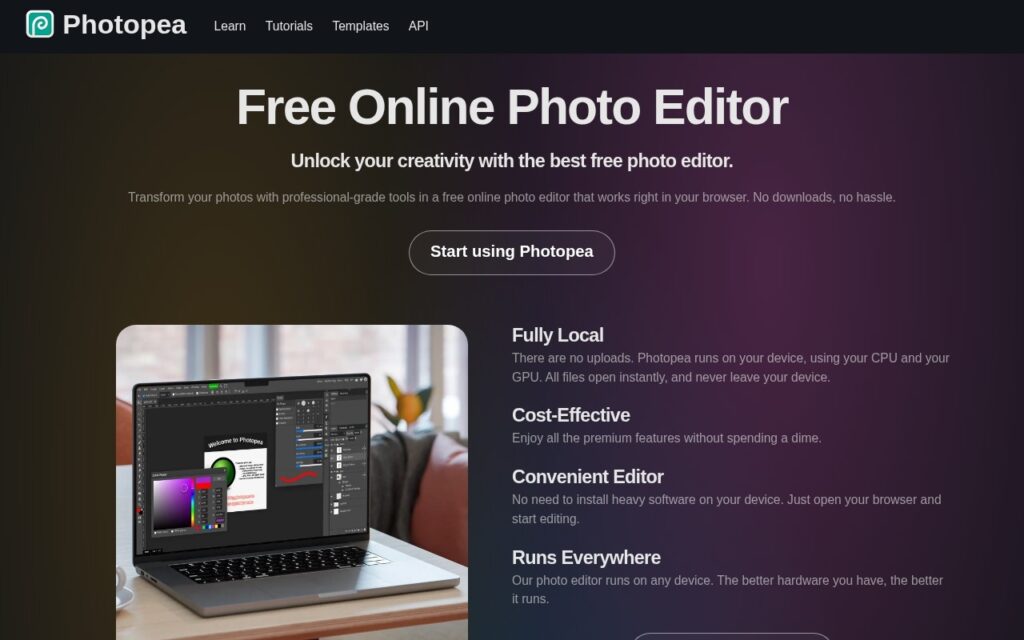
Photopea is a free photo editor that runs in the browser and processes images on the user’s own device, with no download and no upload needed. It aims at professional-style editing, with layers, masks and blending modes, curves, filters, liquify and puppet warp, and vector graphics tools, and it opens PSD, PNG, JPG, RAW and SVG files along with more than 40 other formats.

Its homepage describes AI functionality that removes a background with one click and replaces any part of an image from a text description. That puts generative editing and cutouts inside the same layered workspace as the traditional tools, so a result can be refined with masks and adjustments afterward.

The site presents Photopea as completely free and says it includes all the premium features at no cost. Its learning and premium pages did not load usable details when checked, so no AI usage limits or paid options are described here; confirm those on the site.

Key features

  • One-click AI background removal
  • AI replacement of any part of an image from a text description
  • Layers, masks, blending, curves, filters, liquify and puppet warp
  • Opens PSD, PNG, JPG, RAW, SVG and 40+ other formats
  • Runs in the browser with images processed on the device

Screenshots & demo

Photopea screenshot 1

Pricing

Photopea offers a free plan, with paid upgrades for higher limits and more features.

  • Pricing modelFree
  • Starting priceFree
  • Free planYes
Visit Photopea

Pricing is provided as a guide. Check the official site for the latest plans.

Is Photopea expensive?

Photopea has no advertised paid tier. Among the 119 priced tools we list in Design, the median entry price is $15 a month.

73% of Design tools in the directory offer a free tier, and this is one of them.

Compared against every priced listing in Design, recalculated as the catalogue changes. Method and the full market breakdown are in our AI tool pricing study.

Pros & cons

Pros

  • Free to use with no download
  • Opens Photoshop PSD files and dozens of other formats
  • AI cutouts and replacements sit beside full layer-based editing

Cons

  • Plan, price and AI usage limits could not be confirmed beyond a free claim
  • Browser-based, so performance depends on the device
  • AI features are described only briefly on the homepage

How it compares

ToolRatingFreeFromBest known for
Photopea (this tool)4.2YesFreeOne-click AI background removal
PaintShop Pro3.6No—AI Background Replacement and Portrait Mode
SVGMaker3.9YesFreeText-to-SVG generation with up to four variations
LogoMakr3.7Yes$29/moAI-generated logo concepts from business name, industry, and style

Alternatives to Photopea

4 tools matched to Photopea on what they do, their category and their price.

LogoMakr

3.7

Describe your business, get original AI-generated logo concepts in seconds, then fine-tune on a full design canvas – free until you download.

Freemium Design

AI Vector

3.8

Free, unlimited PNG-to-SVG conversion in under 10 seconds – no signup, no watermark, no credit system at all.

Free Design

Frequently asked questions

What is Photopea?
Photopea is a free photo editor that runs in the browser and processes images on the user's own device, with no download and no upload needed.
Is Photopea free?
Yes, Photopea offers a free plan. Paid plans unlock more features and higher usage limits.
What are the best Photopea alternatives?
The closest matches in the directory are PaintShop Pro, SVGMaker, and LogoMakr, compared side by side above.

Reviews

4.2 Editorial rating No reviews yet

Write a review

More tools like Photopea

InPlaceText

3.6

Edit the text inside a photo or screenshot by boxing the words and typing new ones, with AI redrawing them in the original font, colour and style.

Free Design

Clipping Magic

3.9

Auto-Clip AI trained on millions of real-world images (not lab data) removes backgrounds automatically, then a Smart Editor with a hair tool and scalpel handles the hard edges by hand.

Freemium Design